

Best Employee Scheduling Software for Small Business in 2026
Our guide to the best employee scheduling software is the product of extensive research conducted by our HR experts coupled with external insights from across the industry. Find pricing, pros & cons, best practices and more below.












The best employee scheduling software solutions help organizations plan their labor needs, assign jobs to the right employees, and ensure that the total available working hours are being optimally utilized.
We spent hours researching, evaluating, and comparing the best employee scheduling software for small businesses.
Our focus has been the same as if we were in your shoes, on the market for an employee scheduling tool. We looked at their features, user experience, and main strengths and weaknesses.
However, finding the most suitable employee scheduling tool for your business is as much about understanding your business as it is about the product. Depending on how you’re set up, ‘the best’ product will vary.
For that reason, we’ve tried to put together a list with sufficient variety in industries, types of tech, and pricing styles. That being said, all of these are good bets for businesses with less than 1,500 employees.
Sounds good? Let’s dive in and take a closer look at each tool’s strengths and weaknesses.
To find the ideal employee scheduling software tools for small businesses, we conducted an exhaustive evaluation of over 30 products. We carefully considered numerous factors, including what we believe are four key criteria for these products: ease of use, customization, pricing, and integrations with payroll tools.
Our editorial team, consisting of seasoned HR professionals guided by insights from industry leaders, spearheaded the research. Additionally, we collected valuable data through hands-on user research.
- Ease of Use: Small businesses often need more time and resources for extensive software training. Therefore, we prioritized employee scheduling software that boasts user-friendly interfaces and intuitive navigation.
- Customization: We focused on scheduling solutions that provide a high degree of customization. Our selections offer flexible shift templates, customizable scheduling rules, and the ability to cater to different workforce arrangements, such as part-time, full-time, and seasonal employees.
- Pricing: The selected solutions offer subscription plans suitable for SMB budgets, with pricing tiers based on the number of employees or schedule complexity. Additionally, we highlight software that provides free trial periods or freemium versions.
- Integrations with Payroll Tools: We sought out software options that seamlessly integrate with popular payroll systems, accounting software, and HR platforms. These integrations facilitate seamless data transfer, reducing manual work and minimizing the risk of errors.
For more insights into our comprehensive evaluation process and to explore our selection of the best HR tech, we invite you to read our piece on how we select the best HR tech.



Connecteam

You can enjoy using all three of Connecteam’s hubs (Operations, Communications, and HR & Skills) for free for up to 10 users.
PROS
- Reach staff instantly with native team communication tools.
- Forms and checklists provide workers with necessary job information.
- Track employee hours with a user-friendly time clock.
- Geofencing and automated timesheets for payroll.
- Offers auto-scheduling, error-flagging, and scheduling templates.
- Competitive pricing. Free plan and free trial available.
- One of the only fully-mobile HR tech tools for deskless workers
- Very adequately-priced for all it entails, SMB-friendly
- Quite open to feedback, having implemented user suggestions as features in the past.
CONS
- Limited native integration options. API access for Enterprise plan only.
- No phone support.
- In the communication hub, the app offers no confirmation that messages were sent and/or seen.
- Certain features that some teams consider essential, such as GPS-tracking, are only available in the higher-tier pricing plans.

Creating shifts on Connecteam is designed to be flexible and accommodating. You have the option to create single or multiple shifts, import from Excel, provide open spots for your workers to claim, or set up repeating shifts. Further, given that small businesses often function on shift-based models rather than specific job roles, the platform's adaptability in enabling users to approve individuals for shifts independently is truly a plus.
Connecteam has a clear interface that worked well despite the devices we used: laptop, tablet, and phone. The help center has easy-to-digest video tutorials and articles and a search function that, during our testing, made it easy for us to find what we needed. Plus, we like that the platform keeps everything current and in three languages.
Pricing-wise, we were impressed with Connecteam’s transparency and flexibility. There’s a free-for-life plan for teams with no more than 10 users and a couple of paid options that could be of good use for these businesses as they expand.
Our main concern about Connecteam, though, is its integration limitations: It can natively connect with very few HR tools, while API access is restricted to the Enterprise plan.
We love the thorough Help Center, but it’s a shame there is no phone support. In our experience, being able to engage with support immediately over the phone when required is greatly appreciated by many businesses.
36,000+ companies, including Eco-Moving, Cage Free Voices, and UGS Private Security.
Connecteam offers a free plan for SMBs with up to 10 employees. The platform’s paid plans start at $29 per user per month billed annually.

Best For
SMBs with no more than 30 employees and which do not need extensive integration choices.


We use Connecteam for task management. Employees are assigned daily/weekly tasks based on their roles. With Connecteam, all employees are working toward the bigger goal, one person at a time. The app is also a great communication platform for celebrating birthdays, anniversaries, and accomplishments.
Three major pros Connecteam offers are task management, community, and timekeeping. Connecteam’s task management tools empower each employee to give their best. The communication tools are a great asset to the company’s culture. Connecteam’s timekeeping functions make scheduling less time-consuming.
Before moving the organization to Connecteam, basic employee functions were on different systems. Timekeeping and workload checklists were all in paper form, taking up valuable space. Connecteam helped create operational excellence. Now, supervisors can delegate workloads to employees without physical paperwork to confirm completion. Employees are now eager to post photos of their completed tasks. Timekeeping has also become much easier. We have used Connecteam for over a year.
The biggest con could be app usage for employees who are not comfortable with technology or mobile apps. This is no fault of Connecteam, but inactive users can slow down operational progress. Using a mobile device can also be a distraction for some employees. From an HR perspective, auto-scheduling is generally helpful, but in some cases, employees' schedules can change weekly or biweekly, which requires extra time to ensure schedules are correct.
Compared to other systems I have used at different companies, Connecteam offers much more ease for users. It also has fewer problems with maintenance and malfunctions.
When buying this tool, I think people should consider operational excellence. Companies should also think about the diversity of their team and whether employees will be open to using the app. In addition to gaining employee buy-in for using this software, buyers should also review the price point to ensure they are comfortable using it within their business. Lastly, potential buyers should ensure that a person or team is in place to explore all the functions to get full use of the app.
The access to the helpdesk and training videos for using the app has greatly met the needs of both the users and employees.
This tool is great for businesses that focus on operational excellence or operational standards. Operational size doesn’t matter because the app is multifunctional. Larger organizations may need to use more of the app’s functions.
Organizations where physical paperwork is required, or where phone service or usage is limited.

Buddy Punch
Buddy Punch combines intuitive shift scheduling with real-time attendance tracking in a single, affordable platform. Its drag-and-drop scheduler, mobile-first design, and built-in labor cost controls make it especially appealing for small businesses managing hourly staff across locations or departments.
PROS
- The drag-and-drop builder makes shift creation fast and intuitive.
- Employees can view schedules, request time off, and swap shifts via self-service.
- Scheduling and time tracking are integrated into one system.
- Labor cost controls, such as auto clock-outs and early punch-in limits, are built in.
- Supports multi-location, department, and role-based scheduling.
- The drag-and-drop builder makes shift creation fast and intuitive.
- Employees can view schedules, request time off, and swap shifts via self-service.
- Scheduling and time tracking are integrated into one system.
- Labor cost controls, such as auto clock-outs and early punch-in limits, are built in.
- Supports multi-location, department, and role-based scheduling.
CONS
- The mobile app has fewer scheduling tools for managers than the desktop app.
- Limited reminder options for missed punches or schedule changes.
- Some users have reported sync issues with the QuickBooks integration.
- The mobile app has fewer scheduling tools for managers than the desktop app.
- Limited reminder options for missed punches or schedule changes.
- Some users have reported sync issues with the QuickBooks integration.

Buddy Punch stands out as a lightweight but capable scheduling solution for small and mid-sized teams. Designed with hourly staff in mind, the platform makes it easy to build and share weekly schedules while tracking time, attendance, and PTO in the same interface.
The scheduling module is highly visual and simple to use. We found that we could drag and drop shifts, copy schedules week to week, and assign employees by location, job, or department with ease. Color-coding and filters make it easy to manage multiple roles or business units, which is something retail, restaurant, and field service teams will appreciate.
One standout feature is the employee self-service portal. Team members can view schedules, set availability, and request time off or shift trades from the mobile app. This reduces back-and-forth communication and puts more control in employees' hands. We count that as a win for lean operations.
Buddy Punch also addresses a common SMB pain point: labor cost management. You can limit early clock-ins, automatically punch out workers at the end of shifts, and enforce break rules. These built-in checks help businesses avoid accidental overtime and improve schedule adherence without needing a separate system.
In our tests and based on external user feedback, we identified a few areas where Buddy Punch could improve; particularly in the mobile admin experience and real-time alerts. Some users wished for more flexibility in notification settings or tighter integrations with payroll systems like QuickBooks.
Even so, Buddy Punch’s mix of affordability, ease of use, and all-in-one scheduling plus time tracking makes it one of the most practical solutions we’ve seen for SMBs needing to stay organized without adding operational overhead.
Used by over 10,000 organizations, including The YMCA,, State Farm, Earth Breeze, and The University of Michigan.
Buddy Punch offers tiered pricing based on features and the number of users:
- Starter: $4.49/user/month (billed annually) + $19 base fee
Includes time tracking, PTO management, and reporting - Pro: $5.99/user/month (billed annually) + $19 base fee
Adds scheduling, kiosk punching, and alerts - Enterprise: $10.99/user/month (billed annually) + $19 base fee
Includes real-time GPS tracking, single sign-on, and API access - Free trial: 14 days, no credit card required
Over the past year, Buddy Punch has sharpened its focus on employee scheduling, evolving from a time-tracking-first platform into a more well-rounded scheduling tool built for SMBs. The most notable changes reflect a more substantial commitment to shift planning, cost control, and employee autonomy.
- Expanded scheduling workflows now support locations, departments, positions, and job codes.
- New features like punch limiting, auto punch-outs, and automatic breaks help manage labor costs.
- Improved employee self-service lets staff set availability, request covers, and handle shift trades.
- Repeating shifts and batch shift assignments make scheduling faster for consistent workforces.
These updates reflect a broader shift toward helping small businesses streamline workforce operations, not just track time.
Best For
Buddy Punch is an excellent fit for U.S.-based small and midsize businesses with hourly or part-time staff who need flexible, visual scheduling across locations, departments, or job types.

I use Buddy Punch at least twice a week to supervise payroll, and employee requests. In those sessions, I review all updates, approve requests and submit items for future discussion. The platform is a straightforward employee management system. Buddy Punch makes employee communication a more effective process. It also integrates easily to other services that my clients use.
The platform is straightforward and user friendly. It allows me to keep track of any employee requests. Its tracker for employee disciplinary issues is easy to follow. The system is great for payroll management.
I have used Buddy Punch to manage employees for clients since 2021. The service is a platform that allows employees to have hands-on access to necessary information like time off and payroll. My clients were looking for an option that enabled them to track expenses, manage employees, and maintain disciplinary information for each member of the team i.e. late arrivals. It has been an affordable alternative to other products for my clients (particularly small team startups). Buddy Punch simple interface allows the HR team to keep track of important changes when I need legal guidelines or employee related team management.
I don’t have any major complaints about the product outside of it being difficult to contact support. The software can be slow to update but it is more than worth the price. It can take extra time to manually upload data.
Buddy Punch is pretty great in comparison to some of its competitors. The service is affordable and user friendly. For about $60 per year, you know what you are getting and your expectations are often exceeded.
Do you need a product that is more AI focused? Are you rapidly expanding and will you have time to manually update information?
I have used Buddy Punch since 2021 and it has been a consistent service. They have improved the loading time.
Buddy Punch is good for small-medium sized organizations that are easing their way into effective HR. At a $60 annual price point, it is easy to manage and offers simple functionality but a great experience.
I would not recommend Buddy Punch to large companies or rapidly expanding businesses. If you want a more aesthetically pleasing service, there are other options.

When I Work
When I Work is ideal for small businesses with limited budgets looking for a robust employee scheduling application. It’s not loaded with unnecessary features like many other HR tools but delivers excellent employee scheduling and time tracking capabilities.
PROS
- Easy shift scheduling for managers and employees.
- Global organization view of all employees.
- Minimizes absences and no-shows through shift confirmation messages and seen receipts.
- Allows managers to decide how much control employees get
CONS
- No way to track paid time off
- Limited reporting data
- Technical and user-experience issues with the mobile app

When I Work is a robust employee scheduling tool ideal for small businesses. It gives employers a bird’s eye view of their team’s work schedule and allows them to make changes on the go. It also empowers employees and makes their off-time more enjoyable by giving them control over their schedule and saving them from unplanned work.
When I Work offers the following subscription plans.
- Small Business - $2/user per month
- Enterprise - Custom quote
The Small Business plan comes with a 14-day trial, while Enterprise users can schedule a Demo before purchase.
Best For
- It gives employers the company-wide schedule dashboard simplifying decision making and saving countless hours.
- Allows users to track their work hours and update schedules anytime.
- Enables instant communication between employees and managers to improve coordination and minimize confusion.

I run payroll, so I use When I Work mainly for its outputs of time data, but I am very familiar with the tool and how it functions. Typically I review folks' shifts, correct any clock-ins or clock-outs, and ensure that no one has overclocked. I then download all of the timesheet data and transform it so that it's able to be loaded into our HRIS tool.

I really like how easy it is to use, and how easy it is for the end user - it's very intuitive. When I Work also has out of the box integrations with some payroll tools, like Gusto. In addition, I really enjoy how many features it provides to encompass a broad range of types of hourly workers.
The decision to purchase When I Work pre-dated my time, but the intention was for our business to be able to track time for all types of workers. I've personally used it for approximately 4 years now, and have come to grow very accustomed to it. It provides a very robust platform to track time, holidays, and more.
I really dislike how buggy and slow When I Work is - although this is something that can be fixed. I also dislike its lack of reporting features. Also, and this is quite specific, but I dislike that end users can edit their names - it makes it difficult to use data if an end user can edit their personal information without an admin's access. Also, the security permission features within the tool aren't quite as robust as I would've hoped for.
I haven't used other time-tracking tools, but I know When I Work is one of the most sought after scheduling and time tracking tools. I've explored and researched Workday Time Tracking, which would integrate better with our systems, but it's not as robust as When I Work. Our company enjoys When I Work due to its open API and the ability to build on top of the tool.
If you prefer intuitive use and ease of building on top of the tool, then it's worth it. If you like clean data, and a tool that isn't as buggy, then this might not be for you.
In my time using the tool, it's gotten less buggy, but not much has changed overall. However, I can say I never have issues with the tool being "down" like other tools.
Certainly a startup who needs to manage fewer than 1000 hourly employees. This system starts to see flaws and limitations after this threshold. This should be considered in the purchasing discussion, since it's very hard to migrate off of a time tracking and scheduling tool.
A larger company with several thousand hourly workers who need time tracking and scheduling.

Homebase
There’s a lot to like about Homebase. Its central scheduling interface is its biggest strength, which gives employers and employees a clear view of the company-wide schedule. We also love the fact that it offers a free version which is sufficient for most small businesses.
PROS
- Provides a fully integrated employee scheduling system with separate interfaces for managers and employees.
- Instant messaging feature to directly communicate with team members and make schedule changes on the go.
- Makes requesting time off a breeze.
- Allows you to create schedule templates.
- Has desktop, android, and iPhone applications.
- Separate dashboards for managers and employees
- Real-time communication features allow for schedule changes on the move
- Requesting and approving paid time off is easy
- Great scheduling templates help managers streamline work
CONS
- It doesn’t have the most intuitive user interface, making it hard to navigate the product.
- Offers limited third-party integrations
- The tool offers very little room for customization
- Limited third-party integration support
- Additional features are somewhat expensive

Homebase is among the best employee scheduling applications with thousands of customers worldwide. It provides organizations with an integrated system to manage their team’s schedule and instantly notify the relevant employees of any changes.
Its mobile apps allow employees to access their schedule on the go, coordinate with team members, and stay updated on any changes.
Similarly, it allows managers to assign work shifts and instantly notify employees of their schedules.
Try Homebase For Free
Homebase offers the following subscription plans (billed annually)
- Basic - Free
- Essentials - $14/month per location [most suitable plans for employee scheduling features]
- Plus - $35/month per location
- All-in-one - $70/month per location
Best For

We use Homebase on a daily basis. We use it to schedule our staff. We also use the time tracker to track staff working hours. We use the time clock, which is an app that works on mobile and desktop devices. Additionally, we use the more traditional timesheet module. Both of these link into the payroll module, allowing us to calculate salaries through the system.

I really love the time-clock app, which makes time recording more efficient and reduces time theft. I love that Homebase is highly expandable—we started with just the rota and expanded to include the time clock, timesheets, and payroll. I think it is well-priced, and you get a lot of value for your money.
We were using an Excel-based rota to manage staff hours, but as staff numbers increased, it became cumbersome. The rota had macros that were proving unreliable on different platforms. We wanted an online system to manage our rotas. The key benefits Homebase provided were a lot of automation, including staff shift-swapping. I have used Homebase on and off for about five years.
The geolocation on the time clock can be glitchy at times. It's only suitable for US employees, as you can only pay in dollars, and customer service is US-centric. The mobile app seems to be somewhat limited on iOS.
I think Homebase offers more expandability compared to its competitors. It is also reasonably priced in comparison. The pricing model suited us better than others because we have just a few locations with quite a few staff, and Homebase's pricing is driven by the number of locations rather than the number of employees.
Since it's primarily a scheduling tool, it needs to have a high-quality rota with plenty of automation and shift-swapping as a minimum. Rotas, timesheets, and payroll are closely linked workflows, so it's best to look for software that includes all three areas of functionality to maximize efficiency.
Homebase has gradually expanded its service offerings, allowing users to treat it as a one-stop shop for HR functionality. While this can be more expensive than using separate tools, the convenience of available add-ons is beneficial for those who want an all-in-one HR solution.
Homebase is ideal for US-based organizations with a tech-savvy workforce.
Due to the pricing model based on locations, Homebase might not suit companies with many locations but only a few staff at each location.

Rippling
Rippling's employee scheduling product is a sophisticated solution for SMBs seeking deep automation and HR integration. Unlike standalone scheduling software, Rippling offers a unified platform that intelligently manages workforce scheduling, payroll, and compliance.
PROS
- Smart automation that flags understaffing and overstaffing based on labor plans
- Fully integrated with payroll, ensuring accurate payroll calculations
- An easy-to-use interface that allows quick adjustments to shifts
- Compliance tracking to prevent scheduling conflicts with labor laws
- Supports real-time labor cost tracking for better budget control
- All-in-one platform for employee management + PEO services offered, and even a suite of other IT products
- With 500 integrations, it’s very likely that they integrate with other key tools from your tech stack.
- Operates globally with any currency
- Workflow automation
- Analytics opportunities
- Provides a holistic view of company outflows—headcount costs included
CONS
- Custom pricing model with no public pricing details
- Rippling’s Payroll and Time & Attendance products are required for access to the Scheduling tool
- Limited free trial options compared to some competitors
- Total buy-in to Rippling is essential
- Very SMB-oriented, in case you’re a larger company.
- New features tend to be buggy in ways that tech teams are not accustomed to fixing

Rippling’s employee scheduling tool was built in response to the overwhelming demand for an integrated scheduling solution that avoids the fragmented workflows of standalone products. Many companies struggle with disconnected scheduling and HR systems, leading to compliance risks, time-off mismanagement, and overtime errors. Rippling directly addresses these pain points by offering a fully integrated solution that eliminates manual spreadsheets and inefficient workarounds.
Instead of relying on manual scheduling methods, Rippling’s platform provides labor planning capabilities, allowing businesses to map out necessary staffing levels and receive alerts when schedules do not align with labor needs. One of the standout features is its automated shift validation, which dynamically flags compliance and cost control issues in real-time.
Their attendance module also presents some novelty. You can set up automatic alerts that get triggered whenever a worker is constantly late or missing shifts. The module can support a points-based system so managers can automate consequences if employees are consistently missing shifts or coming in late.
Through our research, we found that mid-sized organizations leverage this kind of forward-thinking features to save time. We heard of a healthcare administrator who achieved a 70% reduction in scheduling conflicts within the first month of use.
Another key strength is payroll integration. Unlike many scheduling solutions that require third-party payroll software, Rippling automatically calculates wages based on actual hours worked, helping SMBs avoid payroll discrepancies. Real-time labor cost tracking further enhances visibility into workforce expenses, making it easier to manage budgets.
Despite these advantages, a remarkable drawback of Rippling’s scheduling tool is that it’s not a standalone product. Businesses must have Rippling Payroll and Time & Attendance to use Scheduling. Additionally, pricing remains undisclosed, requiring direct inquiries for quotes.
Pricing remains custom, but our recent quote requests for various business sizes indicate that companies should expect to invest $8-15 per user per month for the scheduling module, with the total cost varying based on which additional HR features are included.
Best For
Based on our comparative analysis and user interviews, we find Rippling's scheduling solution works best for growing companies with 50-500 employees who need sophisticated automation and can benefit from the broader HR integration. For organizations of this size, we've observed that the higher initial investment is typically offset by reduced administrative overhead within 4-6 months of implementation.

I use Rippling every day for payroll processing, which occurs twice a month. We also use it for performance management, which we implemented this year through a three-step review process during the school year.
Rippling has helped automate our internal processes, particularly for time-off requests. Additionally, we use it for time and attendance tracking, among other HR functions.

- Rippling allows for organizational growth while providing flexible options to manage various HR and payroll functions.
- The chat support feature provides quick responses for most inquiries without requiring a phone call or ticket submission.
- The payroll and benefits modules are robust, allowing organizations to automate much of the process.
We purchased Rippling to streamline our processes. As a small organization, we primarily relied on physical copies of employee documents. We transitioned to Rippling about seven months ago.
Previously, we used ADP for payroll processing, but due to the size and needs of our organization, ADP was not a good fit. Rippling provided a more flexible solution that aligned better with our operational requirements.
- When issues require escalation to a specialist, response times can be very slow, often taking 5–7 days or longer.
- The documents module needs improvement, particularly in allowing multiple employees to access the same file and enabling employees to upload their own documents, such as course certificates or TB risk assessment results.
- The platform can become expensive, as additional modules, such as talent acquisition management and extra workflows, come at an added cost.
Rippling has a robust system with strong integrations, and its modules are built within the platform rather than being a collection of separate acquired tools, like ADP. I prefer its benefits and time-off modules because they are easy to update and manage.
However, the performance management, documents, and payroll sections can be challenging, requiring either manual work or additional paid features to achieve desired results.
Company size is a key factor to consider. After using Rippling for several months, I believe it is better suited for larger organizations. Cost is another consideration, as it is more expensive than options like BambooHR but still slightly more affordable than ADP.
The system offers numerous features, which can be overwhelming, so organizations should focus on their specific needs and choose a solution that simplifies their processes.
Since I started using it, Rippling has introduced a few new features in the documents section. However, I have not observed any major improvements.
Larger organizations with complex needs will find Rippling useful.
Smaller organizations or those with simpler HR and payroll needs will be overwhelmed with all the different functions that Rippling provides.

Humanity Schedule by TCP Software
Throughout our tech test, Humanity proved to be a solid tool for managing schedules, timekeeping, and compliance, particularly for U.S. companies with detailed operational requirements.
PROS
CONS
TCP has long been praised for its time and attendance software. After its acquisition of Humanity, we soon discovered that this vendor also has an impressive employee scheduling product.

There is a great deal of flexibility for both account-wide and employee-level customization in the employee scheduling tool.
From the ShiftPlanning settings, we could easily enable employees to trade or drop shifts, with or without managerial approval. This feature allows us to tailor policies based on team needs. Also, the ability to have custom leave types, such as Sick Days or Maternity Leave, and enable them at the employee level made it trouble-free to accommodate various leave policies across teams.
The vendor also knocked it out of the park with its employee availability management features. Employees are set to be available 24/7 by default, but they can update their specific availability via the Humanity app or desktop interface. They can also use the one-time availability feature to communicate temporary availability changes, like doctor appointments or picking up extra hours.
Not to mention, there’s an auto-fill schedule function that, in our test, helped us quickly fill shifts with available team members while also flagging potential conflicts with a red warning icon. With this feature in hand, we'd argue that there would be minimal scheduling conflicts.
We tested the Time Clock feature and loved it. It gives employees options for clocking in through the app or physical terminals and supports Geofencing.
Managing leave requests was straightforward. Employees could request partial or full days off, and before approving leave, we could easily see which shifts needed coverage and who was available to step in.
Manually double-checking each schedule to ensure we met specific labor requirements is indeed not an enjoyable task, so knowing that we could define the minimum and maximum hours our staff could work in a day or week right within Humanity by TCP Software was nothing short of impressive.
Despite its many features, we noticed a few drawbacks. Humanity keeps its user interface simple, but compared to competitors like Homebase or Deputy, it’s doesn’t feel as modern and intuitive.
This vendor's hyper-focus on US-based companies is, in some ways, double-edged. While it’s well respected in North America, it has limited capability in the global market. Also, we’re not a big fan of its lack of pricing transparency, especially considering that most good brands are upfront about their costs.
18,000+ companies, including Hilton, the University of Michigan, and iFLY Toronto.
Humanity by TCP Software pricing is not disclosed.
Best For
Small businesses in North America, particularly in healthcare, government, and education.

We used TCP daily since it served as our time tracking system. It made running payroll straightforward. Employees would clock in, and I checked for missing punches each day.
I reviewed the overtime report weekly to identify employees projected to exceed their scheduled hours. Pulling timecards for payroll was simple, and it was easy for supervisors to approve them.
TCP is easy to use and user-friendly. I like how organized the main dashboard is. The reports are clear and easy to follow.
My organization purchased TCP while we were transitioning away from a PEO company. We chose it because it was similar to the time tracking system we had been using with the PEO, and the reports were easy to understand.
The timeclock was easy to install, and we had only minor issues with employee enrollment; overall, the process was relatively smooth. We used it for about six months before returning to our prior PEO company in 2024. The charts and summary data were clear and easy to read.
We can get everything TCP offers bundled with our current PEO. It is a separate platform from our HRIS. The implementation was not as smooth as we would have liked.
TCP has a better website and dashboard than the system we were using. The reports are formatted the way I prefer, which saved me time since I didn’t have to reformat them.
Consider whether you want a standalone platform or something included with another system. Think about how many employees you have and whether your supervisors need access to timecards.
I'm unsure, as I haven’t used the tool for a long time.
TCP can be great for manufacturing companies, restaurants, and other businesses that employ many hourly workers.
TCP is not a good option for small companies.

Shiftboard
ShiftBoard is ideal for large production-centric organizations looking to effectively schedule shifts and optimize labor costs. It makes life much easier for shift managers by giving employees access to their schedules and the option to trade hours.
PROS
- Offers two different products for production-centric companies and service providers.
- It’s a sophisticated employee scheduling solution that links directly with production plans, HR software, account, etc., to provide 360-degree resource management.
- It reduces absences and missed shifts resulting in lower labor costs and optimized production planning.
CONS
- Offers limited functionality to accommodate project-based employees.
- The user interface is clunky and hard to navigate.
- It has a learning curve due to its complex options.

Shiftboard is a robust employee scheduling platform that offers significantly more features and functions than the other software in this list. This is why 60,000+ manufacturing and service-oriented companies use it for employee scheduling.
But it isn’t very customizable and lacks several key features for small businesses and companies that operate with contractual employees.
ShiftBoard offers two different scheduling products for manufacturing and service-oriented organizations.
ScheduleFlex Pricing (Service Industry)
Basic - $3/month per user
Professional - $6/month per user (ideal for growing companies)
Enterprise - Custom Quote.
SchedulePro Pricing (Manufacturing Industry)
Enterprise and Enterprise Plus plans - Custom quotes
You can schedule a free demo of SchedulePro and ScheduleFlex from their respective pricing pages.
Best For
- Improves employee motivation and productivity by helping companies minimize overtime and unplanned shifts.
- Allows organizations to manage employees at multiple production facilities from a central dashboard.
- Minimizes communication gaps in large companies through group announcements and one-on-one chats.

We use Shiftboard for multiple purposes. Our program schedule for over 40 program site locations is housed in Shiftboard for our program schedulers to administer and adjust daily. This includes not only publishing available shifts but also narrowing down who can pick up shifts at various locations based on their credentials and training. We also use Shiftboard to communicate with our employees, as most of them utilize the Shiftboard app daily. We send announcements and reminders through Shiftboard. Our employees use Shiftboard to see their schedules, find available shifts, and clock in or out when they work. They also use Shiftboard to request time off and designate whether they'd like to use PTO.
Shiftboard is highly customizable and allows us to have multiple qualifiers for employees to accept shifts, such as credentials or specific training requirements. The platform is easy to use and understand for our employees. The "Tradeboard" feature allows employees to swap shifts if they qualify and meet the requirements, offering flexibility when they need time off. The support team is highly responsive when issues occur, which is not frequent.
My organization contracted with Shiftboard for scheduling over eight years ago. We needed a solution for scheduling 350+ employees in the healthcare industry working in various locations that were staffed 24/7. Our payroll provider had timekeeping and scheduling capabilities, but they were very limited and didn't operate well with 24-hour scheduling. We needed something that employees would find easy to navigate and use daily. We also wanted our employees to have more than one option for how they clock in and out for each shift that would update in real-time.
From an administrative standpoint, the system can be challenging for schedulers to learn. The training modules offered could be expanded to make this easier. The visual calendar is a bit rudimentary.
I find Shiftboard superior to its competitors. Prior to contracting with Shiftboard, I researched 6-7 other timekeeping/scheduling systems, and none of them were as customizable. I appreciate the added benefits of company announcements and communication features, and the price is highly competitive and affordable.
When considering timekeeping/scheduling software, first identify the goals you need it to achieve. The larger and more complex your needs, the more customizable the software should be. Do your employees have the same basic schedule? Do they work at the same location frequently? If so, you may not need much customization. If you have many employees and multiple locations, your scheduling needs will be complex, and you'll want the ability to mold the software to fit your exact specifications.
Shiftboard is proactive about contacting and meeting with their customers regularly to identify any pain points. Shiftboard has undergone multiple upgrades over time, each beneficial to our company. This includes a company dashboard for announcements to all employees, the ability to contact employees individually or by location, and the Tradeboard feature. Their support team responds well to feedback and requests.
Any sized company with complex scheduling needs will find Shiftboard to be a great fit. It is especially useful for healthcare companies, which have hundreds of employees in multiple locations.
Small companies with simple scheduling needs won’t need Shiftboard. If your employees generally work the same shifts at the same location, this may not be a necessary expense.

7shifts
7shifts provides a wide range of scheduling features under one hood. They stand out for their AI-powered auto-scheduler, in-app messaging, time tracking, and even a basic ATS. Few software products that apply to the restaurant business combine many such functions.
PROS
- This software has a lot of integration options, making it easier to streamline aspects of your business like sales. You can, for example, connect to point of sale systems like Square and Toast so you can easily accept credit card and NFC payments as well as inventory and financing.
- A fully-featured software that helps you manage team schedules, timesheets, tasks, communications, and much more, within a mobile-friendly platform.
- Their free plan features basic scheduling and ATS functionalities to get your restaurant up and running, and it can accommodate as many as 30 users per location.
- Robust integrations connect with 50+ POS systems for real-time sales and labor insights.
- All-in-one management unifies schedules, time-tracking (7Punches), payroll, budgeting, compliance, and tip pooling in one mobile-friendly platform.
- A generous free plan supports up to 20 employees with basic scheduling and communication tools, ideal for small teams.
- Mobile-first design offers free mobile apps for iOS and Android, enabling shift swaps, time-off requests, messaging, and real-time notifications.
- Automated labor forecasting integrates POS sales data to suggest optimal labor plans and cut unnecessary costs.
CONS
- The platform’s scheduling can be a drag for teams with global remote workers because the shifts are only scheduled in CST timezone.
- The system, sometimes, does not synchronize employee’s mobile shift data with admin data. So shifts could be created and published on the manager’s end and the employees might not receive it.
- Doesn’t allow you to edit schedules before publishing. If a mistake is made, the schedule will have to be deleted and created again.
- 24/7 live support is limited to top-tier plans; Entrée users mainly use chat and email.
- Mobile shift update syncing may occasionally lag under poor network conditions, but it usually resolves quickly.
- Published reports cannot be edited; adjustments require a fresh export.

7shifts was built specifically to be a human resources software for the restaurant industry, offering a wide range of functionality including employee scheduling, time clocking, labor compliance, and team communication.
Although this software has a lot of moving parts, they all synchronize to streamline restaurant operations. Additionally, the software offers innovative tools like an AI-powered auto-scheduler and templates, to help managers keep up with the fast-paced nature of restaurant HR management.
Sambo’s, The Chopped Leaf, Andy’s Frozen Custard, National Coney Island.
7shifts has four plans available, three with fixed pricing and one with customized pricing. Add-ons are also available for separate purchases. Here are the main plans:
- Comp: Free plan with basic scheduling and ATS features. It supports only 30 users per location.
- Entree: $34.99 per location per month, but you can save about 10% if you pay annually. It is a little upgrade from the comp plan with additional reporting and budgeting features. It also supports a max of 30 employees per location.
- The Works: This plan costs $76.99 per location per month ($69.99 when billed annually). It offers all 7shifts features to give you an all-in-one restaurant team management platform.
- Gourmet: The Gourmet plan is their custom plan. What separates this plan for the previous ones is that it comes with a dedicated account manager.
As for the add-ons, these are priced as follows:
- Task management: $12.99/location/month
- Tip pooling: $24.99/location/month
- Operations overview: $6.99/location/month
- Manager logbook: $14.99/location/month
Best For
7shifts is a great choice for restaurants that want a little bit of human resource management together with the scheduling.

Through 7shifts, you can assign daily tasks and schedule employees in advance, including for the upcoming months. I use it every two weeks and have set a reminder to post the schedules on time. The platform displays the team assigned to each shift and each department.
It also allows you to receive, approve, and reject shift change requests or days off. It is a practical, easy-to-use tool that informs each employee of their duties and schedule. It also supports clocking in and out and tracking time worked.
It allows workers to view their own schedules and those of their colleagues. It enables the assignment and tracking of daily tasks, including marking completed ones. It also supports internal chat functionality for fast and effective communication between team members.
7shifts is a platform that allows for easy organization of working hours across an entire team. It is a useful tool for companies in the hospitality and food services sectors, such as restaurants, bars, and hotels, that have employees with varying tasks and work schedules. The platform allows you to assign specific tasks and send reminders to employees. I have used 7shifts for more than three years across different companies, particularly in restaurant settings.
At times, the platform may freeze or close unexpectedly, losing unsaved information. If you need immediate assistance, it is better to call support, as the chat response time can be slower than expected.
7shifts is one of the most well-known applications in the restaurant industry. It has been a pioneer in restaurant scheduling and continues to improve by regularly updating and adding new features that make it more practical to use.
7shifts is an excellent tool for companies in the food and beverage industry, including restaurants, hotels, and bars. It is especially useful for improving schedule management and task coordination.
7shifts is continuously updated, frequently introducing new features that help save time and simplify tasks for both employees and employers. It remains easy, practical, and secure to use.
7shifts is an excellent tool for companies in the food and beverage industry, including restaurants, hotels, and bars.
7shifts is not ideal for jobs with fixed schedules, such as office roles with standard 40-hour workweeks, where scheduling tools are less necessary.

HotSchedules
We picked HotSchedules for small businesses because it covers the full lifecycle of hourly shift scheduling in an intuitive, mobile-first interface. It offers tools for availability, shift swaps, approvals, and auto-scheduling while helping businesses stay compliant with scheduling laws. While very popular with restaurants, it’s also used across healthcare, hospitality, and retail.
PROS
- Auto-scheduler takes employee preferences, skills, and thresholds into account.
- Mobile app enables shift swaps, time-off requests, and internal messaging.
- Shared employees and multi-location support are built in.
- Forecasts and templates help reduce labor costs and improve planning.
- Includes basic earned wage access (via Fuego) at no extra cost.
- Mobile-first design makes shift management and communication easy for both staff and managers.
- Supports compliance with fair workweek laws via automatic rule enforcement and alerts.
- Built-in labor forecasting, with POS integration, improves schedule accuracy and cost control.
- Auto-scheduling and shift templates speed up the creation of compliant schedules.
- Multi-location support enables employee sharing and visibility across sites.
CONS
- The interface is functional but may appear dated compared to some SMB-first platforms.
- Reporting features are limited without advanced packages.
- There is no free trial, and a quote is only provided after a demo. Additionally, commitments are typically 12 months or more.
- The reporting suite is functional, but users note it offers limited actionable insights unless you add the paid Fourth Analytics module.
- No free trial, and pricing is only revealed after a demo. Additionally, commitments typically have a 12-month minimum.
- Forecasting accuracy depends heavily on the quality of POS integration and historical data.
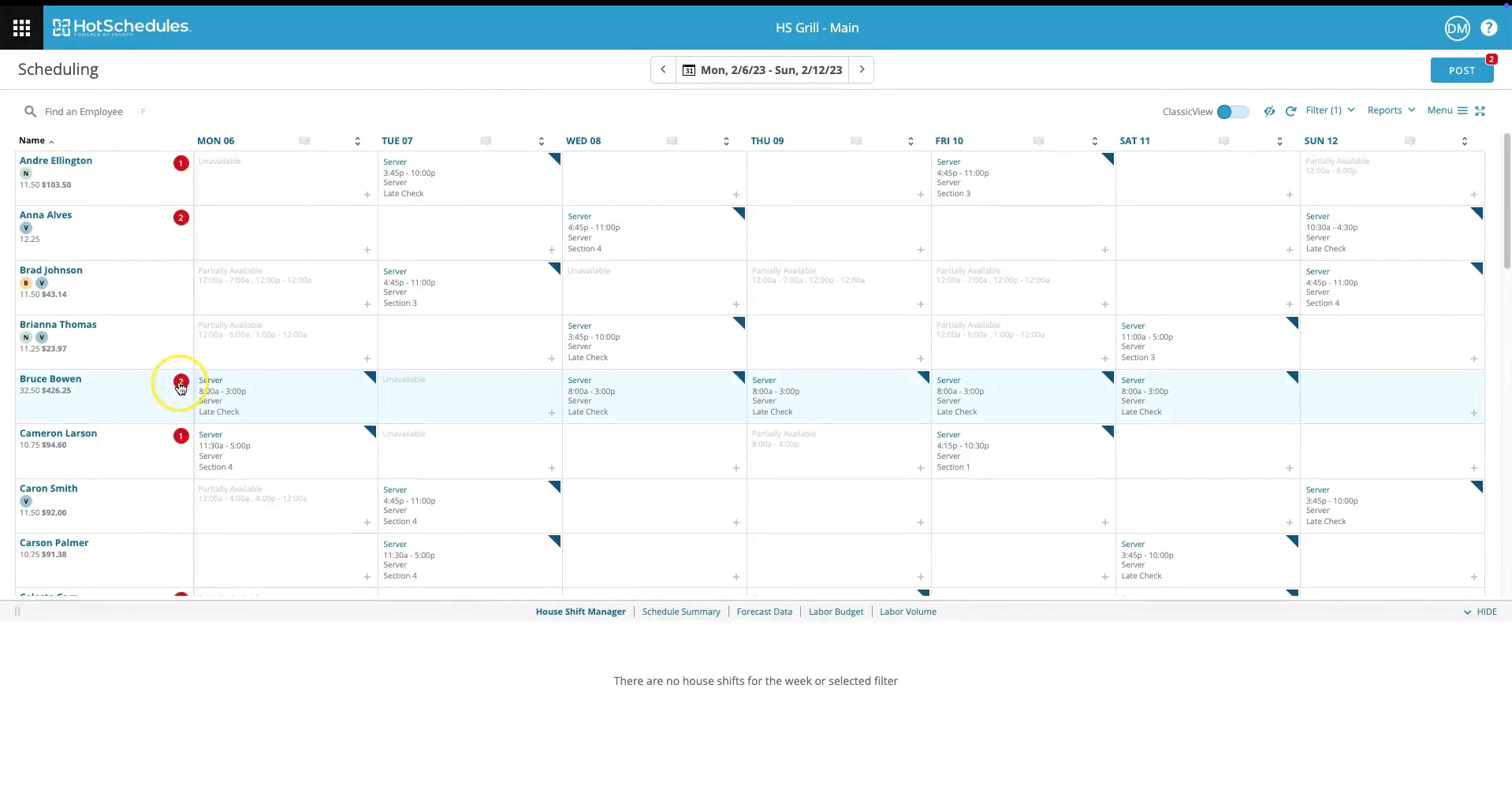
For small businesses with shift-based workers, HotSchedules offers a solid scheduling foundation that goes beyond spreadsheets or basic time clocks. The platform makes it easy for employees to manage their shifts from their mobile devices. Managers, on their part, can approve requests, enforce labor rules (if using WebClock), and forecast demand through the website.
What stood out most in our demo was the balance between ease of use and smart scheduling automation. The system lets managers create schedules from templates or build them manually, then run them through an auto-scheduler that respects availability, job codes, labor laws, and even overtime risk. If needed, users can also manually assign shifts or reassign them using the Smart Select view, which displays each candidate’s skill level, cost, and overtime status.
HotSchedules also includes a basic earned wage access and tip payout feature through its Fuego card system. While it’s not a complete payroll platform, this add-on is a welcome benefit for retaining hourly workers who, for example, value features like faster access to tips.
Ultimately, HotSchedules is very popular among restaurants, but it is also well-suited for a wide range of hospitality businesses that require a dedicated tool to manage people and time more efficiently.
Lastly, one of the few drawbacks we found is that the advanced reporting features are limited to the upper-tier plans, which may be less than ideal for budget-strapped SMBs who’d like a platform with more data-driven insights. That said, the features are there, so with HotSchedules, it’s easy to envision a scenario where you would grow with the tool and use it for many years to come.
Used by hundreds of restaurants, including chains like Pizza Hut, KFC, and Taco Bell.
HotSchedules offers custom pricing tailored to the tools you need. For example, a basic package is just the scheduling and manager modules, while an advanced one adds AI-driven labor projections and compliance alerts.
The best way forward is to schedule a free demo with their team, who’ll ask you questions to better understand your operation, tailor an iteration of the solution to your needs, and provide a quote.
All this being said, please note that plans typically have a 12-month minimum term.
Best For
Small to mid-sized businesses in hospitality, foodservice, and retail that need mobile-first scheduling.

Deputy
Deputy makes employee scheduling a breeze. But what makes it different from other employee scheduling software is its AI capabilities. It does the heavy lifting for you by developing optimized employee schedules for departments, teams, or individual employees based on their workload and availability.
PROS
- Quickly create optimized employee schedules with AI assistance.
- Easily find replacements when an employee doesn’t show up.
- Accurately track breaks and unproductive time.
- Easily integrates with Google Calendar and other workforce management and scheduling apps.
- Create AI optimized employee schedules
- Eliminate no-shows with quick replacements
- Track unproductive time and breaks with precision
CONS
- Very limited reporting and analytics
- Average customer support in case of technical problems
- It has a complex user interface that makes editing shifts, and employee schedules unnecessarily complicated.
- Limited reporting functionality
- Once published, upcoming schedules can’t be changed

Deputy’s AI-powered employee scheduling features make it an ideal solution for busy small business owners. It takes the hassle out of employee scheduling by providing up-to-date workforce engagement details to managers and allowing employees to access their schedules online.
Deputy offers a full-featured free trial of up t0 31 days. After that, you can sign up for one of its paid plans.
Scheduling - $2.5/user per month (billed annually)
Premium - $4.5/user per month (billed annually)
The Premium plan includes scheduling and time & attendance features.
Best For
- Simplifies team communication and workload planning a breeze.
- It helps you identify underutilized and overburdened employees.
- Replaces spreadsheets and other manual work management methods with real-time dashboards.

My team and I used the Deputy system on a daily basis to manage workplace schedules for our sports medicine department. We had users at multiple levels of system access. Deputy was used separately from our Hospital ADP Payroll system, as we were not permitted to integrate them. Additionally, we utilized the messaging component to share key updates with the team. The key workflows I relied on included creating and publishing schedules, managing time off requests and shift-drop requests, tracking employee hours, and generating reports for tracking and invoicing purposes.

- User-friendly ease of access via the app
- Customization ability in creating shift locations based on our outreach partnership sites
- Very affordable option to address our needs
- Feed features - helpful communication tool
When I worked for RWJBarnabas Health, we purchased Deputy to manage the scheduling, shift details, and communications for the outreach sports medicine team. We utilized it for two years. Our pain points included lack of per diem employee access to outlook schedules and disjointed communication platforms. Key benefits of use included an easy centralized scheduling system that was customizable to make our contracted partners along with an easy-to-navigate app for the end-users
- Lack of / difficulty with integration to our other hospital systems
- Feed - while it was a useful tool, at times, it was clunky; notifications were not always pushed through
- Not all settings and functions are intuitive and easy to find - especially with differences between the web-based version and the app version
I have also used "When-I-Work" as a comparison. I preferred the app interface of When-I-Work. However, I preferred the web-based interface of Deputy, which was much more user-friendly.
- Cost - very affordable option, we paid per user
- Volume of users - was an effective schedule management option for 30-40 users with varying access levels
- Chat function - should seek a platform with a consistent messaging function, both with individual messaging and group messaging
Deputy was receptive to ideas for enhancements during calls with customer service, and the overall experience and user-ease improved during the two years we utilized this service.
Single or multiple-location entities in need of customizable location details
I can honestly not think of a user or organization situation where the tool would not at least be somewhat helpful.

ScheduleBase
ScheduleBase does what it promises - simplifying employee scheduling. Its limited features make it an easy-to-use product for field staff and employers looking for a straightforward employee scheduling tool.
PROS
- ScheduleBase is an easy-to-use tool that takes users straight to employee scheduling without overwhelming them with features.
- It can be easily accessed from its website and mobile applications (iPhone and Android).
- It offers a generous free trial of 30 days during which you can test all its features.
- Automatically sends email and SMS alerts to employees when the employer modifies their schedules.
- ScheduleBase is an easy-to-use tool that takes users straight to employee scheduling without overwhelming them with features.
- It can be easily accessed from its website and mobile applications (iPhone and Android).
- It offers a generous free trial of 30 days during which you can test all its features.
- Automatically sends email and SMS alerts to employees when the employer modifies their schedules.
CONS
- ScheduleBase comes with very limited features and is only suitable for companies looking for basic employee software.
- It does not offer any third-party software integrations, which means you can’t connect it with your payroll or HR solutions.
- It has an outdated user interface that isn’t visually appealing and lacks the drag & drop functionalities that most modern employee scheduling tools offer these days.
- ScheduleBase comes with very limited features and is only suitable for companies looking for basic employee software.
- It does not offer any third-party software integrations, which means you can’t connect it with your payroll or HR solutions.
- It has an outdated user interface that isn’t visually appealing and lacks the drag & drop functionalities that most modern employee scheduling tools offer these days.

ScheduleBase has all the basic employee scheduling features that allow you to effectively create and manage your team’s schedules online. It provides you with an easy-to-use employee scheduler and instantly notifies your team of any changes to their shifts. However, you can’t call it an advanced tool since it lacks many additional features such as group chats, time tracking, etc., that the more expensive scheduling tools offer.
Subway, Orange Leaf, GoRun Wichita, Holiday Inn Express, Bell Bank, Randy’s Hardware
ScheduleBase has a straightforward pricing structure based on the number of users associated with a company account. You can start as low as $10/month for up to 20 users. If you’re unsure about getting a paid plan, ScheduleBase offers a full-featured one-month free trial to help you decide if the platform is right for your business.
Here are the different pricing ScheduleBase pricing slabs based on the number of users.
Best For
ScheduleBase is a versatile employee scheduling tool suitable for diverse industries, especially small to medium-sized businesses with shift-based teams like restaurants, call centers, retailers, and construction companies spanning multiple locations.
QuickBooks Time
QuickBooks Time isn’t the most robust product on this list. But the overall feature package that comes with QuickBooks makes it worth using. It provides you a 360 solution for employee scheduling, time tracking, and costing, which saves you countless hours and a significant amount of money in the long run.
PROS
- Increases profitability with integrated time-tracking and employee scheduling features.
- It makes scheduling simpler by highlighting work windows and available employees.
- Provides accurate labor costing thanks to time-tracking, scheduling, and accounting features.
- This product offers promotions and discounts (up to 50%) from time to time.
- Their customer service is personalized. You get to reach them by scheduling a call and customers have commended the courteous, tailored responses to issues they have.
- Consolidated clock in/clock out system for central work locations.
CONS
- Not very user-friendly
- Limited customizations
- No features for scheduling sub-contractors
- The GPS technology is slow to catch up on current locations at times. Instead of live updates, the software shows the employee’s previous locations.
- While their customer support is very helpful, they don’t provide many options for you to contact them. You can only schedule a call.

QuickBooks is a global leader in accounting and HR software. QuickBooks Time is a part of its ecosystem and provides employers with time tracking and employee scheduling features. It isn’t as impressive as some of the other apps in this article. But the overall QuickBooks feature range enhances its employee scheduling capabilities and links it directly to your payroll software and HR systems resulting in more accurate costing and streamlined operations.
QuickBooks Time offers two subscription plans
Premium - $8/user per month + $20 base fee/month
Elite - $10/user per month
Both plans come with a 30-day free trial
Best For
- Helps in creating employee schedules and tracking employee activities in the same tool.
- Replaces the manual work in employee scheduling with a fully automated system with real-time shit tracking.
- Streamlines communication through notifications and email alerts.

We use quickbooks time to track the productivity of our internal team members. We are no longer using it, since we are currently testing out another time management software. We use it to determine the amount of time our support team members are spending on shifts since there are constant changes in the schedule and a need for last minute coverage.

- It provides many features that are helpful for managing a team
- It synchronizes well with other QuickBooks applications
- The reports are actionable
We needed a more effective way of tracking team members' time than using a regular spreadsheet. We have tried other QuickBooks services in the past and thought that QuickBooks time could be a good solution. We have been using it since October, and it has been pretty effective so far. It allows us to keep a comprehensive overview of the productivity of our internal team members. I have personally used the software for about 4 years now with different companies.
- The interface is not intuitive
- Windows and sub-windows have a strange scroll/ view
- The time off notifications can be confusing
Quickbooks-time is a well built product that rarely has failures. It's my recommendation for a reliable product however it's best if you are used to the Intuit ecosystem.
People should think about the number of team members that would be using the tool and how easy they could adapt to the software to use it effectively. If the team does not easily adopt software then it may not be the best for you.
It has had adjustments in it's performance and it also provided more features that provide advanced tracking capabilities and the reporting capabilities have significantly improved.
It would be very good for an organization that has users that are already used to the Intuit ecosystem since it functions similar to other QuickBook products.
It would not be good for a team that has a hard time adopting new technology since they wouldn't properly utilize it and then the management would get incomplete or inaccurate data.

OpenSimSim
SocialSchedules by OpenSimSim covers most (if not all) of the core features you need in a modern scheduling software tool: from scheduling to time off management, shift replacements, and in-app messaging. It even offers a free feature-rich plan for up to 10 employees.
PROS
- SocialSchedules is easier to use than other employee scheduling tools thanks to its drag & drop user interface and excellent user experience.
- Generous free plan with all core features: scheduling, in-app messaging, availability management, and time off requests.
- You can try all features in the premium plan for free for 14 days.
- The knowledge base provides in-depth help content.
- Includes time tracking, recruitment, and sales management modules to provide a fully integrated one-stop HR management solution.
- Unlimited chat history means your group chats can become a secondary knowledge base for your team to quickly refer to and find previously discussed information.
Easier to use compared to other employee scheduling tools thanks to its drag & drop user interface and excellent user experience.
- Offers a generous free plan, ideal for small teams, which includes all its core features with unlimited usage.
- Includes time tracking, recruitment, and sales management modules to provide a fully integrated one-stop HR management solution.
- Offers unlimited chat history which means your group chats can become a secondary knowledge base for your team to quickly refer to and find previously discussed information.
CONS
- The free plan is available for up to 10 scheduled workers. It also stores data for 28 days.
- Dedicated customer support, SLAs, API access, and custom reports are only available for the highest-tier plan.
- No features for auto-scheduling and labor cost forecasting.
- It can be quite confusing to see two websites: one with the former name Opensimsim and the other with the newly branded one SocialSchedules, co-exist separately.
- The iOS app hasn't been updated since Oct 2022, while the Android app gets several negative reviews for lacking certain features compared to the web version.
- Its knowledge base has in-depth help content, but its customer support is limited to Enterprise users.

There’s a lot to like about SocialSchedules’ employee scheduling capabilities. It offers an easy (drag & drop scheduling features) and inexpensive way (the free plan with all core scheduling features) to schedule shifts and keep track of your employees.
We like how simple it is to navigate the platform from managers’ perspectives. Upon sign-up, we got a virtual tour guide that walked us through the platform briefly, a help center with more details on how a feature works, and chat support in the right corner of the dashboard to get help when needed. As soon as we sent a schedule, assigned a new task, or updated shifts related to them, stakeholders got updated instantly. The platform gave us a bird’s-eye view of the team’s daily and weekly schedules, with individuals’ workloads and availability in different color codes. For the monthly view, we needed to switch to time cards. In the time cards section, you can also filter what you want to see by departments, positions, workers, and shift status. It simply worked well. However, filtering by status is locked for free users. Only paid users can access it, along with other cool features, such as advanced time tracking, certification tracking, and compliance.
Besides evaluating it from a manager’s perspective, we enjoyed testing the platform out as an employee too. Through SocialSchedules, we could see our assigned weekly schedule and the countdown until our next shift began. The ability to request time off and leave a note on reasons for the request was also a nice touch for both managers and employees. Our favorite feature was native messaging: we could contact managers and team members privately or via a group chat within the app. The only downside experienced was the mobile app. It underperformed compared to the platform version.
SocialSchedules integrations include Point of Sale Systems (POS) and payroll applications such as Heartland, ADP Workforce Now, and Square POS. However, POS integrations are only available for paid users. Custom API is also limited to the highest-priced plan.
SocialSchedules offers three different subscription plans along with a generous free plan that includes all the core product features for one location, one department, and up to 10 workers. Following is a summary of its paid plans when billed annually:
- Starter: $12.99 per month per location, 2 departments per location. Features include unlimited workers, shift confirmations, block time off on dates, overtime (daily/weekly), overtime report, and manager logbooks.
- Premium: $33.99 per month per location and comes with 5 departments per location, cloud storage (7 years), mobile time clock, POS integrations, certification management, auto break allocation, and advanced reporting.
- Enterprise: Custom pricing. The plan includes unlimited locations, departments, cloud storage (7 years), dedicated support contact, negotiated pricing, custom API integration, custom reports, and custom features.
Best For
SocialSchedules’ generous free plan makes it ideal for teams with 10 employees or fewer, whereas their paid plans with tools for compliance, certifications tracking, and labor budgeting make it a solid option for hospitality and service businesses.

Calendly
Calendly differentiates itself through a user-friendly interface, sleek design, and exceptional time-saving capabilities. Notably, it offers a rare indefinite free plan, setting it apart in the scheduling tool arena.
PROS
- Calendly’s simplicity is its biggest pro. It has an elegant user interface, it's very easy to navigate, it promptly gets the task done, and connects seamlessly with other applications.
- The reduction in back-and-forth emails. Your invitees can book a meeting slot, without reaching out to you multiple times. Calendly automatically sends them a confirmation and they can reschedule or cancel on their own. It’s even better for virtual meetings because once your invitees schedule a meeting with you, Calendly will automatically generate a meeting link based on your preferred video conferencing tool.
- The ability to set your own rules so that you can get complete control over your availability preferences. For example, you can decide how long a particular kind of meeting should be, buffer time between meetings, how many appointments can be booked per day, etc.
- Calendly seamlessly integrates with popular calendar and mailing tools. Meetings are automatically reflected on your personal calendar and video conferencing links with tools like Zoom or Google Meet are generated without any extra steps.
- Provides a bird’s eye view of your team’s availability for meetups and events.
- Calendly’s simplicity is its biggest pro. It has an elegant user interface, it's very easy to navigate, it promptly gets the task done, and connects seamlessly with other applications.
- The reduction in back-and-forth emails. Your invitees can book a meeting slot, without reaching out to you multiple times. Calendly automatically sends them a confirmation and they can reschedule or cancel on their own. It’s even better for virtual meetings because once your invitees schedule a meeting with you, Calendly will automatically generate a meeting link based on your preferred video conferencing tool.
- The ability to set your own rules so that you can get complete control over your availability preferences. For example, you can decide how long a particular kind of meeting should be, buffer time between meetings, how many appointments can be booked per day, etc.
- Calendly seamlessly integrates with popular calendar and mailing tools. Meetings are automatically reflected on your personal calendar and video conferencing links with tools like Zoom or Google Meet are generated without any extra steps.
CONS
- Doesn’t provide shift management features.
- Besides branding and the ability to choose different colors, Calendly does not offer a lot of options for customizations. This could be frustrating for users who want to embed Calendly in their website without making it seem like a completely different component.
- Calendly is not very mobile-friendly. You can’t perform all the functions on the mobile version.
- The payment collecting feature is not available in all currencies. Your invitees can only pay in the United States Dollar (USD), Australian Dollar (AUD), Canadian Dollar (CAD), Pound Sterling (GBP), and Euro (EUR).
- You’ll be severely limited in terms of features if you choose the free plan or the cheaper ones. According to Craig, a Customer Success Manager at a small business, “All advanced functionality is locked behind higher subscription levels – We have the Professional level so that we can set up a team, but they locked the most obvious and useful meeting type for teams behind yet another upgrade to the sub level.”
- Besides branding and the ability to choose different colors, Calendly does not offer a lot of options for customizations. This could be frustrating for users who want to embed Calendly in their website without making it seem like a completely different component.
- Calendly is not very mobile-friendly. You can’t perform all the functions on the mobile version.
- The payment collecting feature is not available in all currencies. Your invitees can only pay in the United States Dollar (USD), Australian Dollar (AUD), Canadian Dollar (CAD), Pound Sterling (GBP), and Euro (EUR).
- You’ll be severely limited in terms of features if you choose the free plan or the cheaper ones. According to Craig, a Customer Success Manager at a small business, “All advanced functionality is locked behind higher subscription levels – We have the Professional level so that we can set up a team, but they locked the most obvious and useful meeting type for teams behind yet another upgrade to the sub level.”

Calendly is a modern meeting scheduling platform designed for entrepreneurs, consultants, service-oriented companies, and businesses that frequently conduct meetings across time zones.
Businesses looking for an affordable solution can use it as a makeshift tool for assigning work slots to in-house and remote employees.
However, it isn’t an employee scheduling platform for managing shifts, employee communication, shift trading, or leave management.
Calendly has many big names in their customer base, such as eBay, Compass, Lyft, Dropbox, La-Z-Boy, Twilio, and Stack Overflow.
Calendly has five pricing plans that can be billed either monthly or annually. If you choose the latter, you’ll save 20%. Below are the prices you’ll pay per month per user, if you choose to get billed annually.
- Basic Plan: This is completely free of cost. However, as the name suggests, you’ll only have limited features to use.
- Essentials Plan: This plan costs $8 and is suitable when you need scheduling automation.
- Professional Plan: This plan costs $12 and is their most popular plan. Use it if you need customizations, integrations, and basic team features.
- Teams Plan: This plan costs $16 and is useful for teams that rely on collaboration and need to align on a scheduling process.
- Enterprise Plan: This plan has custom pricing and is suitable for teams with 30+ members and advanced needs. You’ll have to contact their sales team to get pricing.
All the paid plans come with a 14-day trial, at the end of which, you’ll automatically be downgraded to the free plan. They also offer special pricing for non-profit organizations. You’ll have to reach out to their customer support specialists for details.
Best For
Calendly suits businesses of varying scales seeking an economical and intuitive scheduling solution. Particularly advantageous for solo entrepreneurs and small enterprises, Calendly's inclusion of a free plan caters to individual professionals and modest business setups.

I use Calendly every single day. I use it to set up phone screens with candidates. I use it to set up technical interviews between the candidates and the team. I also use it to manage my many calendars with my many clients. All in all, Calendly is kind of my personal assistant. It handles my schedule and keeps me on track.

It is super easy to use. It has an intuitive interface. It integrates seamlessly with different platforms. Its quality-pricing ratio is fantastic.
As a freelancing recruiter, scheduling interviews with candidates for different clients proved to be a challenging task in itself. Luckily, Calendly has proven to be one of the most trusted tools in my career. The ability to schedule unlimited types of events and have it check all my calendars for availability was a game changer. I am reassured daily that my calendar is in order and with no overbookings. A must-have for this day and age.
The only thing I would like to improve would be the ability to create events across multiple calendars.
I have used Google native booking app and Teams native app, and they both feel sluggish and counterintuitive. Calendly is elegant, fast, and efficient.
This platform is very dynamic and a great tool for anyone who needs a front office to take care of their scheduling. It tailors to anyone's needs. Whether a small consulting business or a busy staffing agency, Calendly offers a free account or a few different paid subscriptions. But the free account has the same basic functionality and solves the same issue as the paid accounts.
For any organization. From a 1-person gig to a multinational platform, Calendly is a good fit all around.Calendly has evolved continuously to make it's interphase better and faster. It has added new integrations and new features.
For any organization. From a 1-person gig to a multinational platform, Calendly is a good fit all around.
I literally can't think of any business that would not have a use for this tool.
What is Employee Scheduling?
Employee scheduling is the process of managing your employees' total available working hours and scheduling them properly to ensure the continuation of work with optimal productivity.
In easier words, an employee schedule outlines employee working hours across different work shifts so that everyone knows who’s working when.
Why is employee scheduling important?
A well-planned employee schedule means everyone in your workforce knows their working hours. This reduces miscommunication and allows managers and team leads to plan their work with more clarity.
In short, employee scheduling brings transparency to your workplace and leads to a more organized, satisfied, and motivated workforce.
On the contrary, the absence of staff scheduling can result in employees working overtime, losing interest in their jobs, and feeling burned out because of unplanned work and last-minute changes.
Research shows that frequent overtime poses a severe health risk to employees and directly impacts their productivity.

This is why it’s crucial for large organizations that operate across shifts to carefully plan their employee schedule and ensure that their workforce performs at the optimal level.
This is where employee scheduling software comes in.
What Is The Best Employee Scheduling Software For Your Business?
We’ve covered some of the world’s highest-ranked and most widely used employee scheduling software in this article.
Most of them offer similar features and benefits. However, they’re all different products with their unique strengths and weaknesses.
Which tool is right for your business depends ultimately on your specific scheduling needs. Since most of these software products offer free trials, free plans, or demos, we recommend using these options before finally choosing a product for your business.
About the Author


About Us

- Our goal at SSR is to help HR and recruiting teams to find and buy the right software for their needs.
- Our site is free to use as some vendors will pay us for web traffic.
- SSR lists all companies we feel are top vendors - not just those who pay us - in our comprehensive directories full of the advice needed to make the right purchase decision for your HR team.


