

12 Best Recruiting CRM Software in 2026 (Tested & Reviewed)
Check out my candid reviews and comparisons of the best recruitment CRM software, including options for enterprises as well as startups and SMBs.










Recruitment CRM software manages candidate relationships beyond the immediate hiring cycle. Unlike applicant tracking systems (ATS), which organize active applicants in your current pipeline, recruiting CRM software maintains records of candidates you’ve met, interviewed, or passed on and keeps communication flowing with them over months or years.
The primary value is simple: when you need to fill a role, you have a searchable network of candidates you've already vetted, rather than starting from scratch each time. A recruiting CRM lets you track candidate details, log interactions, and schedule follow-ups at scale. For recruiters at staffing agencies or hiring managers with recurring roles, this reduces sourcing time and improves placement speed.
In this guide, I review recruiting CRM software options across different team sizes and hiring models. Each platform handles core functions differently: some emphasize candidate data enrichment, others focus on automation or integration depth. We've tested how these tools work in practice, what they cost, and which fit specific workflows.
I evaluated recruiting CRM platforms on what actually matters to recruiters: finding candidates quickly, keeping data accurate, and integrating with tools you already use. Following the SSR HR tech evaluation methodology, I tested several recruiting CRM options and ranked them based on four key factors:
- Search and filtering capabilities: I tested how quickly I could locate candidates by skills, experience level, location, or custom criteria. This included boolean search, saved filters, and whether the platform could surface relevant passive candidates without manual browsing. Some recruiting CRM tools even suggest candidates based on your job requirements.
- Data accuracy and contact information updates: I evaluated how each platform keeps candidate records current. Some automate enrichment, others require manual updates, and some integrate with third-party data sources. I checked how often information updates and whether invalid contact data gets flagged or removed.
- Candidate communication and branding features: I assessed how platforms let you customize outreach through emails, messages, and career pages. I also checked whether candidates perceive interactions as professional and consistent with your employer brand. Data security practices were part of this evaluation, since candidate information is sensitive.
- Integration with existing tools: I tested how recruiting CRM software connects to your ATS, email, calendar, and job boards. I assessed whether integrations required custom setup or worked out of the box, and how quickly candidate data synced between systems.
- Testing approach: I tested recruiting CRM software as a recruiter managing daily candidate pipelines, as a hiring manager tracking recruiting metrics and candidate stages, and as a candidate experiencing the application process. I also gathered feedback from recruiting professionals: a head of talent acquisition at a staffing agency, a recruiting manager at an RPO firm, and talent acquisition teams at mid-market companies. Their input helped me understand how recruiting CRM tools handle real-world hiring needs across different hiring volumes and team structures. The recruiting CRM platforms that performed best across these tests are featured in this guide.
Using the above factors, I evaluated the most popular recruiting CRM platforms side by side and in various applications: as a recruiter who uses the software daily for candidate management and engagement, as a candidate who submitted their application for a job before through the CRM and the integrated ATS, and as a hiring manager who oversees the candidate pipelines and recruiting metrics.
For a holistic view of how a candidate relationship management tool is used for real business needs, my colleagues and I asked for takes from multiple software users at companies big and small, including Lisa Pope, Head of People and Culture at Jones Jones LLC, Talent Acquisition Manager Amir Hussain at ACL Digital, and Melissa Varon, RPO Recruiting Manager at KellyOCG. The recruitment CRM software tools that received the best scores are presented in this guide.


Humanly

For any team looking to keep a tight, organized grip on talent outreach and nurturing, I highly recommend Humanly. From the dynamic filtering and candidate status labels to the timeline view and re-engagement campaigns, the platform amazed me with its nuanced approach to candidate relationship management.
PROS
- Smart candidate calibration and filtering across multiple sources
- Detailed candidate status labels for nuanced pipeline visibility
- Built-in follow-up reminders for long-term candidate nurturing
- Humanly leverages a huge database of candidates to present you with talent from all corners of the globe. You can also source new ones through their Chrome extension while browsing sites like LinkedIn and GitHub.
- The Humanly tool integrates with hundreds of ATSs, providing an upgrade to your sourcing that won’t require you to switch tools.
- Generative AI is cleverly implemented for messaging candidates, automating campaigns, and ranking candidates at various stages of the hiring funnel, yet a human can step in and take over at any time.
- Their reporting module is among the cleanest and most in-depth we’ve seen for this kind of tool.
CONS
- No free plan or trial available
- Lacks core ATS features like job posting, career sites and resume parsing
- Opaque pricing, less suited for small businesses
- Since it’s a tool that was relaunched after a company acquisition, there might be some changes in the near future that could impact your workflows.
- The price point might be a bit steep for smaller teams, but they do offer custom prices based on the functionality you need and the number of users.
Humanly’s CRM functionality offers a smart, organized approach to keeping track of each candidate interaction and tailoring outreach based on engagement history.
When it comes to candidate calibration and filtering, there was clearly a lot of care put into the development of this duo. During testing, I could pull passive candidates I’ve gathered with Humanly’s sourcing extension, those actively applying before, potential referrals, and existing contacts in the integrated ATS. Then apply personalized ranking to find each role’s top matches. Bye for good, the days of sifting through multiple sources!
Another feature I found especially useful was the Candidate Status Labels, which offer a more nuanced view of each candidate’s status than the usual “active” or “inactive” buckets. For example, a “Sourced” status indicates that a candidate profile is still being processed, while “Reached” provides details on why outreach was stopped—an efficient way to gauge the next steps.
And, recruiters—you’ve got to check out the Saved for Later option on each candidate’s card. This feature allows you to set follow-up reminders (one week, one month, three months, etc.). Imagine when a candidate is interested in a role but needs more time before moving forward, and you’ve got this tool in your hand. Simply lifesaving, isn’t it?

On par with some household names like SmartRecruiters and Recruiterflow, Humanly let me filter candidates who hadn’t responded to past outreach efforts and set up new messaging campaigns to follow up.
Yet, with that smart sourcing and engagement capability comes some compromises in terms of pricing. Although specific pricing is custom, the estimations I've gotten could be steep for some small businesses.
I was also hoping for a more flexible pricing structure from the recruitment CRM software. While Humanly does offer a monthly billing option, it neither offers a free plan nor a free trial.
Feature-wise, Humanly currently doesn’t support some core ATS functionalities, such as job posting, resume parsing, and career sites. So, if these features are must-haves for you, look for our top ATS choices instead.
1,000+ companies, including TheKey, Aya Healthcare, and Noom.
Humanly’s pricing details are not publicly available.
Humanly's most notable recent update is the introduction of a video-based AI interviewer with a realistic avatar, moving beyond text and voice-only screening. The goal is to generate more structured candidate responses that feed consistently into downstream screening workflows. This reflects a broader industry shift toward treating early-stage conversations as a data source rather than relying on resumes alone. That said, the approach still requires recruiter oversight to interpret outputs and maintain an appropriate candidate experience.

Best For
Companies seeking a powerful addition to their ATS to enhance outreach and strengthen the recruitment pipeline.

Spott
Spott is a new AI-native recruiting CRM where the database essentially maintains itself. Every call, email, LinkedIn message, and WhatsApp conversation auto-links to the right candidate or company record. A built-in notetaker transcribes calls and feeds data back into profiles, suggesting field updates that recruiters accept or reject. LinkedIn profiles sync automatically, contact details get enriched in the background, and AI suggests structured field updates from every new conversation. For agencies whose CRM data typically goes stale within weeks, that continuous enrichment loop is the core value proposition.
PROS
- Omnichannel inbox pulls LinkedIn, WhatsApp, email, and VOIP calls into one view, with every interaction auto-linked to the right candidate or company record.
- Continuous auto-enrichment: LinkedIn data syncs automatically, contact details get enriched, and AI suggests field updates from new conversations — keeping profiles current over time.
- Built-in notetaker transcribes calls and meetings, then feeds context back into candidate profiles and suggests updates that recruiters accept or reject.
- Multi-channel outreach campaigns (email, LinkedIn, WhatsApp) run natively inside the CRM with no separate sequencing tool needed.
- Custom attributes on every record, saveable list and kanban views, and an @mention system to link notes and tasks across candidates, jobs, and colleagues.
- Client portal lets hiring managers review candidates, leave feedback, and track pipeline status in real time using your agency’s branding.
- Their In-house migration team can help clients move from their existing CRM within weeks.
- Semantic search matches candidates by meaning, not just keywords, surfacing non-obvious fits that Boolean queries miss.
- Unified inbox syncs LinkedIn, WhatsApp, email, and VOIP calls into one view, with every interaction auto-linked to the right candidate record.
- Built-in notetaker transcribes calls and meetings, then auto-suggests profile updates — keeping your database current without manual data entry.
- AI matching ranks your full candidate database against job criteria and provides a natural language explanation for each match, so recruiters stay in control.
- Forward-looking task management: type a task in natural language and Spott auto-links it to the relevant candidate, job, and colleague.
- Client portal lets hiring managers review shortlisted candidates, leave feedback, and track pipeline status in real time using your agency’s own branding.
CONS
- Built specifically for recruiting agencies. Corporate talent acquisition and internal HR teams aren’t the target audience.
- 15+ integrations live and new connectors ship roughly every two weeks, but agencies with deeply embedded third-party workflows may still find gaps.
- No payroll or invoicing module yet; agencies handling contractor billing will need a separate system.
- Integration ecosystem is still growing; agencies with deeply embedded third-party workflows may find some connectors on the roadmap rather than live.
- No payroll or invoicing module yet; agencies handling contractor billing will still need a separate system.
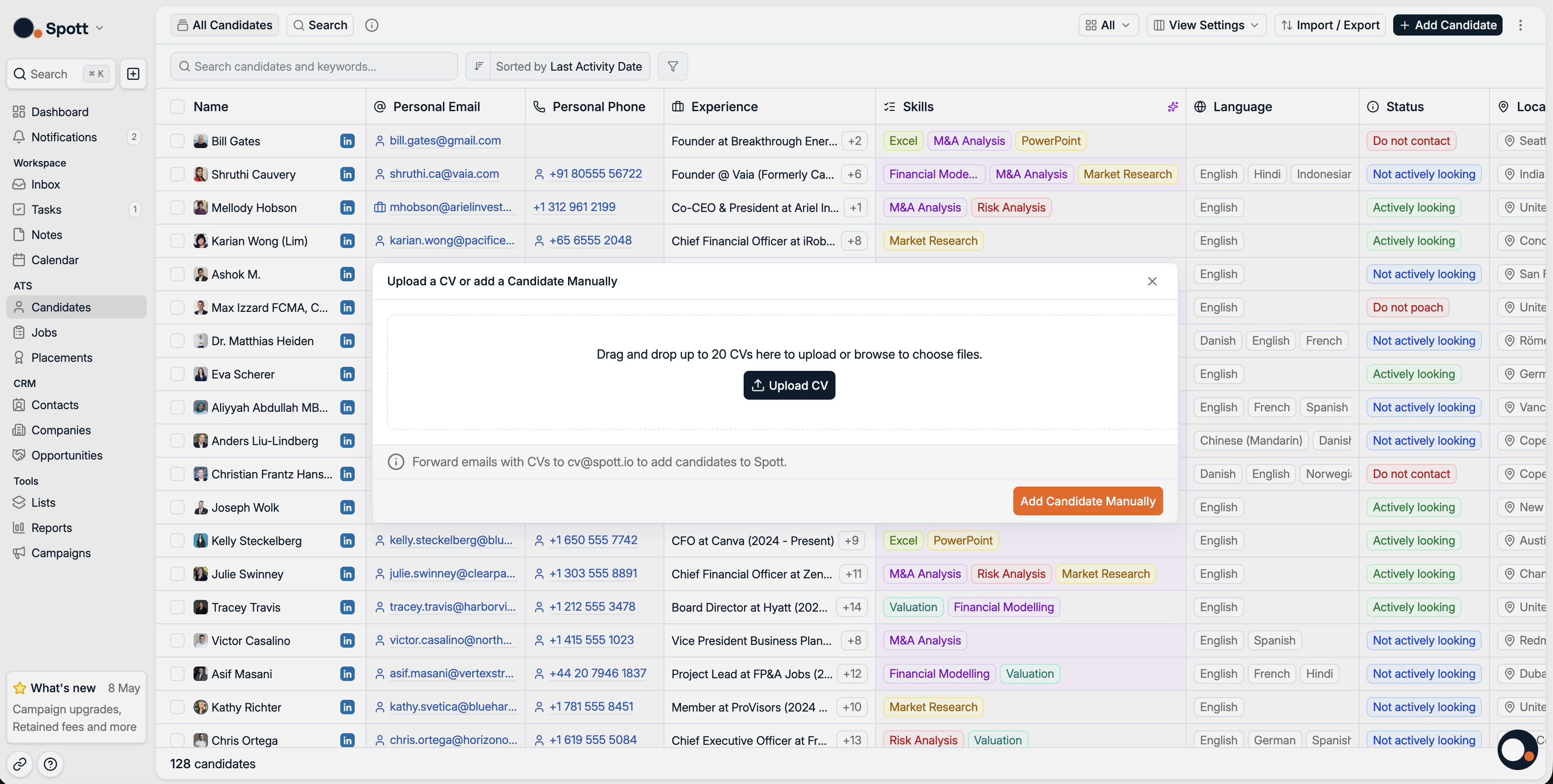
Spott is an AI-native recruiting CRM for staffing and recruiting agencies, backed by Y Combinator (W25) with a $3.2M seed round. The team has been building for about a year and a half and commercially live for roughly 6 months. We demoed the platform and came away particularly impressed by how much it does to keep CRM data clean and current without recruiter effort.
The core CRM value is the omnichannel sync. Calls (VOIP), LinkedIn messages, WhatsApp conversations, and emails all flow into a unified inbox and automatically attach to the correct candidate or company record. A built-in notetaker transcribes meetings and calls, then feeds that context back into profiles — suggesting field updates that recruiters accept or reject. LinkedIn profiles sync and auto-update, and contact enrichment runs in the background. The result is a database that maintains itself over time rather than decaying.
Spott also bundles outreach campaigns (email, LinkedIn, WhatsApp sequences), a client portal for hiring manager collaboration, and AI-powered candidate matching — all natively, with no separate subscriptions. Furthermore, we think Spott can easily become an all-in-one workspace thanks to their open API and MCP support. Agencies can connect automations, analytics, and presentation tools into a single environment without bolting on extra software. That consolidation sets it apart from CRMs like Loxo or Recruiterflow where you'd typically need add-ons for sequencing or enrichment.
Undisclosed. Notable names include Cornerstone Global Partners, HW Anderson, Alexander Lyons Solutions, Macmillan Davies, and KennedyFitch.
Spott publishes pricing on their website, which is uncommon for this category. A 7-day free trial is available with no paywalls. Plans include:
- Core at $139/user/month (currently $119 promo until May 31): AI-native ATS/CRM, custom objects, email/social/WhatsApp sync, AI search and matching.
- Pro at $199/user/month (currently $179 promo until May 31): Everything in Core plus automations, multi-channel sequences, data enrichment, and priority support.
- Enterprise: Custom pricing. Includes everything in Pro plus custom T&Cs, DPA, advanced roles and permissions, flexible invoicing, and a strategic point of contact.
All plans are billed annually with no add-ons or paywalls.
Spott evolved from a single-purpose AI report writer for executive search firms into a full ATS and CRM in about a year and a half. They rebuilt their data layer around a vectorized database (enabling semantic search), added a unified communication layer across VOIP, LinkedIn, WhatsApp, and email, and shipped built-in tools for outreach campaigns, analytics, contact enrichment, and CV formatting. Their AI expanded from generating candidate presentations to proactively suggesting field updates, ranking inbound applicants, and filling structured attributes. Backed by a $3.2M seed round, the team ships new features every Friday and is opening a US office in July 2026.
Best For
Recruiting and staffing agencies of any size that need a CRM with continuous auto-enrichment and omnichannel sync, so the database stays current without relying on recruiters to manually log activity.

Recruit CRM
Recruit CRM has one of the most extensive CRM features in the space. This platform also impresses us with its frequent feature updates per user request and a transparent pricing structure that includes a timeless free trial.
PROS
- Excellent CRM features catering to staffing agencies.
- Personalized email automation and GDPR-compliant profile enrichment feature.
- Timeless free trial with a fully transparent pricing structure.
- Unlimited training, multi-language human support, and GPT-4 features in all plans.
- No extra fees required for basic data migration that includes importing Excel/CSV files with candidates & clients. During the implementation process of this software, the customer service personnel will help transfer your data for free.
- Great customer service. Their average response time is under two minutes.
- Powerful Linkedin Integration & Executive/Recruitment Report PDF Generator to save time
- Tons of resources made available to users including blogs and articles that give you all the information you need to know about how the software works, job description templates to help you get acquainted with all the possible job openings you will be looking to close, and a glossary that gives you the A-Z of recruitment practices.
CONS
- Email sequencing is only available for the Business plan and above.
- Service may slow down during peak usage.
- Doesn’t support in-app SMS messaging.
- Limited native integrations. Recruit CRM only integrates natively with LinkedIn, Zapier, Logic Melon, some email apps, and Google and Outlook calendars. If you want to run background checks, for example, using Checkr or other background verification platforms, you won’t be able to do that unless you use Zapier’s API extension.

There are 2 main reasons why I think small and mid-sized staffing agencies should check out this platform: one is its pricing structure. Though slightly higher than Manatal, Recruit CRM is still one of the most affordable options out there. Not to mention, you can use its free trial for as long as you want.
The other reason is the maturity of their products. Having kept an eye on Recruit CRM since I’ve joined SSR in 2022, it amazes me the vendor has always kept agency users in mind when developing its platform. This laser focus has totally paid off and made it one of the go-to options for these users to manage both candidates and clients.
On top of a simple but effective applicant tracking tool, Recruit CRM has a modern CRM system that lets you perform a range of client management tasks, from automating resume formatting to submitting candidates and getting feedback from clients, scheduling appointments, managing invoices, and keeping track of all deals and sales opportunities.
Unlike Manatal, which lacks email scheduling, Recruit CRM lets you craft personalized email sequences (this task is now even easier with the help of GPT tools built-in), determine the specific date and time each goes out, and track how it is performing in real-time.
Unfortunately, this email engagement tool is just a tease on its cheapest plan, as you can only have one sequence with that option.
You should also bear in mind that Recruit CRM doesn’t cover SMS messaging and can be quite slow during peak usage.
1,200+ companies, including Avizio, Zeren, and Cooper Coleman.
The cost of Recruit CRM, when billed annually, ranges from $100 to $165 per user per month. A free trial option is available.
Recruit CRM’s recent updates focus on integrating AI into two core areas: candidate sourcing and candidate data structuring.
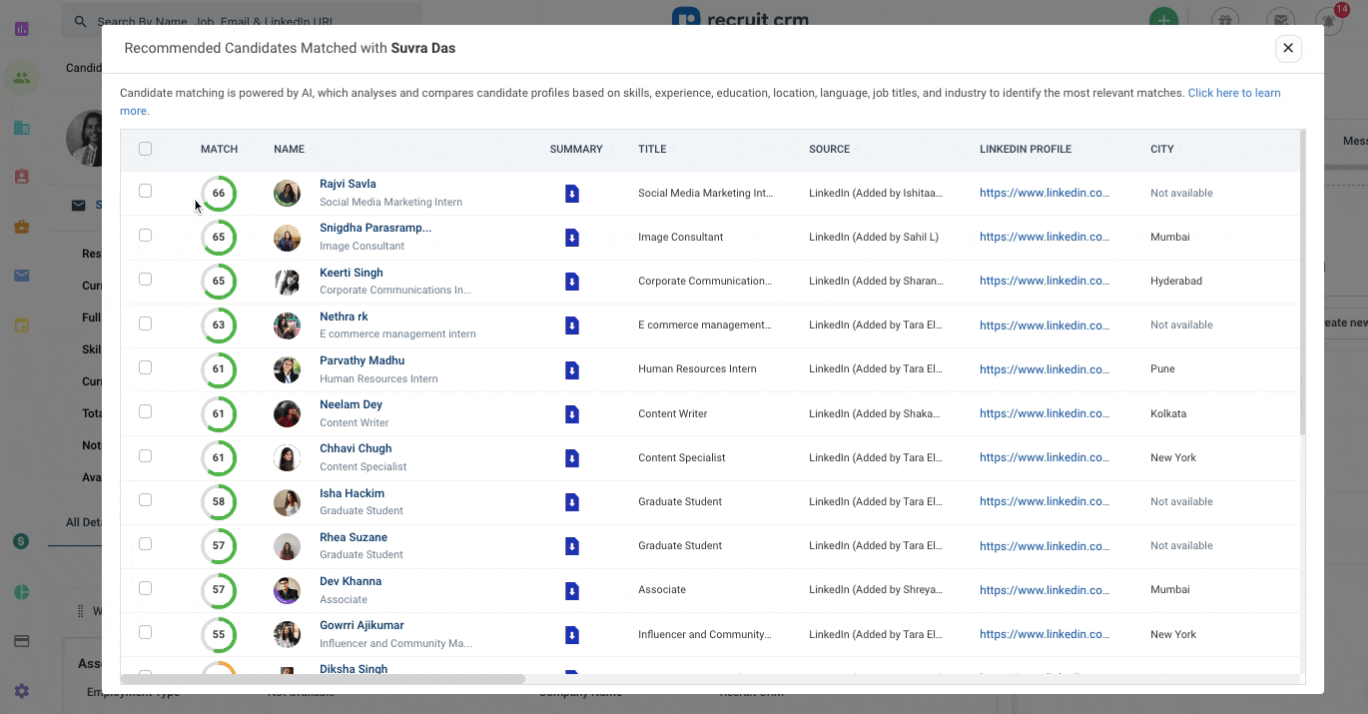
- AI candidate matching: Uses a broader set of data points (skills, experience, education, etc.) to surface similar candidates, instead of relying only on keyword search.
- Improved resume parsing: Now powered by Sovren, extracting more detailed and structured data from resumes, with support for multiple languages.
- Database enrichment: Parsed data can fill gaps in existing candidate profiles, making the CRM more searchable and useful over time.
Best For
Small and medium-sized staffing agencies to manage client and candidate relationships.


As a Manager of Talent Acquisition, I use Recruit CRM in various ways. It helps me track the number of employees in our pipeline accurately. I also create Candidate Lifecycle Reports for senior team review and decision-making. The tool assists in creating job listing pages, posting jobs, and managing online application procedures. This comprehensive functionality supports my workflow and enhances our recruitment process.

The professional user interface and advanced search features allow candidates to filter jobs by location, date, and interest. The pricing is favorable, making it accessible for smaller businesses. Integration with Google Meet and Microsoft Teams is straightforward, and the customizable email templates save time.
It has been three years since we started using Recruit CRM. Our company needed a solution to communicate with employees without relying on separate emails and to enhance our HR management capabilities. Recruit CRM has streamlined remote interviews, eliminating the need for physical offices. The integration with Google Meet and Microsoft Teams has made it easy to conduct 1:1 online meetings with candidates, interns, and employees. This tool has significantly improved my efficiency as a Human Resource professional.
Integrating with a custom email for sending emails from our job email requires knowledge of SMTP integration. The tool lacks Zoom and Webex integrations, which we often use, forcing us to switch to supported tools. Creating employee reports requires skill, as there are no templates available for this module.
Recruit CRM offers job listing, deal-making, online meeting integration, and document management at the same price, while competitors charge extra for these add-ons.
Consider the size of your HR needs and the team you will manage with this tool to ensure it remains cost-effective in the long run. Assess the tool’s features against your organization's requirements to determine its suitability.
While there haven't been many changes, new features like job listing and online interview modules have been added.
Recruit CRM is ideal for recruiting companies and Human Resource departments.
It may not be suitable for smaller businesses with few team members.

Gem
Gem’s ability to auto-add and enrich candidate profiles, run outreach campaigns across email, SMS, phone, and InMail, and tap into a database of over 800 million profiles makes it one of the most capable recruiting CRMs we’ve tested. We also like that integrations are not locked behind premium plans, and that Gem continues to expand its platform through smart acquisitions like InterviewPlanner.
PROS
- Auto-sources profiles from LinkedIn and 20+ sites based on recruiter criteria
- Email, SMS, phone and LinkedIn InMail sequences with personalization
- AI rediscovery agent surfaces past candidates from ATS and CRM
- Unlimited sourcing across 800M+ global profiles, no credit caps
- Auto-refreshed, enriched candidate profiles
- 50+ native ATS integrations plus custom API
- Free for early-stage startups via Gem's Startup Program
- Gem helps you discover qualified candidates across multiple channels, send personalized messages, visualize your recruitment pipeline, and stay on top of crucial hiring metrics
- Gem's integration with LinkedIn and various ATS means that all candidate data is stored in a centralized location. Users find this feature extremely useful.
- According to users, one of Gem's finest features is the ability to create automated drip campaigns to engage with both active and passive candidates
CONS
- Implementation and data migration can take several weeks
- No client management tools for staffing agencies
- No dedicated mobile apps
- Some users have experienced slow load times and lags while using the application
- In rare cases, the contact information, such as the email address or phone number of a sourced candidate, might be wrong
- While Gem currently integrates with LinkedIn, it does not provide the option to automate messages via LinkedIn InMail

Those getting to work on candidate sourcing and outreach are no strangers to Gem, a platform specializing in talent management. I've reviewed more than a few tools in this space in my day, and Gem’s re-engagement feature is perhaps the best I’ve seen.
Tracking down profiles that showed interest at first but then didn’t respond to follow-ups tends to be a headache for almost any TA, so I love the fact that Gem allows users to do just that with a few clicks. Once the targeted audience is selected, it’s also pretty easy to get the sequence ready. I used the pre-built email templates so I didn’t have to start from zero, then added some personalization touches here and there, and wrapped things up by choosing the email address from which my sequence will be sent and scheduling. I can imagine how busy TAs would appreciate this recruitment CRM as they can, in a matter of minutes, revive conversations that have gone cold and bring those candidates back into the active pipeline.
Another thing I like about Gem is its advanced search, particularly through Prospect Search and Gem Prospects. The former lets you curate candidate lists and create talent pools, so your next steps (engaging with these groups) can be more targeted and efficient. Meanwhile, the latter provides you with search tools that work across profiles within your CRM database as well as your connected ATS. With the addition of Gem’s AI rediscovery agent, you can now go even further by searching past applicants and surfacing hidden gems already in your system using natural language prompts instead of Boolean strings.
Compared to competitors like Loxo, Gem supports the same wide array of communication channels: emails, phone calls, and SMS. It also recently added InMail sequences – a feature it lacked during my last review, and now combines these with AI-powered sourcing agents that pull from a proprietary database of more than 800 million profiles. What stood out to me here was the unlimited access. Many sourcing tools restrict search volume or outreach with credits, but with Gem, there are no caps, which is a big win for high-volume recruiting.
However, while Gem now offers monthly subscription options, it still does not have a mobile app. Also, just to keep things clear, their recruiting CRM and ATS are two separate modules, so you’ll need to pay for both if you want to use them. And if you're looking for a recruitment CRM with client management capabilities, my suggestion is to check out different options like Manatal and Recruit CRM, as Gem still does not provide a client portal or features like resume formatting and invoicing.
1,200+ companies, including Zillow, DoorDash, Anthropic, and Asana.
Gem's pricing varies based on client type. For employer organizations, there are three plans: Startups, Growth, and Enterprise, starting at $130/month when billed annually. Staffing firms have a separate pricing structure: Essentials at $99/user/month (annual billing) for up to 3 users, Professional at $149/user/month (annual billing) for up to 10 users, and Enterprise, which requires custom pricing.
Gem has expanded from a sourcing and CRM tool into a more integrated recruiting platform, with recent updates focused on improving speed, automation, and workflow coverage across sourcing, CRM, and ATS layers.
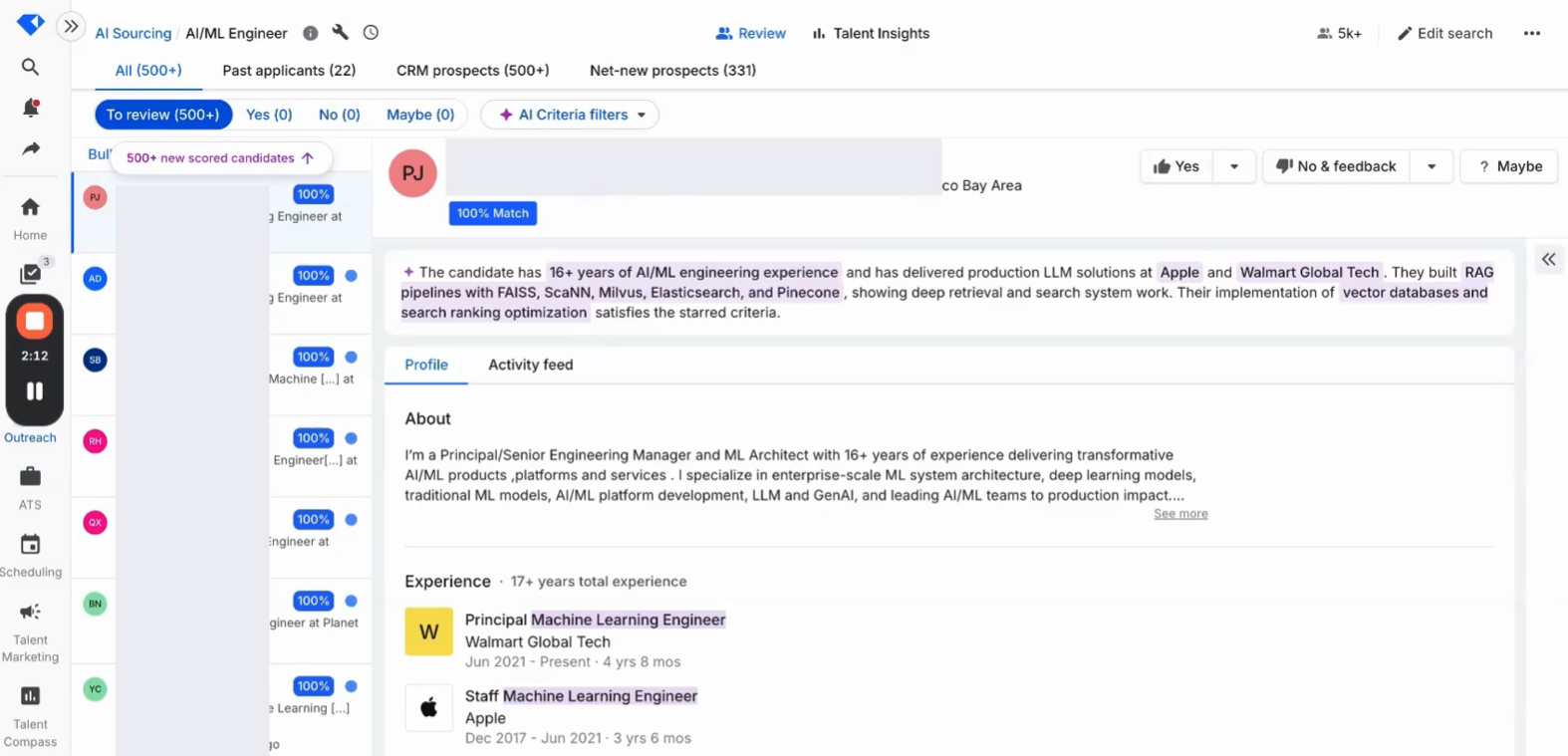
- AI Sourcing Agent surfaces candidate matches faster with background scoring; match quality depends on search inputs
- Location-radius filtering enables proximity-based searches for hybrid roles
- AI "not interested" classification reduces manual CRM logging with standardized response reasons
- Agency workflow management adds restricted-access controls and source tracking within the platform
- New integrations with Metaview, DocuSign, Dropbox Sign, Juicebox and Wellfound
- Mobile job access added for on-the-go recruiting workflows
Best For
Startups that qualify for the free program and high-volume recruiting teams that need AI-driven sourcing, transparent ranking, and the option to consolidate into a full ATS plus CRM under one platform.

I use Gem as an ATS, CRM, and sourcing platform. It is fairly new to me but has a very interactive and user-friendly interface. It can become quite complicated due to its wide range of functionalities. A previous client considered migrating from a legacy ATS to Gem.
I was mainly brought on to clean up the ATS, manage requisitions, move candidates through the pipeline, and source candidates as needed. Gem includes automated email responses that support candidate engagement, which is helpful but not unique compared to other platforms.
- The user interface is intuitive and appealing.
- The AI capabilities enhance efficiency in screening and matching candidates to requisitions.
- Gem's brand presence and sourcing platform attract a large candidate pool, which is valuable for talent acquisition.
- Its interface encourages repeat use and is particularly attractive for newer companies.
One of my clients is exploring Gem as an option through an additional sourcing and job posting platform. I have been using it for the last five months. The main reason for considering Gem was to improve sourcing efficiency and candidate engagement.
- It's quite pricey, and some functionalities are complex due to the variety of features offered.
- Gem’s strength seems to be in sourcing, which may limit its performance as a full-featured ATS.
- The platform’s multiple use cases can be overwhelming for new users or smaller teams.
Gem stands out by excelling as a sourcing platform, which gives it an advantage in attracting candidates. The interface is modern and well-suited for newer companies and younger users.
For those moving from legacy systems, the updated design and automation features are a strong improvement.
Candidate attraction is one of Gem’s strongest assets. My client experienced excellent candidate flow, which supports the investment at its price point. For organizations interested in AI-powered efficiency, Gem offers strong functionality in that area.
I have not used it long enough to evaluate its evolution. However, I was a Gem user before it introduced ATS functionality, so that is a notable addition.
Larger organizations with sufficient budget and a need for sourcing and automation tools will find Gem a great fit.
Smaller organizations that are just starting out or have limited budgets won’t make the most of Gem.

SmartRecruiters
Targeted at mid-sized and large enterprises, SmartRecruiters offers a highly configurable CRM solution that lets you form talent communities, craft automated engagement campaigns, and track their performance in real-time.
PROS
- Forms talent communities by specific hiring needs, skill sets, or shared traits.
- Search candidates by phone number, partial email address, and more.
- Branded sign-up pages for talent communities that allow self-sign-up without job applications.
- Regular updates with new or enhanced features.
- SmartRecruiters has a built-in candidate assessment and skill testing module that allows you to predict cultural fit, future performance and retention, without needing to integrate third-party solutions.
- SmartRecruiters provides features for offer management. You can create offer letter templates, share them with successful applicants, and collect their e-signatures from any device using SmartRecruiters’ DocuSign integration.
- Speaking of integrations, SmartRecruiters has pre-built integrations with over 500 HR solutions and job boards. You can also ask SmartRecruiters’ team to build additional integrations for you if it doesn’t integrate with products in your tech stack.
CONS
- Marketed as an add-on for SmartRecruit ATS.
- Enriching profiles requires using partner service.
- Undisclosed pricing. No free trial is available.
- SmartRecruiters’ pricing isn’t transparent. Interested users have to go through the sales team to receive a quote. Users are also not able to create trial accounts on their own.
- Users have reported a steep learning curve and that the UI takes time to get used to. Some users have also reported that the system can be slow and glitches at times.
- The reporting feature doesn’t always retrieve data accurately. Some users have also complained that report customizations and KPI tracking capabilities are limited.
- Candidate filtering is quite limited. As it stands, only basic options such as degree, location, gender etc are provided.

I briefly introduced SmartRecruiters as a highly configurable CRM solution earlier, and here is what I mean by that. First, this platform performed well across all my testing devices: laptop, tablet, and phone— both when I logged in as a recruiter user and as a candidate. Second, from CRM and ATS to onboarding and chatbot, it can single-handedly bundle all these tools under one hub, or, if you prefer, you can pick and choose just what you want.
However, what impressed me most about this recruitment CRM is its Campaign, which lets you narrow down your talent search even further when you set up a campaign. For instance, you can choose to target only people you've contacted within your Contract Driver segment who live within 50 miles of New York and who confirmed in your screening question that they have a driver's license. Then, in the sequence section, you can set up rules to only send the next message X days after the last message was opened or clicked on.
SmartRecruiters has also done a good job with its search functionality. From keywords to Boolean, advanced search, and even custom filters, I haven’t found anything its competitors do that this CRM doesn’t.
But what a bummer! Such a capable option doesn't have an automatic candidate enrichment feature built in. Additionally, due to its enterprise-focused nature, SmartRecruiters doesn't offer a free trial, and its prices are somewhat steep compared to its peers.
4,000+ companies, including VISA, Nine, and Devoteam.
SmartRecruiters pricing starts at $14,995.
Best For
Mid-sized and large enterprises worldwide.

I use SmartRecruiters on a daily basis. It is my go-to resource for recruiting and candidate experience. The key workflows it addresses for me are the approval process for a requisition, advertising the JD, shortlisting, and, even better, Hiring Managers reviewing resumes right in the tool.
No more downloading resumes to share with HM and saving them in external folders. I am able to share the profiles per role with the HM, and they are able to view the profile and resume and provide feedback. All correspondence, even scheduling of screenings and interviews, happens in the tool. Saves my team and me hours upon hours and reduces error 100%.
- SmartRecruiters is very user-friendly and organized.
- The tool is intuitive to use, not a lot of learning required.
- The workflow of the tool is spot on and represents what I am trying to achieve.
- The tool is so organized that I feel confident having this process stand up in a recruitment audit.
We bought SmartRecruiters for the full service it offers. We wanted a tool that could capture the entire recruitment process, serve as a resource for audits of HR, and provide a better candidate experience.
SmartRecruiters does all that and more. It is extremely user-friendly. It also assisted us in changing the culture of our organization towards recruitment, seeing it now as a partner and not an afterthought. SmartRecruiters offers excellent training resources as well to address this transition.
- If I could improve some things of Smart Recruiters, it would be the reporting, the visuals of the report, and the flexibility of the reporting.
- This tool worked so well for us also because we took the time to set it up, use it, etc. I wish more companies that have the tool take the time to do that, yet at the same time, SR could provide more templates to ease the setup.
- SR is hands down better than the others, as it is the easiest tool I have ever used, and I have used many.
- The tool is user-friendly for those who are not recruiters, but hiring managers or panelists.
- A new person can use the tool with very little training.
- It is not cumbersome like other tools.
The criteria I would consider when buying this type of tool are: how easy is it to set up? Meaning, how easy is it to set up all the internal systems so that one can put the entire tool to work?
Can it be used as a communication tool? This is a deal breaker for me. Setting up the tool as a communication tool puts all correspondence in one place and allows for flawless audits.
How can you integrate the broader company and hiring managers in the process?
The best tool is one that the company can truly embrace and not develop parallel systems around it.
The integration of AI options has been the best integration they could have added. It gives the user another set of eyes to review and shortlist candidates, ensure compliance, and communicate.
Any type of organization with, I'd say, at least 25 hires a year, multiple teams, and a need for compliance. SmartRecruiters is not best nor required for a smaller organization with minimal turnover.
SmartRecruiters would not be required for a small organization, say with 25 or fewer hires per year, little turnover, and that wouldn't be willing to change their culture to integrate the tool fully.

Bullhorn
Bullhorn has long been on my recommendation list for enterprises in the staffing and recruiting industry. Its smart engagement automation features are adept at increasing candidate conversion rates within the users' existing database.
PROS
- Effective candidate re-engagement driving more placements from existing ATS data
- Scheduled SMS and email messaging for timely outreach
- Fast Find, Boolean and Saved Searches for quick and advanced profile retrieval
- SourceBreaker provides productive automation for candidate search and business development.
- End-to-end solution: ATS, interview scheduling, talent engagements, onboarding, and invoicing.
- Easy implementation and transition from existing ATS.
- 40+ native VMS integrations.
CONS
- High pricing, estimated at $25,000 for a team of 1,200
- Steep learning curve with an unintuitive UI
- No native profile enrichment, relies on Bullhorn partner marketplace
- Limited mobile app functionality
- The UI is not very user-friendly, and the system can be slow at times.
- Customer support service isn’t very responsive.
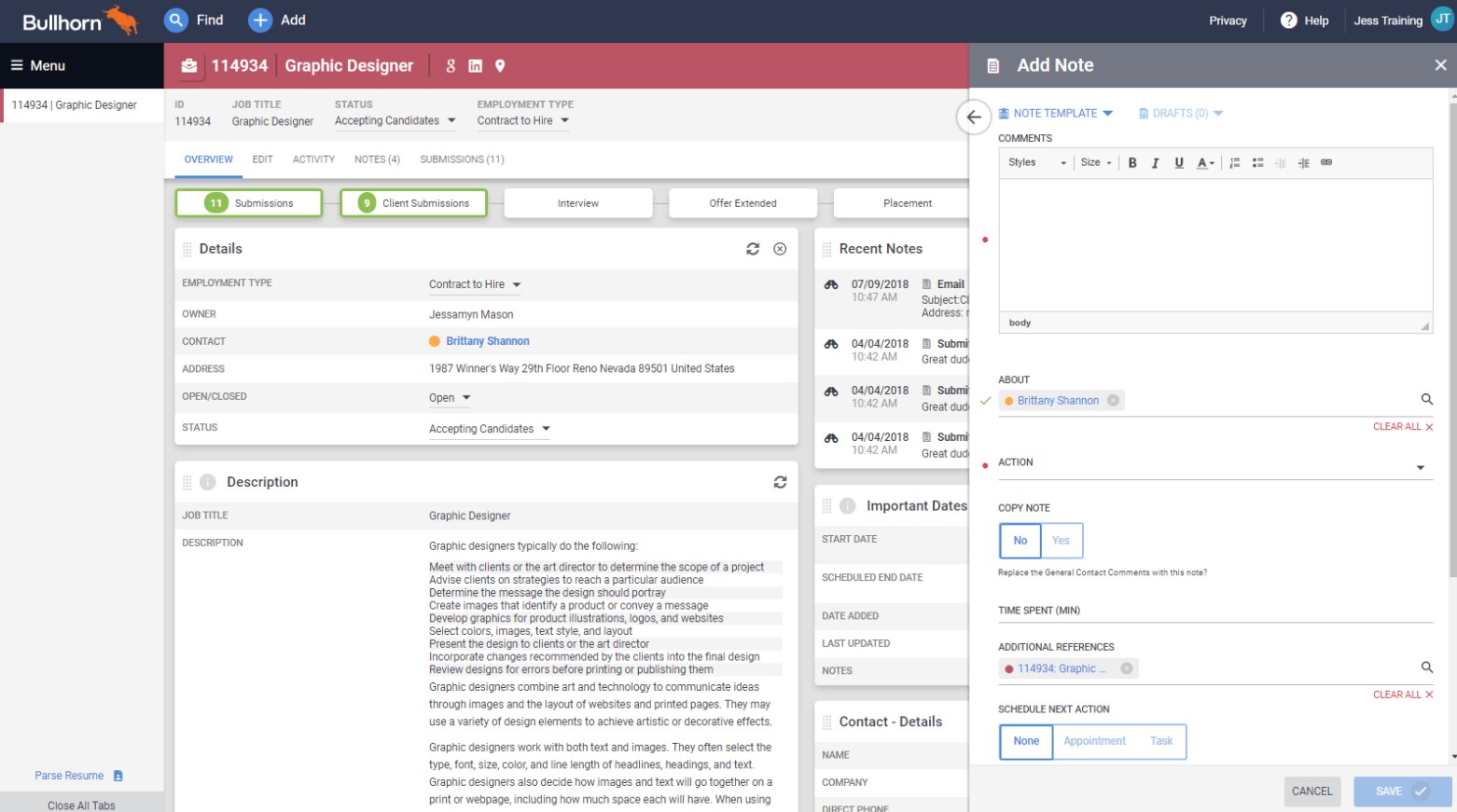
I actually met Bullhorn when I still worked in the staffing space a few years back and had a great experience with this tool. Unlike Loxo and Gem, Bullhorn doesn't have the ability to find new candidates, but it’s a robust recruiting solution made for staffing agencies and is extremely helpful when you have a huge candidate database in your ATS to utilize.
With Bullhorn, you can set up rules, like reaching out to profiles for whom you haven't added a new note for 3 months. The system will then auto-contact these candidates with a personalized campaign that you design. Plus, when you create a campaign in Bullhorn, the timing will be adjusted to the recipient's time zone to ensure your messages hit their inbox right when they're most likely to be seen and appreciated. Every staffing recruiter I know always prioritizes searching their existing talent database before anything else, as this is a smart way to utilize resources and has remained their top source of hires for years. So, seeing Bullhorn double down on optimizing this essential aspect is genuinely impressive.
To test this CRM further, I tried its search tools. Fast Find let me find a candidate without having to enter their full name. Advanced Search understood Boolean search terms and was fast at producing search results. There are also Saved Searches to ensure TAs don’t duplicate efforts.
However, I’m quite disappointed that Bullhorn does not have a native feature to enrich talent profiles. You either have to reach out to candidates as a workaround, or purchase enrichment tools like CandidateIQ by Vettd from Bullhorn’s partner marketplace.
The platform’s mobile app was also less intuitive than I had hoped. I can barely do anything beyond the basics, like viewing tasks and companies. All the text I added to a note was turned into lowercase. Moreover, the app didn’t let me see comments on candidate profiles or do any kind of reporting or analytics.
10,000+ companies, including ManpowerGroup, Robert Half, and Adecco.
Bullhorn pricing has not been disclosed, yet according to our research, it tends to be on the higher end of the market.
Best For
Staffing and recruiting firms that manage a large talent pool and seek to optimize their re-engagement strategies efficiently.

Bullhorn has solutions for every aspect of the recruiting life cycle including,
- Applicant tracking system and CRM, messaging, middle and back office, including a timesheet portal, commission tool, and oversight.
- Salesforce integration, providing a competitive edge for keeping real-time data for tracking client information.
- Onboarding ATS integration, document storage, E-Verify, and candidate portal.
- Recruitment automation, unlocking new levels of team productivity, data integrity, and ensuring a consistent recruitment cycle.
- The biggest benefit of Bullhorn is that automation makes work easier.
- Attracting candidates through AI job and auto-matching, saving time and money by notifying candidates already in our database of roles they fit.
- The onboarding automation provides a clear view of what is still needed, and the dashboard is tremendously helpful.
As an HR Manager and HR Consultant supporting numerous clients over the years, Bullhorn has been tremendously helpful in streamlining the process of finding top talent and connecting candidates to the right roles and clients. I’ve used Bullhorn since 2011 and have experienced the following key benefits:
Over the past 10 years, I have seen Bullhorn expand from a sourcing tool to a comprehensive solution featuring applicant tracking, candidate engagement, customer relationship management (CRM), email integration, relationship intelligence, and dashboard reporting.
I have no cons; Bullhorn has been a huge help to my staffing team efforts. Each month there is a new partner and new add-on, and the price has remained steady.
Bullhorn stands alone due to the broadness of the tools and functions it offers.
Budget: Ensure the tool fits within your financial constraints.
Identify the pain points: Determine if you need ATS/CRM, recruitment automation, or other specific functionalities.
Yes, it has evolved tremendously over the past 10 years with advancements in AI, automation, and partnerships that enhance the entire hiring, onboarding, and talent retention process.
Bullhorn is ideal for clerical and light industrial, healthcare, and professional staffing solutions. Whether starting a staffing business, growing a small team, or managing a medium to large enterprise, Bullhorn can help with the entire recruitment process. It is easy to use, offers unmatched productivity, and provides world-class support 24/7.
I can't think of any, as Bullhorn's extensive features and consistent enhancements over the past 10 years maximize team and individual output through automation.

Manatal
Manatal is widely known for its generosity in terms of features: applicant tracking, AI recommendations, candidate profile enrichment, and a recruiting CRM—all at a pretty low price.
PROS
- Robust applicant tracking capabilities and auto candidate profile enrichment.
- Services start at $15/month, with a free trial and flexible payment options.
- Multilingual and mobile-optimized interface.
- Highly accurate search functionality.
- Suitable for both corporations and agencies.
- Manatal is quite affordable and offers a 15-day free trial for users to test it out before making commitments.
- Manatal is fairly easy to use. It features drag-and-drop enabled pipelines for candidate organization.
- Manatal’s AI-based recommendations feature can save hiring managers quite a bit of time. It’s able to scan job descriptions then search a users talent pool and bring up candidates most suited for the job.
CONS
- Integrations rely on Zapier. Their API is available only to top-tier subscribers.
- The extension relies solely on LinkedIn to source profiles.
- No email scheduling capability.
- Only custom plan users have access to phone support.
- The AI recommendations feature works best with resumes that are in English, and doesn’t work as accurately with other languages according to several users’ feedback. Several users have also complained about Manatal’s interface only being available in English and that career pages cannot be published in languages other than English and Spanish.
- Manatal doesn’t offer a free plan. We mention this as a con as several SMB-geared ATSs do offer a free-forever verison, and that puts Manatal slightly behind competition.
- Manatal doesn’t offer prebuilt integration modules. They do have an open API that allows users to plug in third-party products and custom tools, but that required a bit more time and technical knowledge to accomplish. It’s also worth mentioning that only Custom plan customers can access Manatal’s API and Zapier integration. Customers on the Professional and Enterprise plan cannot.
- Users can search for candidates via Boolean Search or Advanced Search, but cannot combine the two search methods together. E.g users cannot use the Boolean search operators (AND, OR and NOT) within Manatal’s Advanced Search tab.

I think Manatal should be proud of its candidate enrichment functionality. It can run on autopilot if you let it, and more importantly, it is highly accurate. By leveraging existing profile information as parameters, this platform's AI can trace down matching social media accounts, then dig for any missing intel and fill it into the system for you. Coincidences do happen, so I’m glad the AI is programmed to only enrich a profile when it’s at least 70% confident the found social media account is the right one.
Mantal’s search features are also pretty cool. There's a Quick Search for basic things like finding a candidate by their name. If you need something more specific, like candidates with certain skills, languages, and experience, the Advanced Search is where it's at. This feature ranks each result based on how close it matches what you're looking for, so you get the most relevant profiles in a matter of seconds.
Manatal has done an okay job with engagement features. It offers SMS and emails, and the mass option is also included. However, there are some inconveniences. One issue is that there’s no email campaign scheduling I can find when testing this tool, which can be a real hassle for those working with talent in different time zones.
Additionally, beyond job boards, Manatal has just 7 native HRMS integration options: Sprout, Humaans, HiBob, Omni HR, WorkDigital, Melioris, and BambooHR—a very humble number compared to other CRM tools I’ve picked in this guide.
Manatal is used by 10,000+ organizations, including Adecco, Decathlon, and Tesco.
Manatal pricing starts at $15 per user per month when billed annually. A 14-day free trial is available, and no credit card information is required.
Best For
Budget-minded, small-to-midsized recruitment teams and staffing agencies.

I use Manatal daily for candidate and client sourcing, as well as applicant tracking. It serves as the primary ATS and CRM for my recruitment consulting company. I use it to post jobs to our career site, client websites, and job boards.
The platform also allows me to create client companies, assign client contacts, and manage candidate records. It’s a comprehensive tool that supports the full recruitment workflow.

- I really like the Chrome extension for sourcing candidates via LinkedIn.
- The ability to create folders for candidates is helpful for prospecting and organization.
- I appreciate the customizable interface, especially the option to change list views.
We purchased Manatal for use as a recruitment Applicant Tracking System. We needed a well-functioning product that was also user-friendly for candidate sourcing. Our goal was to find an ATS that also includes CRM capabilities.
The integration with LinkedIn via a Chrome extension was especially helpful for sourcing purposes. I have been using this product for about two years.
- I wish there were more advanced customization options available.
- Additional job board integrations would improve the platform’s reach.
- A more robust reporting system would be useful for showcasing recruitment activity to clients.
Manatal stands out from competitors because it is a more effective sourcing tool than many other ATS platforms. It simplifies the process of searching for and uploading client or candidate information directly from LinkedIn via the Chrome extension.
You should consider what the primary use of your ATS will be. This tool is better suited for users who already have experience working with applicant tracking systems. While Manatal offers several job board integrations, other platforms may have broader options in that area.
For recruitment agencies or consulting companies, this is a strong option due to its CRM and sourcing features.
Manatal has been a reasonably advanced platform since I began using it. Over the past couple of years, a few new features have been introduced to enhance usability.
Manatal is well-suited for recruiters or talent acquisition professionals who have prior experience using an ATS. It’s especially useful for small recruiting agencies or consultancies.
This platform is not ideal for organizations without a dedicated recruiter or for hiring managers with limited recruiting experience. It requires familiarity with ATS systems to be used effectively.

Loxo
Loxo stands out due to its impressive automation capabilities and multi-channel engagement options. Plus, the platform has just added a free plan, so you can give it a go before deciding to go premium.
PROS
- Automated outreach campaigns triggered by candidate pipeline stage
- Multi-channel engagement via email, SMS, calls and InMail
- Free plan with unlimited users and jobs
- Loxo Connect for direct candidate contact information
- Periodic automatic candidate data enrichment
- In-app GPT for personalized engagement content and campaigns
- Excellent customer service with a strong record of fast response times.
- User-friendly resume parsing.
- Friendly and visually appealing user interface.
- Offers a convenient Chrome extension.
- Allows client involvement in projects with direct interaction.
- Regularly releases new product updates.
- Includes a free plan.
CONS
- No Android app; iOS app lacks job orders and recruiter notes
- Complex pricing with numerous add-ons
- Candidate engagement tools excluded from free plan
- Loxo Connect Credits reset monthly with no rollover
- Slightly higher pricing compared to similar tools.
- Lack of an option to auto-anonymize resumes for blind screening.
- Reporting is not particularly useful with certain useful metrics not tracked.
- No Android app. Limited features and occasional performance issues on the iOS app.

If you’re eyeing a recruitment CRM with seamless automation and robust multi-channel outreach, I highly recommend you look into Loxo. This platform offers emails, texts, calls, and inMails. It recently also added some cool GPT tools to assist recruiters with their engagement work.
Diving deeper into its automation features, auto-add is something I have only seen in Loxo and nowhere else yet. This unique feature enables users to attach an outreach campaign to not just each job but also each job stage independently. During my tech test, it let me have one for my 'Shortlist' job stage and another for my 'Screening' one. And as I added myself as a candidate to this pipeline, I received tailored messages as my profile progressed through these stages.
Fellow automation enthusiasts will easily like Loxo’s auto-refreshing database as much as I do. It’s such a sassy tool that leverages the system’s proprietary search engine and AI to continually enrich candidate profiles with the latest info they can find online, be it job changes, relocations, new contact details, or anything in between.
Alternatively, you can use Loxo Connect to get prospective talent’s contact info. I have to warn you, though, that this tool comes with a fee and your paid credits reset at the end of each month. In other words, all your unused credits in a month will not be rolled over to the next.
I wouldn’t go for this recruitment CRM if my business were on a budget, as Loxo’s free plan doesn't include engagement elements like email sequences, phone calls, SMS texting, and the Outreach GPT. You'll need to upgrade to one of the two most expensive plans to get access to these tools.
Another downside to Loxo is that there’s no mobile app for Android users, and its iOS app is not very user-friendly and lacks certain features like job orders and recruiter notes.
13,000+ companies, including Randstad, Cigna, and Lockton.
Loxo offers a free-forever plan and 3 premium plans starting at $199 per user per month. Potential customers can take advantage of a 7-day free trial before committing to a paid subscription.
Best For
Mid-to-large recruitment agencies and in-house recruitment teams looking to automate their candidate engagement process and maintain an up-to-date database.

We use Loxo to directly reach out to candidates with niche experiences. Through Loxo we can search for the specific subject that we need a tutor for and evaluate the candidates. We can then contact the candidates directly for recruitment to the platform. This process is simplified through the use of AI recommendations that assist with identifying talent that would be a good fit based on the requirements.

- The platform is super intuitive and simple to set up
- The AI assistant makes it easier to review prospects
- The platform has many features that improve the recruitment process
We struggled to find quality talent internally. We need quality tutors in specialized subject areas like IGCSE, A Levels and IB which aren't commonly found in the US. In order to address that gap we needed a platform that would provide access to a cohort of candidates with a wider skillset. We recently started using Loxo to find talent from other parts of the world to address that gap.
The onboarding process wasn't super smooth.
Loxo is interesting because it leverages the most modern recruiting technologies to ensure that recruiters get quality candidates and this saves a lot of time
You should think about how much time your team is willing to invest to find a quality candidate.
It's good for organizations seeking very niche talent in different parts of the world
It's not good for brick and mortar companies seeking regular office workers in very generalized fields.

JobAdder
JobAdder truly knows how to make it easy to engage with candidates from various channels. The CRM also impressed me with its flexible pricing options, customizable workflows, and a long list of integration partners.
PROS
- Multiple communication channels (email, SMS, WhatsApp) for candidate engagement.
- Automated candidate data enrichment.
- Good integration partners (150+ options to date).
- Discounts are available for not-for-profit businesses and charities.
- Easy to use and easy data migration.
- Client portal for a clear communication flow between agencies and clients.
- Email, SMS, and WhatsApp for talent engagement.
- In-depth onboarding and in-platform training.
- Monthly payments. No lock-in contracts and no penalty fees to switch either.
- 150+ integration partners.
- Native iOS and Android apps.
CONS
- Price has gone up considerably over the past 2 years.
- Customer support can be slow and refer users to self-help sections.
- UI can be clunky at times.
- No option to merge deals or contacts.
- No free trial.
- Limited administrative power to resolve issues.

In my testing, JobAdder performed just as well as Recruit CRM, Manatal, and Bullhorn when it comes to candidate engagement tools. I can use email, SMS, or even WhatsApp to reach talent through this platform. Plus, there's a bulk messaging option that allows me to send messages to up to 500 profiles at once. I tried bugging 50 of my contacts to see how this feature goes. There were just a few steps to take, and the emails were sent out almost instantly.
Like Bullhorn, I can view my candidates from my integrated ATS (BambooHR was the one I used at the time) right in JobAdder. I can also sort them based on their skills, ratings, lookalikes, and a handful more. What sets this recruitment CRM apart from others I’ve reviewed, though, is its deep integration with SEEK Talent Search Connect. Given that over twelve million candidates on SEEK are available to tap into right within JobAdder, not just the ones already in the ATS, thanks to this integration, this can’t be a greener flag, especially for teams looking for talent in Australia and Asia.
Also, thanks to this integration, the candidate data enrichment feature gets a boost: Not only does it automatically keep track of activities, notes, and documents, but it also fills in the latest details it finds from SEEK for you.
Unfortunately, there's been a lot of grumbling about how the prices on this platform keep going up. On another note, an awful number of JobAdder users I talked to and myself aren’t happy with the support we’ve been offered. They tend to be slow to respond and often just redirect users to self-help resources.
1,000+ companies, including Firefish, West Recruitment, and MAYDAY.
JobAdder’s CRM offers customized pricing.
Best For
Recruitment agencies in the UK and Australia.

Hellora
Hellora evolved from employee referral software into a recruiting CRM purpose-built for U.S. healthcare hiring. We found that narrow focus makes their AI more compelling than generic implementations, as it's applied to solving healthcare-specific recruiting challenges through explainable candidate matching, continuous profile enrichment, and personalized outreach for clinicians already in an organization's ATS.
PROS
- Purpose-built for U.S. healthcare hiring with AI trained on clinical roles, licenses and workflows
- Semantic search identifies qualified candidates in ATS databases without keyword matching
- Continuously updates candidate profiles using healthcare licensing data
- Sends outreach directly from recruiters' Outlook and Gmail inboxes
- Centralized email and SMS inbox with AI-drafted candidate messaging
- Built-in employee referral and hiring event management
- Designed specifically for healthcare hiring with training on clinical roles, licenses, and workflows that general-purpose CRMs lack.
- Semantic search finds candidates in existing ATS databases beyond keyword matching.
- Automatically updates candidate profiles using healthcare licensing databases and data shared across the Hellora Healthcare Network.
- Outreach from recruiters' existing email accounts (Outlook/Gmail) rather than separate recruiting domains.
- Shows reasoning for candidate recommendations instead of opaque scoring, allowing recruiters to evaluate suggestions.
- Includes employee referral workflows with text-based submissions, SMS campaigns by department, and automated reward adjustments.
CONS
- Limited to U.S. healthcare hiring, not suited for multi-industry or international organizations
- Engagement history and conversation intelligence still maturing
- No native interview scheduling or calendar integrations
- Limited to U.S. healthcare, restricting use for multi-industry or international recruiting.
- Conversation history and meeting tracking still developing, with no native calendar integration yet.
- Pricing requires direct negotiation rather than published per-unit rates, making budget forecasting difficult.
Hellora takes a deliberately narrow approach to recruiting CRM, focusing almost entirely on U.S. healthcare talent engagement rather than trying to serve every industry. Throughout our demo, that specialization was evident in nearly every workflow.
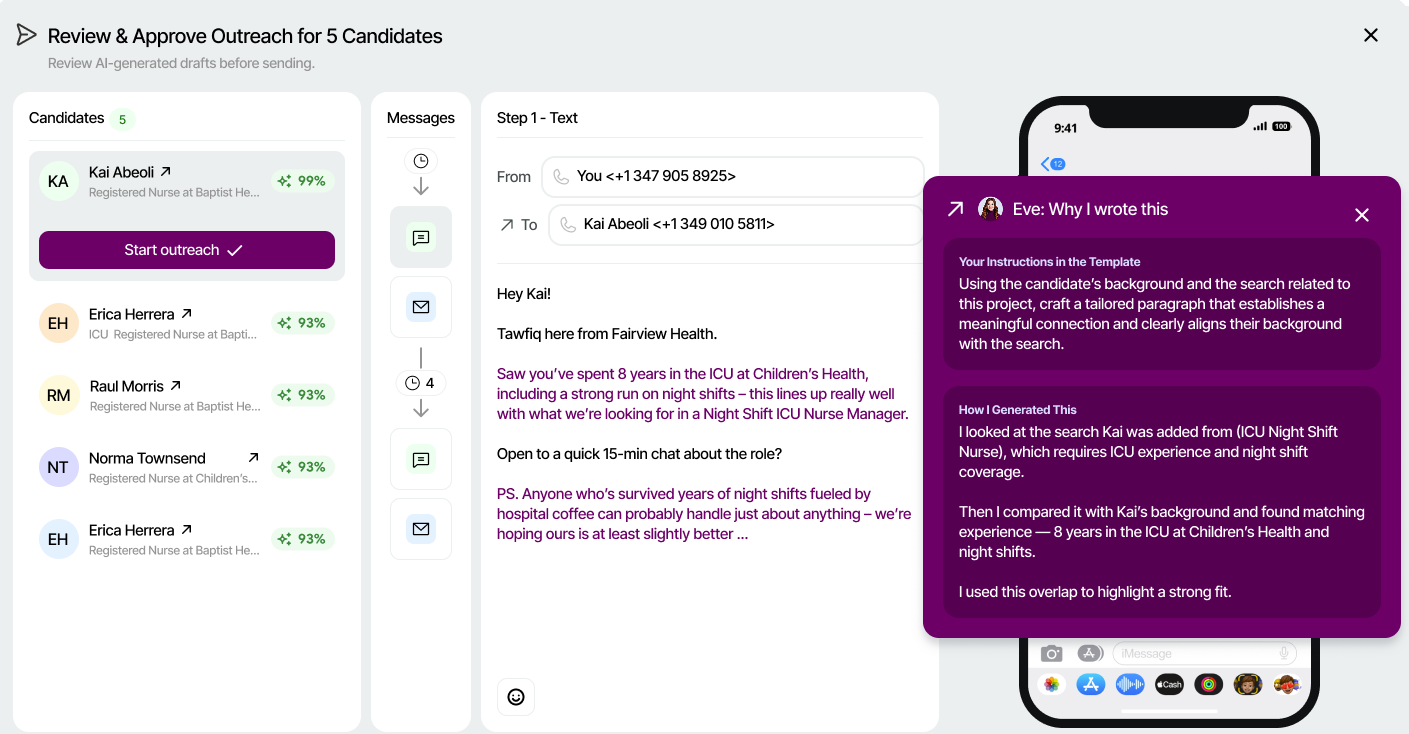
The platform's strongest capability is candidate rediscovery. Instead of relying on keyword searches and filters, recruiters can search using natural language while the AI evaluates resumes, licenses, previous applications, referrals, hiring event participation, and other structured and unstructured candidate data. We also liked that the platform explains why each candidate is a match instead of simply assigning a score, giving recruiters the context they need to validate recommendations rather than treating AI results as a black box.
Hellora handles the profile enrichment using public licensing databases and updates from its healthcare network (with candidate permission), helping you keep your talent databases more current. Once suitable candidates are identified, recruiters can launch AI-assisted email and SMS campaigns with personalized messaging that remains fully editable before being sent.
In terms of communication, we found value in the platform's ability to facilitate outreach via recruiters’ existing Outlook and Gmail accounts. By avoiding secondary domains, the CRM makes the engagement more personalized.
We also found that the platform is most differentiated during candidate sourcing and re-engagement. Beyond that, the CRM is still evolving. For example, native interview scheduling isn't available yet, candidate profiles don't currently consolidate interactions such as phone calls and Zoom meetings, and much of the relationship management centers on outreach campaigns rather than maintaining a richer, long-term engagement history. The product team shared that several of these capabilities are already on the roadmap.
Ultimately, healthcare providers looking to reactivate existing pools of U.S. healthcare talent will likely get more value from the platform's domain-specific intelligence than they would from a general-purpose recruiting CRM. Organizations hiring across multiple industries or internationally, however, may find that focus too limiting, though we are told several still opt to use the tool for its forward-looking AI capabilities and robustness.
Fairview Health, BrightSpring Health Services, BJC Health System, Children's Hospital Los Angeles, Compassus Home Health, Children's Health, PetVet, VHC Healthcare.
Custom.
Best For
U.S.-based healthcare organizations managing thousands of employees and substantial candidate databases.

Recruiterflow
If you find Bullhorn too expensive, Recruiterflow can be a great alternative. This recruitment CRM software is cheaper, super easy to use, and has one of the best talent nurture automation features in the space.
PROS
- Multi-channel engagement via email, SMS and calls with Twilio integration
- Auto data enrichment with LinkedIn and Gmail integration
- Advanced Boolean search for precise candidate targeting
- Intuitive enough for non-tech-savvy recruiters
- Candidate engagement efforts are possible via email, SMS campaigns, and phone calls (Twilio integration required).
- Auto data enrichment capabilities with LinkedIn and Gmail integration.
- Advanced Boolean search for precise candidate targeting.
- Easy to use for non-tech-savvy recruiters.
CONS
- No native mobile app, PWA only
- Occasional glitches during application setup
- Automatic profile enrichment excluded from Base plan
- Most automation features locked behind Advanced plan
- No native mobile app is currently available, only a PWA.
- Some minor glitches with the application setup process.
- Automatic profile enrichment is not included in the Base plan.
- Most automation features are only available in the Advanced plan.

Recruiterflow is like a Bullhorn version yet made for smaller staffing agencies—it doesn't have all the bells and whistles of a custom plan, but it's way cheaper and, from my experience, easier to work with.
I’ve tested and am pleased with the platform’s Advanced Search. This feature supports Boolean, radius search (with Google Maps integration behind the scenes), and custom filters. You can (and definitely should) combine that with the system's engagement features, as this will give you a powerful combo to one: segment your talent database into smaller communities and two: nurture these communities with email sequences that resonate and go out at the right time.
Another thing I like about using Recruiterflow is its "Recipes" feature. Think about how much time you could save by automating actions like auto-adding candidates who haven't heard from you in 90 days to your nurturing campaign. Or, you could set a rule so that an email introducing new placements lands in the inboxes of vetted candidates who weren't picked by clients each month. Very cool, isn’t it?
There’s no denying this platform is user-friendly, but the Help Center content is not as detailed as what I've seen from other vendors like Manatal. Some of the features also seem to arrive much later than what their competitors have. For example, they didn't even have star-rating candidate profiles until June 2024. However, I'm happy to share that they've recently added AI candidate matching. It felt like quite the wait, but thankfully, it’s been well worth it.
1,000+ recruitment firms, including RepVue, Total Aviation Staffing, and Johnson Search Group.
Recruiterflow pricing is between $85 and $99 per user per month for the base plan, depending on whether you pay annually or monthly. There is also a free trial with no credit card info required.
Best For
Recruiting and staffing agencies looking for an affordable, user-friendly solution to manage and nurture their talent pools.

Crelate
Testing Crelate and it became apparent to me that this CRM tool has one of the best search features. It’s not only robust but super flexible. You can perform quick, fast searches, more complicated ones, and even filter within a specific email campaign.
PROS
- Supports quick lookup, full-text search, Boolean logic, and custom filters.
- Ability to add unique Boolean groupings within the filters and columns within Search.
- Engagement channels available via email, phone, and SMS.
- Supports quick lookup, full-text search, Boolean logic, and custom filters.
- Ability to add unique Boolean groupings within the filters and columns within Search.
- Engagement channels available via email, phone, and SMS.
CONS
- No free plan is available, though a free trial is offered.
- Interface is quite dated and less user-friendly compared to competitors.
- Contact data enrichment is an add-on (read: cost extra).
- No free plan or free trial.
- Interface is quite dated and less user-friendly compared to competitors.
- Contact data enrichment is an add-on (read: cost extra).

Crelate's UI is not my cup of tea as compared to competitors, it looks rather old-fashioned and complicated. But when I tried this platform’s search feature, it was a whole different story. The Search isn’t just robust but also super flexible. For starters, you can choose which quick-filter tiles—those at the top of the dashboard that let you turn different filters on and off—you want to see on this view.
Functionality-wise, this feature enables you to search and filter through your resumes, notes, and tags. Like most recruiting CRM I’ve picked on this page, Crelate also let me do both simple, quick lookups and Boolean logic for more complex queries. Something unique about this feature that you probably won’t find elsewhere is the ability to search and filter at the campaign level. I can actually use criteria like status and date range to narrow down my search results within a specific campaign. How cool is that?
I like the efficiency of Crelate’s profile enrichment tool—it alone can auto-collect several essential talent data points, from phone numbers to email addresses and new employers. Yet, the way it’s marketed is kind of disappointing. Unlike many others that allow most users to have this feature for free, with Crelate, you’ll have to buy it as an add-on to be able to use it.
If you're looking for a corporate-focused solution with great mobile apps, I don’t think you should go with this tool, either. Crelate has always focused on staffing agencies, and its mobile apps don't offer as many features as the browser version.
1,700+ recruitment agencies, including RedfoxTM, Ambassador Search Group, and Extra Effort Solutions, Inc.
Crelate has three plans: Essential ($85 per user per month), Business ($119 per user per month), Business Plus (custom pricing), and Enterprise plan (custom pricing).
Best For
Mid-size recruiting firms and staffing agencies.
I used Crelate daily during the demo period as we evaluated new ATS/CRM systems. This was for a recruitment consulting and agency setup. I used the software extensively for a project, including job postings, the client portal, and ATS functionality. I also used the onboarding suite to help the client manage new hires.
- This product has versatile features that are helpful for any recruiting project.
- The platform supports all full-desk recruitment functions effectively.
- The interface and design are user-friendly.
We worked with Crelate when we were looking for a new ATS/CRM solution. We needed a high-capability software platform with a wide range of options. We were taking on a large staffing project in the medical field and required a versatile product to support our clients.
We were also performing HR consulting functions and onboarding for other companies. Crelate was able to address all of our needs effectively.
- Crelate requires a minimum of five active seats.
- The cost could be more economical for smaller-scale projects.
- Although customer service is responsive, the implementation and demo process is somewhat complicated, and you must work with a representative instead of starting a trial directly from their website.
Crelate is a strong tool for recruiting. It suits recruiting consultancies, staffing agencies, and internal corporate recruitment teams. Crelate offers suitable options for a variety of recruiting business needs.
Consider the size of the project you will be working on. If the project or hiring team has fewer than five people, this software may not be a practical choice, since it requires a minimum of five seats for a subscription. Evaluate the add-on features you may need, such as onboarding and background checks.
Crelate does a good job of implementing updates and considering user feedback to improve the platform. The interface is solid, and they regularly add new features.
Crelate suits a variety of organizations. I used this software at a recruiting consultancy agency, and it was an excellent platform for that purpose. Its features also make it a good fit for internal recruitment teams and staffing agencies.
Crelate is not suitable for small recruiting projects or small companies. It is also not recommended for hiring projects that lack a dedicated recruiter or recruitment team.
Key Features to Look for in a Recruitment CRM
When researching the best CRM software for recruiting, you may find that some fall short in one or a few of the following five, but offer something else as an alternative. I wouldn't recommend going for such tools, though. In my experience, while some features may seem attractive at first, talent database, engagement, workflow automation, reporting, and integrations are truly the core ones that one will regret treating as add-ons.
- Candidate database: To build and maintain good candidate relationships, you need a solid candidate database. To be considered solid, this feature should: 1) be a central hub for candidate information and 2) have a user-friendly interface, be it accessing the talent pool in a mobile app, automatically sourcing candidates with pre-defined and custom criteria, enriching profiles with a click on a button or via a Chrome extension, syncing data between the CRM and ATS, or removing any duplicate entries.
- Communication management: A strong candidate database won't be much use if you don't have the right tools to communicate with your contacts effectively. In-house tools like branding, engagement templates, landing pages for lead capture, interview scheduling, and social media marketing are worth exploring, as they help ensure you engage with top talent in the best way possible.
- Workflow automation: To effectively engage with your talent pool, you'll need suitable content for each drip campaign or audience segment. Doing all of these manually can take several hours a day. Plus, timing matters, especially when your candidates are from multiple time zones. Top recruitment CRM software, via personalization, segmentation, and automation, can lighten the load and help you reach and follow up with candidates with the right message and at the right time.
- Analytics and reporting: Don't underestimate the power of using data to improve your recruitment efforts. You can't create an engagement strategy that works for every type of candidate you have, but with the help of the right system, you can easily sort and mine data, track conversions and sources in real-time, and identify trends and patterns to adjust your engagements in ways that work for most of your talent pool.
- Integration capabilities: From messy and scattered talent data to a slow hiring process and ineffective communication, a standalone candidate management system can really mess up your recruitment efforts. On the other hand, a collaborative CRM offers intuitive integrations with job boards, your Outlook/Gmail, HRIS, ATS, onboarding tools, and other HR and recruiting systems your team uses, whether native or via Zapier. This, in turn, streamlines and tidies up the entire data synchronization process across all your platforms[1].
Benefits of Using a Recruiting CRM Software
Key benefits a top candidate relationship management tool can bring to your organization include talent pooling, enhanced candidate experience, and recruitment efficiency, and better data-informed hiring decisions
- Talent pool nurturing: One of the best things about using a recruitment CRM is its capability to manage and nurture talent for both current and future hiring needs. With the application of AI in recruitment tech, you can expect top-notch CRM solutions to engage talent more efficiently without compromising quality.
- Better candidate experience: Getting SMS/emails about job postings that really match what they are looking for in their career change, being able to apply straight from their phones, and getting timely updates on their application progress—these are some of the perks a user-friendly recruiting CRM platform can offer to make your candidate job search easier and more personalized.
- Recruiting efficiency boost: Most talent CRM platforms today come with recruitment process automation, AI-driven features, and integration capabilities. Choosing a good one means you won't have to spend hours each day manually searching for potential candidate profiles and reaching out to them one by one. You can also automate talent nurturing and be confident that the CRM will keep all your talent data synced across your HR systems.
- More data-driven decisions: Recruitment solutions, including the CRM category, have become a lot smarter over the past few years. Besides the ability to produce customizable reports, these platforms can now offer real-time HR analytics to help users detect when a passive candidate is open to a job opportunity, which position you’re hiring for may interest them, and even what message will really grab their attention[2]—all to help you make good, informed decisions when engaging with talent.
CRM vs. ATS: How These Two Differ
The core difference between a recruiting CRM and an ATS lies in their focus. CRM focuses on building and maintaining candidate relationships for long-term engagement, while ATS is specifically tailored to manage the application process and workflow for open positions within the organization. These two recruiting platforms can be used independently or integrated to optimize the entire recruitment process.
However, a trend we’re seeing is that the line between these two types of recruitment software is becoming blurred, with more vendors striving to make their product a complete, end-to-end solution by integrating a CRM into their core ATS or vice versa.
For instance, Greenhouse introduced its CRM 5 years after its ATS product (and has since made some acquisitions to enhance this new offering), while platforms like Manatal and Zoho Recruit launched both their ATS and CRM at around the same time when they entered the market. Or more recently, Gem, a household name in talent sourcing tools, launched its ATS, built on the solid foundation of its CRM software.

Who Recruiting CRM is Not for
Recruiting CRM software may not be ideal if you need to hire only occasionally, for gig roles, or if you experience high turnover.
- The hiring need is short-term: Since recruiting CRM software is meant for long-term talent management, investing in it for short-term needs won’t be the best use of your resources. Teaming up with staffing and recruitment agencies that specialize in filling short-term placements might make a lot more sense to you.
- Your team relies heavily on gig workers: As recruitment CRM is more geared toward full-time hires, you likely won’t find this tool suitable in this case, either. Instead, you might want to use freelancer management systems like Upwork or Fiverr for project-based work and job advertising platforms that focus on gig roles.
- Your recruitment team faces high turnover: Constantly training new TAs and recruiters doesn't just take up a lot of time and money. It can also lead to messy data entry and inconsistent use of recruiting CRM software. In this situation, it's really important to focus on keeping your recruitment teams happy and motivated above everything else.
Recruitment CRM Best Practices
A recruitment CRM solution is for teams that want to manage candidate data and nurture their talent database over time but don’t necessarily want to sacrifice lots of time and effort for manual, complicated data hygiene and engagement setups. Retail recruiting, DEI recruiting, and manufacturing recruiting are among the top use cases for recruiting CRM systems.
- Retail Recruiting[3]: For retailers looking to enhance the shopping experience during the holiday season, recruiting CRM software can greatly help with creating career pages and lead capture forms in-store to connect with potential part-time staff. Given students make up a fair share of social media platform users, retailers can also use the CRM to run email, SMS, and social media campaigns that deliver job openings and product promotions to the right audience.
- Diversity Hiring: Recruiting CRM platforms can help employers practice DEI recruitment through targeted, multi-channel recruitment marketing. With advanced search and an organized database, you can identify specific talent communities and then use personalized emails, landing pages, and social media to engage these diverse talent groups. Further, these software solutions can assist you in identifying recruitment strategies and sources that have brought in high-quality, diverse employees.
- Manufacturing Recruitment: Open house events and connections with local colleges and apprenticeship programs can help get future workers interested in manufacturing careers, and a recruitment CRM system is an excellent tool for storing and keeping these contacts engaged. By syncing their existing HRIS/HCM/HRMS and career fair platforms to the recruiting CRM, these businesses can also cultivate talent pools of internal prospects, set up career expos, and run nurture programs to encourage relocation, all to meet staffing needs for their facilities.
How Much Does Recruiting CRM Software Cost?
Recruiting CRM pricing varies and depends on factors such as the number of users, active jobs, feature sets, and customer support. Most providers offer subscription-based models, with pricing typically ranging from $15 to $129 per user per month. Some providers may also offer custom enterprise pricing plans for larger organizations.
Below is a comparison table of top recruiting CRM software prices.
Best CRM for Staffing Agencies
Here are some top candidate relationship management tools for staffing firms:
- Bullhorn: A household name in the recruitment staffing software space, highly customized automation for re-engaging candidates in your ATS.
- Recruiterflow: A very intuitive CRM option with excellent talent nurture automation capabilities.
- Recruit CRM: Perfect for small and midsize staffing agencies, this tool is very well priced and constantly expanding its CRM feature list.
FAQs
What is a CRM in recruitment?
Holm (2012) noted digital recruitment made candidate communication central, calling it “candidate relationship management.” In practice, recruiting CRM is a tech category that provides pipeline management, automated campaigns, and talent segmentation. These tools focus on the pre-application phase, building awareness, interest, and engagement with passive candidates[4].
How do organizations use CRM for recruiting?
Organizations across industries mainly use recruitment CRM software to build lasting relationships with potential talent via frequent outreach, check-ins, and nurturing campaigns. More recently, as this solution has evolved to include ATS features, more companies are leveraging it to track candidates, run employee referrals, and perform resume parsing. The goal is to consolidate all recruitment activities into a single, user-friendly dashboard for easy management.
How does recruitment CRM work?
The recruiting CRM process involves capturing relevant information about potential candidates to understand their career aspirations and expectations. It involves all the steps that an employer or a staffing agency takes to build long-lasting candidate relationships. Depending on each vendor, it may also encompass all the touchpoints in a candidate's lifecycle—from outreach to job application and onboarding.
What is the best Recruitment CRM software for small businesses?
The following are some free and cheap recruitment CRM platforms SMBs can consider:
- Manatal: Starts at $15 per user per month, billed annually. 14-day free trial available.
- Recruit CRM: Starts at $49 per user per month, billed annually. Free trial available.
- Zoho Recruit: Starts at $25 per user per month, billed annually. Free plan available.
Are there any free recruiting CRM systems?
Yes, they are, though not many. Recruit CRM, Zoho Recruit, and Giig each have a free version you can use for as long as you want, while vendors like Manatal give you free access to their recruitment CRM features for a limited period. Also, if you don’t mind a bit of workaround, the popular customer relationship management tool HubSpot is free to use and can function as a pretty good CRM for recruitment purposes.
Was It Worth Your Time?
Choosing the perfect recruiting CRM software can be quite a task, especially if you're just diving into this area. I hope this guide has given you all the insights you need to make the right call.
Before we wrap up, anything you wish I had covered here? Reach out here or LinkedIn me—you’re doing me a huge favor by keeping the guide as helpful and on-point as possible.
References
[1] Tuttle, L., & Critchlow, K. (2025). Digital transformation in talent acquisition: Modern approaches to recruitment and selection. International Journal of Research in Human Resource Management, 7(1), 351-357
[2] Vats, P., & Kumar, A. (2024). Digital Marketing Skills in HR: Bridging the Gap for Effective Talent Acquisition. Library of Progress-Library Science, Information Technology & Computer, 44(3), 19752.
[3] Nguyen, THA., 5 Strategies for Meeting the Challenges of Retail Recruitment
[4] Specchia, A., Zamparelli, S., & Horvath, E. APPLICANT RELATIONSHIP MANAGEMENT: A RELATIONAL PARADIGM FOR TALENT ACQUISITION.
About the Author


About Us
- Our goal at SSR is to help HR and recruiting teams to find and buy the right software for their needs.
- Our site is free to use as some vendors will pay us for web traffic.
- SSR lists all companies we feel are top vendors - not just those who pay us - in our comprehensive directories full of the advice needed to make the right purchase decision for your HR team.


