

10+ Best Onboarding Software for New Hires in 2026
Fact-based employee onboarding software reviews from SSR experts plus insights from thought leaders and everyday users to make the most out of your onboarding tool.









Achieving business success starts with your people — but not just what they bring to the table. How you welcome and engage them so they stay focused and produce their best work can make or break your company’s ability to grow for the long term. It’s no surprise then that companies and hiring managers are building formal onboarding processes (from the software tools listed below to simple gifts send to new employees) to welcome and train new hires — and that they’re using employee onboarding software to automate these processes.
With the best employee onboarding software, you can make a new hire feel welcomed even before they start, set them up for success in their new roles, and empower them to give their all every day. Not only that, you’ll prevent them from wanting to leave. In fact, new hires are 58% more likely to be at the company three years later if they went through an onboarding program.
As you likely know, employee turnover can wreak havoc on your company’s productivity and recruiting costs. So it goes without saying that having a formal employee onboarding process is critical. In this guide, we break down everything you need to know about the top onboarding software providers so you can empower new hires before they even start, create high-growth teams, and save yourself a lot of time and money in the process.
To choose the best employee onboarding software, we’ve booked demos with several vendors, sought the expertise of HR tech leaders, did independent tests, and chatted with other end users. The features we think make the biggest difference for employee onboarding software are ease of use, customizability, feedback collection, and reporting and analytics.
- Ease of use: The best employee onboarding systems integrate new hires into your company quickly and smoothly, helping them access the relevant paperwork, e-sign documents, become familiar with your company’s policies, and more. Accessibility on mobile devices is also important, so extra points were given to platforms that enable employees to complete tasks on-the-go.
- Customizability: We’ve looked for employee onboarding software with customizable workflows, allowing your HR team to tailor the onboarding process according to various job roles and departments. The majority of these tools also allow you to customize and deliver training materials and courses that’ll acquaint new hires with your company's mission, goals, and how their role fits in the bigger picture.
- Feedback collection, reporting, and analytics: We know that listening to what your employees have to say about your onboarding process is key to making it better, so we’ve looked for tools that support feedback collection and analysis, either through built-in capabilities or integration. The tools on this list also have robust reporting capabilities, helping you track various onboarding metrics including completion time and rate.
We only recommend the best products in a given category. For more information on how we evaluate and select those products, check out our editorial guidelines.



Freshservice

For teams requiring tight integration between employee onboarding and IT and Enterprise Service Management, we highly recommend Freshservice. Its Journeys enable organizations to orchestrate structured, role-based onboarding across IT and business teams, whereas tools like ticket-driven workflows, identity orchestration, business systems, and employee lifecycle automation are great for structured, process-heavy environments.
PROS
- Cross-department orchestration coordinates tasks across IT, HR, Facilities, Legal, Finance, and other teams within a single structured workflow.
- Employee lifecycle automation standardizes and simplifies onboarding, offboarding, and internal transitions.
- Cross-system integrations orchestrate actions across HR platforms, identity providers, and business applications.
- Users can customize journeys with configurable workflows, tailoring paths by department, role, or region.
- Provides end-to-end tracking of tasks, stakeholders, and progress across complex lifecycle processes.
- Freddy AI can answer employee questions instantly inside Slack or Microsoft Teams.
- Service workflows can coordinate HR, IT, Finance, and Legal tasks in one place.
- Workspaces allow departments to operate independently while sharing the same platform.
- Strong automation tools like Journeys simplify complex employee transitions, such as onboarding or relocations.
- AI can search knowledge sources like Confluence, SharePoint, and Google Drive.
- Dashboards provide clear visibility into unresolved requests and operational bottlenecks.
- Freshservice integrates well with your HR tech stack, offering out-of-the-box integrations with Workday, BambooHR, Oracle HCM, and SAP SuccessFactors, and several others.
CONS
- Onboarding requests can only be initiated via the support portal, not directly from the agent view.
- Approval reassignment isn’t supported; requests must be canceled and recreated if a manager changes.
- Freshservice controls access to sensitive onboarding files through roles and permissions, but encrypted storage for those documents is not yet available.
- Agent-based pricing can add up quickly for larger service teams.
- The platform still feels like a service desk tool first, which may not match every HR team’s workflow.
- Some advanced automation and orchestration capabilities require higher-tier plans.
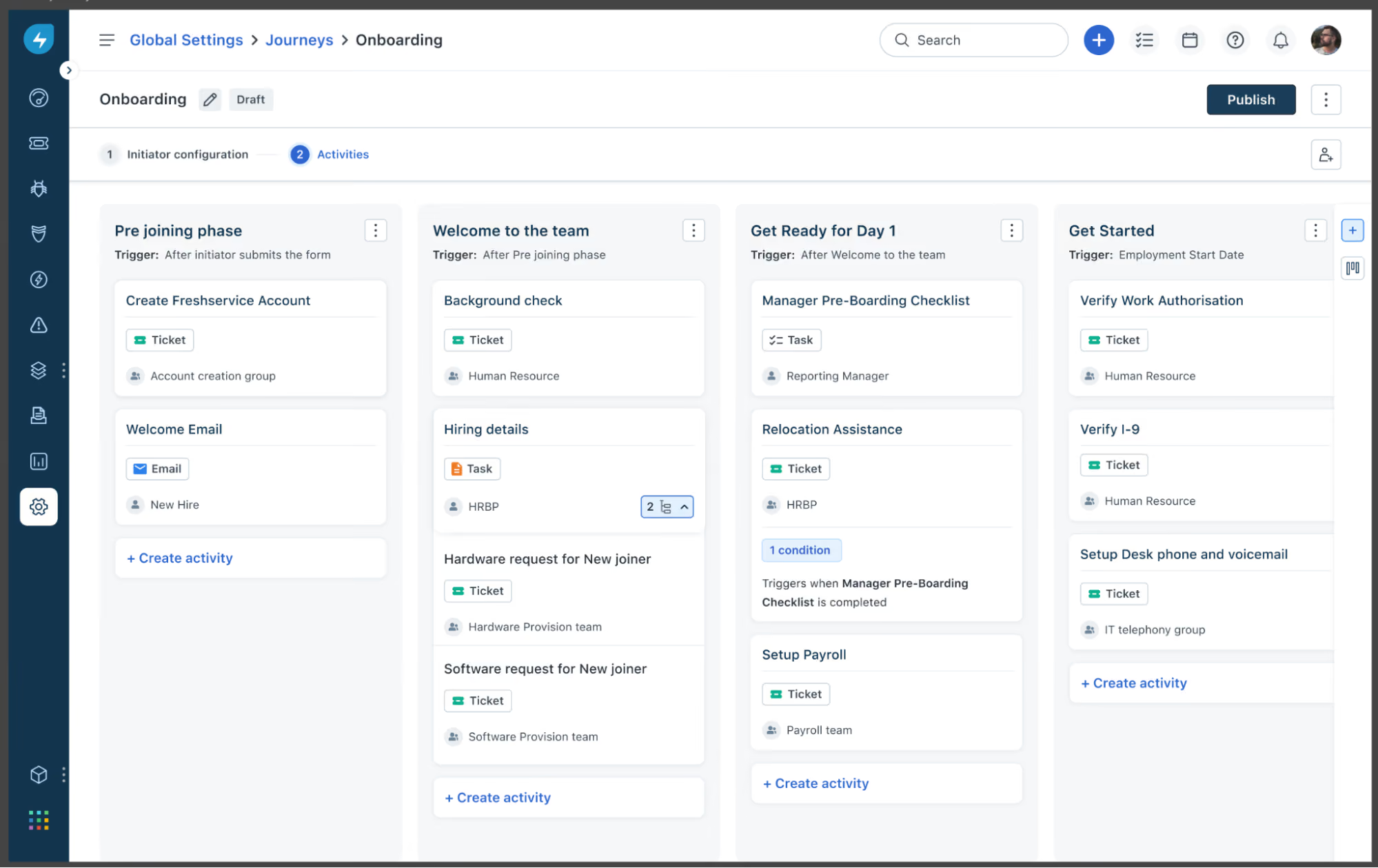
Freshservice approaches employee onboarding from a service management perspective, and that became even clearer to us after reviewing their latest Journeys capability. Launched in 2025, Journeys replaces Freshservice’s previous onboarding module for new customers and expands the platform’s focus from simple onboarding checklists to full employee lifecycle workflows.
Instead of treating onboarding as a single HR process, Freshservice positions it as a cross-department workflow that can involve HR, IT, Finance, Legal, Facilities, and other operational teams. That orientation makes sense for organizations where onboarding includes provisioning accounts, assigning equipment, collecting documentation, and coordinating approvals across multiple departments.
What stood out most to us was how much more customizable this feels than the older onboarding experience. Journeys supports multiple activity types, including emails, tickets, plain tasks, and form-based tasks. Teams can also personalize emails with placeholders, pass selected journey data into tickets for context, and let new hires complete assigned tasks before they even receive a company email address through a tokenized guest portal.
We also appreciate how service items can now be tied directly into a workflow. In the demo, a stakeholder selected software and hardware preferences inside a form task, and Freshservice automatically created child tickets for fulfillment in the right workspace. That is a smart improvement for organizations that want to standardize provisioning without asking HR or hiring managers to manually open follow-up requests. The system also gives journey owners a useful runtime view, with statuses, due dates, logs, and activity-level progress in one place.
That said, Freshservice still feels more operational than employee-experience-led. Even with Journeys, onboarding begins from the support portal, which may feel natural for service teams but less so for HR teams that primarily live in an HRIS. The product is clearly strongest when onboarding is treated as a coordinated service workflow, not as a culture-first welcome experience.
Freshservice does restrict access to sensitive onboarding documents, but according to the demo, they do not yet offer the added reassurance of encrypted document storage for this use case. In practical terms, that means access can be tightly limited, but HR teams handling highly confidential employee records may want stronger built-in document security.
Finally, the platform’s service-desk DNA still shows up in practical ways. Approval reassignment remains rigid in the older onboarding flow, and highly HR-specific teams may still find the overall experience more ticket-centric than they want. Even so, the new Journeys capability makes Freshservice more compelling than before for companies that need onboarding to coordinate multiple departments, conditional workflows, and fulfillment tasks at scale.
74,000+ companies, including Databricks, University of Oxford, RingCentral, and Marvel.
Freshservice Employee Onboarding is part of the Freshservice for Business Teams Pro plan at $49/agent/month (billed annually). The plan includes a Service Catalog, Journeys, Workflow Automator, reporting, compliance, and project management. Optional add-ons include Freddy AI Copilot and e-signatures. A 14-day free trial is offered.

Best For
IT-centric organizations, particularly those that already use Freshworks for service management.


We use Freshservice to request services from IT support personnel. I am in recruiting, and when I hire someone I also launch a new ticket which goes to both my onboarding team and the IT team, asking them to do their respective parts to get the employee started. This is a way to keep us all informed and on time with regards to critical requests like these.

It keeps us organized, accountable on timelines, records every submission or edit, which helps us continue to look at our operational processes and make sure they work for everyone involved. When they don't, we're able to use the data of our own activity to make changes and pivot.
We were using Slack messages as a ticketing system for IT requests, and to plan for new employees that would be onboarded. We were also only using email tickets (we would email IT@shift.com, for example, to request personal help with IT related issues). Communication requests/tickets would get lost chronically and we all had enough. Since we started using Freshservice last year, it allowed us to request service (from IT or Onboarding) and even report issues for our own IT needs.
There are other solutions out there that do a better job at organizing tickets, Jira for example.
Freshservice has been good in helping us stay more organized, respond in a way that gives many people simultaneous visibility. That said, Jira is more comprehensive; it has a knowledge base, ticketing, and project planning tools. It's literally everything we need and it turned out to be cheaper than the multiple other systems we have so as a company, we're talking about phasing out Freshservice.
Cost, labor to get it up and running and then continuously running correctly - that takes time! Also, people should think about who they want to have visibility and actions in Freshservice for various scenarios. FS is really good at that.
I would say small startup type companies like ours was/is where the environment is very scrappy and everyone likes to have insight and visibility so we can continue to discuss operational efficiencies.
Very large, non-technical companies.

Connecteam
Connecteam streamlines employee onboarding with mobile accessibility, user-friendly course creation, and centralized learning materials. Its micro training units, compliance tracking, and always-on access ensure faster training, increased productivity, and a consistently skilled workforce, all while saving time and resources.
PROS
- Connecteam offers a user-friendly platform that's mobile-oriented for deskless employees.
- Comprehensive feature set including team management, communication, training, and engagement.
- Transparent pricing across all plans and there’s a free-forever plan for small businesses.
- 14-day trial offered without requiring a credit card.
- One of the only fully-mobile HR tech tools for deskless workers
- Very adequately-priced for all it entails, SMB-friendly
- Quite open to feedback, having implemented user suggestions as features in the past.
CONS
- Initial learning curve can still be experienced due to the abundance of features available.
- Certain crucial features are restricted to higher-priced plans.
- Some users reported customization limitations, such as the inability to create shared document folders for onboarding and having to assign documents to specific employees instead.
- In the communication hub, the app offers no confirmation that messages were sent and/or seen.
- Certain features that some teams consider essential, such as GPS-tracking, are only available in the higher-tier pricing plans.
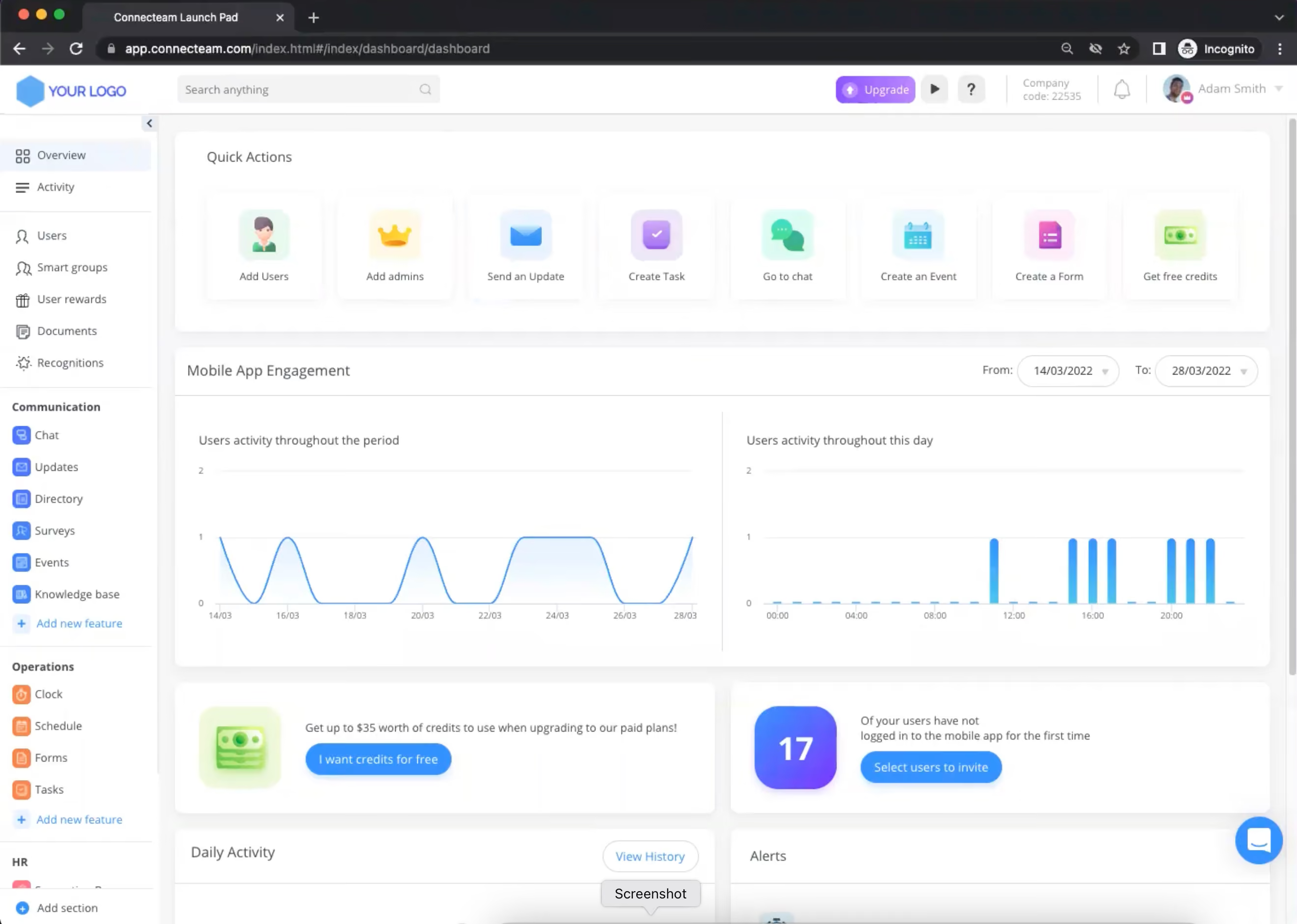
Connecteam offers a host of specialized tools that support the onboarding and training of deskless workers. The platform stood out for us for its mobile-first approach, which allows employees to access and complete training courses from anywhere, at any time. This flexibility is especially valuable for frontline teams who may not always have access to a computer.
Among the things we liked about it is its user-friendly course creation tools. Businesses can easily create and share their own educational materials, eliminating the need for expensive third-party content. The platform also offers a variety of pre-made courses and templates, saving time and resources on research and content creation. These courses are based on best practices and micro-learning principles, ensuring that employees receive engaging and effective training.
Connecteam centralizes all learning materials into one digital space, making it easy for employees to access the information they need. The platform's microtraining units allow for shorter learning times, while always-on access accelerates time to competence. This means that employees can get trained faster and remain productive, even as they continue to learn and grow within the company.
Compliance is another area where Connecteam shines. The platform ensures that everyone is trained consistently with one unified program, and makes it easy to revise content to align staff on new policies and procedures. Progress monitoring and follow-up features help ensure completion, while a detailed record of all mandatory training keeps the company covered.
Sodexo, Subway, Hilton, Chick-Fil-A, and Foot Locker
The onboarding features, including training courses, can be accessed through Connecteam’s HR & Skills hub. The pricing for this hub is as follows:
- The Small Business Plan: Free forever for up to 10 users.
- Basic: $29 per month for the first 30 users and $0.5 per month for each additional user.
- Advanced: $49 per month for the first 30 users and $1.5 per month for each additional user.
- Expert: $99 per month for the first 30 users and $3 per month for each additional user.
Best For
Connecteam’s platform is highly scalable, and its plans suit the needs of most businesses, regardless of size and industry.

I track my employees' clock-ins and clock-outs, ensuring they are accurately clocked in at the correct locations and jobsites. Employees forget to clock in often, and checking live data makes correcting this in real time very easy.
The geofencing feature on Connecteam helps with employee accountability. I also like using the Quick Tasks feature for setting up benefit milestones for new hires. It's easy to overlook a 90-day review or PTO deposit, but Quick Tasks helps me stay organized.

I like that Connecteam makes communication easy for our team. PTO requests go straight to the manager, and the forms are easy to use. I appreciate how user-friendly the app is. Some of my staff are older, but the app’s ease of use makes training simple.
Shift Requests are a convenient way for employees to request overtime, and this feature has helped us save money on overtime.
We decided to use Connecteam to track employee timesheets and their PTO. We were having trouble managing timesheets and vacation approvals previously. Connecteam has helped us save on overtime expenses. It has also improved transparency on available PTO for our employees. I have used Connecteam for 8 months.
The company setup and onboarding on Connecteam were difficult. The built-in AI chatbot helped me get through the process, but it could have been easier.
I wish Connecteam integrated with QuickBooks, which is where I run my payroll. It would be helpful if I could download my timesheet data into QuickBooks.
I also wish Connecteam had more reporting features.
Connecteam stood out from its competitors. We use their free version for 10 employees or fewer, which was a major selling point to upper management. None of the competition offers a free version.
If you have 10 employees or fewer, this is a great platform to explore. Connecteam includes everything you need for job scheduling, timesheet tracking, and PTO management.
I haven't noticed many changes since starting in January. I also haven't had any needs that the platform doesn't already meet.
Any business with multiple employees, multiple schedules, or benefits to manage will find Connecteam helpful.
For small companies that are only managing one schedule or have just a couple of employees, Connecteam may offer more than they need.

Rippling
Rippling can not only handle onboarding but payroll, benefits, and HR for both US-based and global businesses. The platform has extensive integrations, an intuitive UI, and multiple modules to be purchased jointly or separately. Rippling is found most helpful for fast-growing teams with under 2,000 employees.
PROS
- Rippling provides employees with a self-service portal for digital onboarding.
- Automated onboarding surveys.
- US payroll includes I-9s and W-2s, built-in auto-warnings to prevent businesses from violating state laws and regulations.
- Global payroll works for both employees and hourly workers.
- Can connect with 500+ apps.
- Built-in compliance training for employees and managers.
- Has a mobile app.
- Ability to purchase modules separately or as a full suite.
- All-in-one platform for employee management + PEO services offered, and even a suite of other IT products
- With 500 integrations, it’s very likely that they integrate with other key tools from your tech stack.
- Operates globally with any currency
- Workflow automation
- Analytics opportunities
- Provides a holistic view of company outflows—headcount costs included
CONS
- Payment is available via direct deposit or check only.
- No free trial.
- Phone support is a paid add-on.
- Not the best bet for teams with 2,000+ employees.
- Limited features on the mobile app compared to the web browser version.
- Total buy-in to Rippling is essential
- Very SMB-oriented, in case you’re a larger company.
- New features tend to be buggy in ways that tech teams are not accustomed to fixing

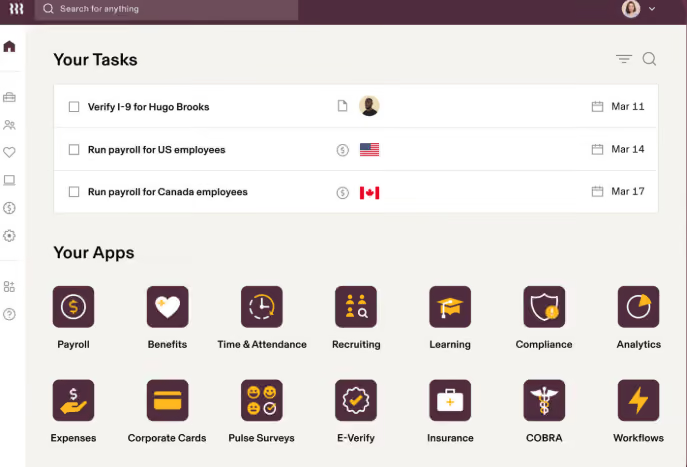
Rippling is renowned for its comprehensive payroll and HR features, particularly among fast-growing teams. While employee onboarding is not a standalone tool, it is included in the Rippling Unity module, which offers automation, documentation, and a workforce directory.
We are impressed by Rippling's lifecycle automation within the Unity product. It encompasses onboarding, payroll, benefits, training, and offboarding, accessible via web browsers and mobile devices. The platform provides a pre-built library for custom workflows, surveys, and HR documents, expediting the setup process. The automation capabilities allow us to tailor onboarding workflows and collect feedback automatically from new hires.
Employee self-service is facilitated through Rippling's benefits administration module. It allows employees to view and update payroll, benefits, and documents directly in the portal. Mobile access to compliance training courses is also available. However, the choice of withdrawal methods is limited to direct deposit or check, and the mobile app can be sluggish at times, affecting certain features like receipt scanning and paystub access.
Vox, Maximum Games, Superhuman, Compass Coffee, Highnoon.
Rippling pricing starts at $8 per employee per month. Get in touch with Sales for more details.
Best For
Rippling is most useful for growing teams that have fewer than 2,000 employees. It can work for US-based, international, remote, and office-based organizations.

The first function we transitioned into Rippling was our payroll administration. Rippling provides scheduling and timekeeping management tools, something that is not always a feature with other payroll administration systems (e.g., Gusto).
It's nice to have scheduling, timekeeping, and payroll together because they all have an impact on each other, and keeping it all in one system made things efficient and reduced errors.
We also moved our benefits management tasks into Rippling. We also used the financial features like expense management and travel stipends.
- How many features are offered within the system
- The automations that occur between different functions and departments, e.g., new hire triggers that get sent out to all departments to complete their new hire tasks.
- Errors went to almost zero within payroll due to how easy the scheduling, timekeeping, and payroll processes are within Rippling.
Our business was growing and we were looking to combine and streamline several of our functions. We had been looking into HRIS options but we really liked the idea of HR, IT, and Finance all being connected in a single system with Rippling.
We now can handle expense reports, payroll, benefit administration, travel stipends, and device management in one place. We saved time by not having to re-enter information into several different systems. We truly enjoyed how streamlined everything felt with Rippling.
- The price is very steep in order to access all of the features we truly needed
- Our salesperson promised we would have great customer service, but after we signed the contract, it was almost impossible to reach someone. Also, we never had anyone consistent to work with us.
- There was a very big learning curve and it required a lot of staff training.
It connects scheduling, timekeeping, and payroll together, which is sometimes not the case with other payroll admin systems like Gusto. Also, the user experience is much easier with Rippling compared to something like ADP or Workday, which are clunky and corporate feeling.
Think through what offerings are actually needed, because adding on categories like finance and IT makes this software very expensive. I think Rippling is best for businesses around 50-1,500 employees, and if your company is poised for growth, I suggest adopting Rippling sooner rather than later!
Over time, Rippling has really boomed into a larger company that seems to fit well with both small and larger sized businesses. Initially, it felt like it was a small to mid-sized business solution.
I think Rippling can be great for a small but growing business. It also can handle businesses with 1,500-2,000 staff very easily! It's great for a variety of industries as well.
It would be too costly for a business with less than 50 employees who do not plan on adding staff in the near future.
Companies that just need payroll administration assistance could benefit from shopping around for other solutions at a better price.
Also, any company that needs extensive help with adopting this should consider an alternative solution, as Rippling truly doesn't provide that level of attention and hand-holding.

Whale
We found Whale a highly effective onboarding tool for growing teams, especially those prioritizing consistency, clear documentation, and role-specific training. The platform’s AI-powered automation and interactive learning features make it engaging for new hires, while its strong support framework ensures teams are set up for success.
PROS
- Automates role-based training for efficient and tailored onboarding.
- Engages new hires with AI-generated quizzes and gamified badges.
- Offers intuitive process documentation tools, including step-by-step guides and a step recorder.
- Scalable pricing, with a free plan for small teams and affordable options for mid-sized businesses.
- Strong implementation support, including a four-week onboarding framework guided by a Customer Success team.
- Automates role-based training for efficient and tailored onboarding.
- Engages new hires with AI-generated quizzes and gamified badges.
- Offers intuitive process documentation tools, including step-by-step guides and a step recorder.
- Scalable pricing, with a free plan for small teams and affordable options for mid-sized businesses.
- Strong implementation support, including a four-week onboarding framework guided by a Customer Success team.
CONS
- Limited customization options in the content editor.
- Best suited for mid-sized and scaling companies, less ideal for very small teams who lack well-defined onboarding processes.
- Relies heavily on structured workflows, which may not suit informal or dynamic teams.
- Pricing can become expensive for larger organizations with many users.
- Limited customization options in the content editor.
- Best suited for mid-sized and scaling companies, less ideal for very small teams who lack well-defined onboarding processes.
- Relies heavily on structured workflows, which may not suit informal or dynamic teams.
- Pricing can become expensive for larger organizations with many users.
If you’re a growing company ready to invest in structured onboarding, we think Whale is absolutely worth considering. It’s a tool designed to make onboarding efficient, organized, and tailored, and we found plenty to like about how it delivers on these promises.
One of the main reasons for our recommendation is how well Whale handles role-based training automation. As part of our testing, we set up onboarding for a sales team and assigned specific training modules based on their roles. The platform smoothly tailored training paths for new hires so everyone received exactly what they needed without having to sift through irrelevant material. For teams with limited HR resources or those looking to streamline their onboarding process, this level of automation can be a huge lifesaver, we’d imagine.

Another feature we thought was great was the platform’s use of AI to enhance learning. We tested the AI-generated quizzes and badges, which added an engaging, gamified element to the onboarding experience. For example, after completing a training module on customer handling, the system generated a quick quiz to reinforce key points, rewarding high scores with badges. This approach made learning interactive and fun— a refreshing touch for what is often considered a tedious process.
Teams wanting consistency in their training materials will love Whale’s focus on process documentation. The ability to create step-by-step guides and standard operating procedures felt intuitive and effective. During our test, we used the step recorder to capture a guide for using a CRM system. The result was a readily shareable, easy-to-follow document that we’d imagine new employees would find helpful.
In terms of pricing, Whale’s model starts at $99 for 10 users—quite accessible for most businesses looking to standardize their onboarding process affordably. Plus, if you’re a smaller team with fewer than five users, you can get started for free, no strings attached.
On the customer service front: our experience was quite positive. During our free plan trial, Whale’s support rep guided us through a four-week kick-off process, helping us create thematic structures, onboard users, and document workflows.
That said, the content editor was one of the first limitations we noticed about the onboarding tech. While functional, it lacks advanced customization options, which could be frustrating if you need highly personalized onboarding materials tailored to your brand or industry.
Additionally, though Whale does offer a free plan for teams of five or fewer, we believe the software works best for larger teams, ideally with 25+ employees and scaling. In our tech tests, we noticed that features like the step recorder are most valuable for ones with well-defined processes already in place. Smaller organizations or those without structured workflows might find Whale’s robust framework an overkill instead.
The number of customers is not disclosed, but our research indicates that most are small and midsized teams based in the U.S. and Europe. Notable clients include Oxygen Service Company, RIHM, Theiner ICT, Image Solutions, SJA Solutions, and Posternock Apell.
Whale is free for small teams, starting with documentation and knowledge sharing. The Scale plan costs $99 for up to 10 users, with an additional fee of $10 per month for each extra user. Enterprise pricing is available on request.
Best For
Whale’s employee onboarding software works best for growing businesses, especially those that prioritize consistency, clear documentation, and role-specific training.

Leapsome
More than a basic task tracker, Leapsome helps your new hires integrate both culturally and productively right from the start, using structured checklists, embedded surveys, learning resources, and real-time praise features.
PROS
- Onboarding workflows can be fully customized, scheduled, and triggered by employee attributes.
- Preboarding steps supported, including document upload, policy sign-off, and profile setup.
- Feedback and praise tools help reinforce early wins and promote belonging.
- Surveys, probation check-ins, and goal-setting can be linked directly to onboarding flows.
- Smart automations include reminders for new hires and nudges for managers.
- Built-in learning module allows for task-based learning paths during onboarding.
- Leapsome is quite feature-rich; the platform packs modules for employee onboarding, learning management, engagement, performance management, goals tracking and much more.
- The majority of users find Leapsome’s UI to be friendly and easy to navigate.
- There are lots of third party integrations options to choose from, including Slack, which many users appreciate.
- The platform has transparent pricing, and you only pay for the modules you need.
CONS
- All contracts are for a minimum of one year.
- Customer support requires a minimum annual spend of $6,000.
- The price is no longer publicly available.
- There is currently no way to post or upload an image or file into your feedback.
- Since Leapsome can do so many things, you may need some time to get used to it. The implementation process can also take some time.
- There currently isn’t a mobile app that users can download and access Leapsome quickly on-the-go.
- Free 14-day trials are available but you need to book a demo with the sales team first to sign up for one; you can’t do so on your own.
When we trialed Leapsome’s onboarding functionality, what stood out immediately was how much more it offered than just assigning tasks or sending welcome emails.
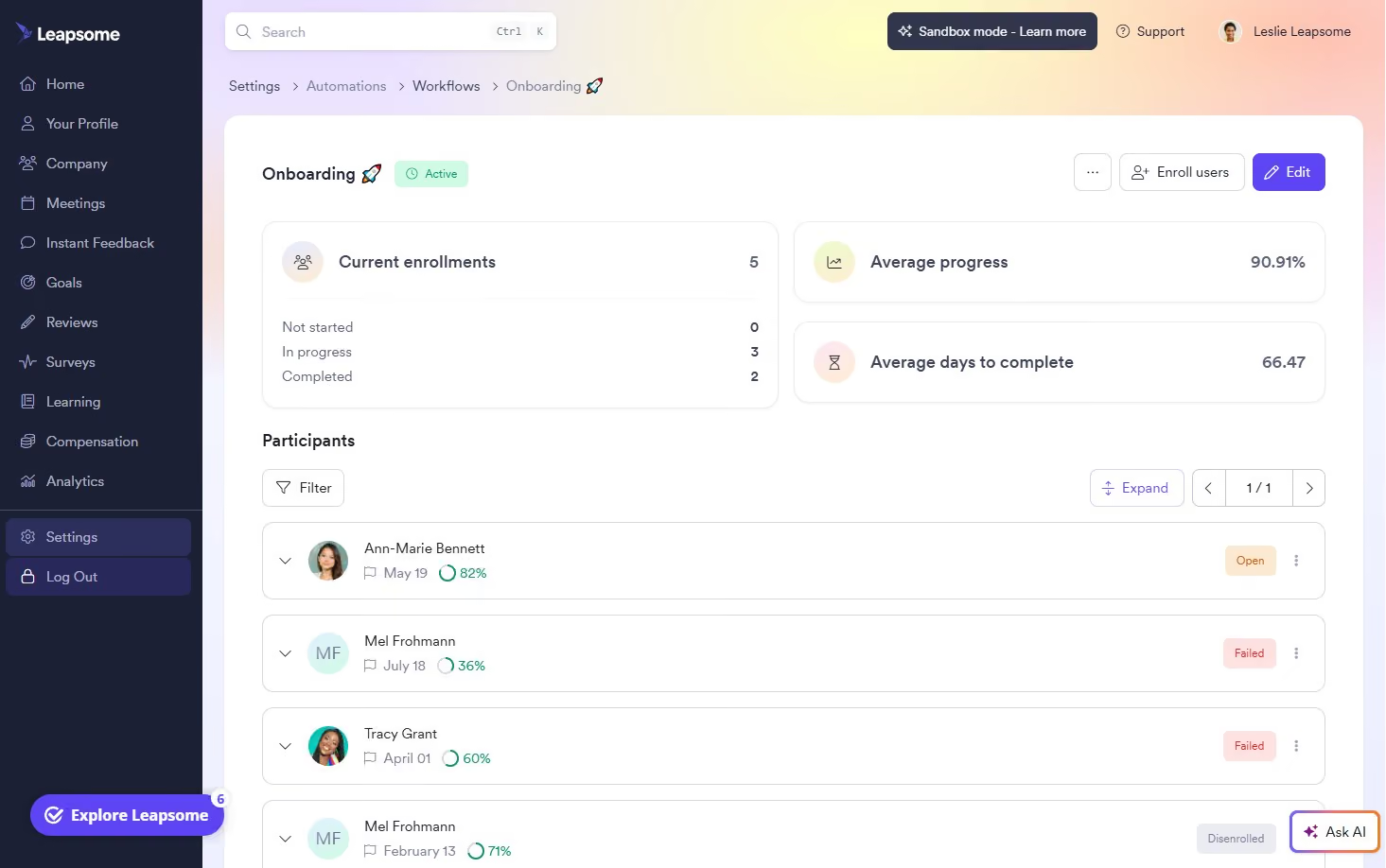
You can build out onboarding and even preboarding workflows that launch automatically based on any employee detail, like job title, location, or start date. The flexibility here is impressive: flows can include document uploads, policy acknowledgments, profile setup, training tasks, and probation check-ins. You can even schedule nudges and reminders for incomplete steps, and escalate overdue items to managers if needed.
But what we really liked was how Leapsome ties onboarding into performance and culture-building right from the start. Managers can give public praise to new hires using custom badges like “Team Player” or “Time Management.” That praise shows up in a Slack channel or on the in-office Praise Wall. New employees also get exposed early to team meetings with shared agendas, goal-setting check-ins, and feedback tools. It’s a thoughtful way to create early momentum, especially for remote or hybrid teams.
For adoption, Leapsome supports workflow-based nudges like the “New Joiner Awareness Journey,” which sends weekly onboarding tips during the first 30 days. Employees are prompted to explore their profiles, join team meetings, and offer praise to colleagues to help them engage with company culture.
That said, all Leapsome plans require a one-year contract, so you’ll want to be confident it fits your needs. Dedicated customer success support is available only to customers spending at least $6,000 annually, which may be a stretch for smaller companies looking to activate just one or two modules.
Even with those limitations, we think Leapsome hits a rare balance: it brings structure and heart to the onboarding experience. For SMBs that care about creating lasting first impressions and want to make feedback, recognition, and alignment part of the new hire journey, this one is a sound option worth considering.
1,500+ companies, including DrFirst, Bob W, and Jina AI.
Leapsome pricing is custom.
Best For
(Global) SMBs that want onboarding to extend beyond operations and into engagement, feedback, and retention.

BambooHR
BambooHR helps you save countless hours in onboarding. It comes with customizable pre-boarding packages, built-in e-signatures, onboarding process templates, and automated messaging to help new hires through onboarding tasks.
PROS
- Flexible packaging and custom pricing: you can add features as needed to your base plan
- Customizable checklists for the onboarding process
- Centralized information repository, good tool for optimized document organization
- Automate workflows and set up reminders for efficient task management
- Easy to use
- Flexible packaging and custom pricing is the way they roll. You can pick out one or two packages and pick other modules as add-ons based on your needs.
- Very simple and straightforward tool, easy to use.
CONS
- For advanced onboarding workflows, customization may be limited.
- Companies outside the United States might find it too U.S.-centric. For example, payroll is only available for U.S.-based employees, and customer support is only offered during U.S. business hours.
- Certain components like time tracking, performance management, and surveys are only available as add-ons.
- Payroll is only available for US-based employees
- Customer support is only offered during US business hours.
- Some modules like time tracking, performance management, and surveys are only available as add-ons.

For years, BambooHR has stood out for covering the complete employee lifecycle, encompassing core HRMS functions like recruiting and performance management. We’ve always found their design intuitive and easy to use, which helps explain why they remain one of the top names in HR software.
Onboarding features are limited to specific plans, so teams who are looking for this feature a la carte should look elsewhere. However, Bamboo is a great choice for teams in the market for or open to adopting an HR suite of user-friendly tools designed to streamline processes, optimize efficiency, and foster employee engagement.
Among the 34,000+ companies that use BambooHR, you’d find names like Quora, Universal Group, Reddit, Asana, Change.org, University of Maryland, Grammarly, Stance, Postmates, Wistia, the Jacksonville Jaguars, and ZipRecruiter.
BambooHR's employee onboarding tool is available across its three per-employee, per-month pricing tiers:
- Core ($10): Includes essential HR functions (records, hiring, onboarding, time off, compliance).
- Pro ($17): Adds performance and engagement tools to Core features.
- Elite ($25): Pro features plus compensation management, advanced analytics, and premium services.
Best For
BambooHR is a good bet for organizations seeking a customizable HR solution offering flexible pricing. It’s popular among teams embracing partial or complete remote work arrangements.

I use BambooHR daily as the central hub for all people operations. Most frequently, I manage employee records, onboarding workflows, and performance review cycles, ensuring that data stays consistent across teams.
I also use it to track time-off requests, run reports on headcount and turnover, and pull analytics for leadership dashboards.
The self-service features have been especially valuable for empowering employees to update their information, access pay details, and manage leave without HR intervention.
Overall, BambooHR has streamlined HR workflows, reduced manual work, and provided reliable insights that support strategic decision-making.
- Intuitive interface: BambooHR is extremely user-friendly, making it easy for both HR teams and employees to navigate without constant training.
- All-in-one functionality: It consolidates core HR workflows—like onboarding, time-off tracking, and performance management—into one seamless platform.
- Insightful analytics: The reporting and dashboard features provide quick, actionable insights into turnover, engagement, and workforce trends.
- Employee self-service: I appreciate that employees can update their own information and request leave directly, reducing administrative bottlenecks.
We purchased this tool to centralize and modernize our HR operations, which were previously spread across spreadsheets and disconnected tools. We needed a solution that could simplify employee data management, onboarding, performance tracking, and time-off workflows in one intuitive platform.
The key benefit we’ve experienced is how user-friendly it is for both HR teams and employees—automating administrative tasks, improving accuracy, and freeing up time for strategic work.
Its reporting and analytics features also make it easier to present insights to leadership for decision-making.
I’ve used BambooHR for over three years, and it has consistently improved transparency, engagement, and efficiency across HR processes.
- Limited customization: Some workflows and reports have rigid templates, which can make it difficult to tailor dashboards or fields to complex organizational needs.
- Performance management module: While functional, it lacks the depth and flexibility of dedicated performance tools—especially around goal alignment and continuous feedback.
- Integration gaps: Certain integrations with payroll or ATS systems require manual syncing or third-party connectors, which can slow down automation.
- Mobile app limitations: The mobile experience could be more robust, particularly for managers approving requests or viewing reports on the go.
BambooHR stands out for its simplicity, flexibility, and user experience. Compared to larger systems like Workday or SuccessFactors, it’s far more intuitive and easier to implement, especially for mid-sized organizations.
It balances strong core HR functions—like onboarding, time-off, and performance tracking—without overwhelming users with complexity.
While it may lack some advanced analytics or global compliance features found in enterprise tools, its clean interface, customizable modules, and reliable support make it a top choice for teams prioritizing efficiency over complexity.
When buying an HRIS like BambooHR, focus on ease of use, since adoption by managers and employees determines long-term success.
Evaluate the tool’s scalability and integrations to ensure it grows with your organization and connects smoothly with payroll, ATS, and benefits systems.
Reporting and analytics should also be a key factor—good insights drive better people decisions.
Finally, assess customer support and implementation timelines, as responsive service can make or break the onboarding experience.
BambooHR has evolved from a simple employee database into a comprehensive people platform. It now includes advanced features like AI-powered insights, benchmark reporting, and integrations for time tracking and benefits management.
Over time, the tool has focused on improving automation, analytics, and user experience, making it more strategic and scalable for growing organizations.
BambooHR is best suited for small to mid-sized organizations that want an intuitive, all-in-one HR platform without the complexity of enterprise systems.
BambooHR may not be the best fit for large, global enterprises with highly complex structures, advanced compliance needs, or custom integrations across multiple regions.
.png)
Deel
What sealed the deal for us in recommending Deel in this guide is its flexibility and its focus on remote teams. Deel Hire supports various types of international workers, offers multiple modules you can purchase individually, and lets you onboard new hires directly in Slack.
PROS
- Supports different types of workers, including EOR hires, salaried employees, and independent contractors.
- Bulk upload worker information available for mass onboarding.
- Option to onboard a new hire within Slack (via a plugin).
- Compatible with 96 HR and recruiting systems, including popular accounting, ATS, and remote workforce management software.
- Excellent 24/7 customer service with fast onboarding (2-3 days) and local payroll experts in each jurisdiction.
- Seamless integration with platforms like QuickBooks, BambooHR, and Greenhouse, plus custom integration options.
- User-friendly, self-service features enable quick setup; identity verification often takes under 24 hours.
- Automated invoices simplify payments, provided they're in English.
CONS
- The tool cannot be purchased separately; it’s accessible only as part of Deel HR.
- Not the best money spent for teams with only locally hired employees.
- Key features like onboarding automation are add-ons, which may increase costs.
- Limited flexibility in modifying contracts or service agreements; changes often require an addendum.
- Invoices cannot be generated in languages other than English.
As a distributed team, we have a special appreciation for Deel's completely remote-friendlyonboarding tool. It caters to pretty much any hiring need you might have: EOR workers, PEO hires, full-time salaried employees, or even independent contractors. And more importantly, the tool does so nicely, with transparency and flexibility as highlights.
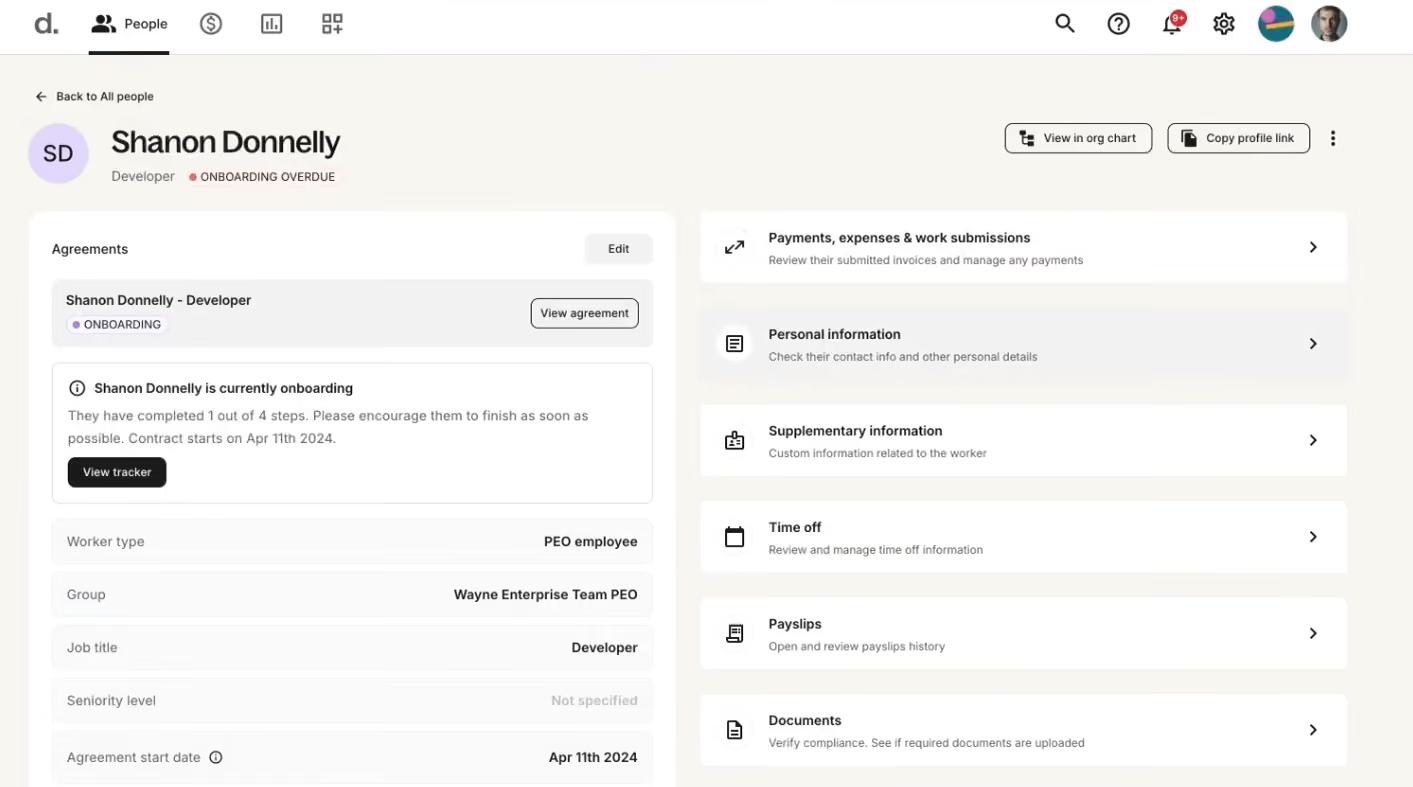
When we logged into Deel with an employer account, we were greeted right away with the onboarding progress of all our workers. We could instantly see who was missing what from their checklists (see screenshot). It makes it so easy to stay on top of the onboarding status and spot areas where we should simplify to better the new hire experience.
Digging deeper into the app, the level of transparency Deel provided users truly stood out to us. With a click on a worker, we could view more detailed information about how they were in their onboarding checklist: what's been done and what's still pending. And if it looked like they needed a nudge to finish up their tasks, sending them a reminder was just a button click away.
The Onboarding by Deel plugin is such a convenient tool. After we set up workflows for each department and location, the plugin automatically segmented and sent onboarding notifications and reminders directly to new hires through Slack. We could even monitor everyone's progress without leaving the comms app.

We wish this tool were more approachable, though. Under the current pricing structure, the onboarding tool is included in Deel’s broader modules. So, even if you’re willing to pay for this tool separately, that's not an option.
Also, if your team is fully locally hired and you don’t plan to hire employees or contractors from other countries, check out our reviews of Eloomi and ClearCo above— they could be a much better fit for you.
40,000+ companies, including OpenAI, Zapier, and LEGO.
Deel's onboarding integrates across several modules: Deel Hire (via Employer of Record, starting at $599/month, or US PEO, starting at $125/month) and Deel IT (via Deel IT module, starting at $45/month, or Platform, starting at $10/month).
Best For
Organizations seeking to recruit or currently employing workers and independent contractors globally.

From an HR perspective, it's like moving from chaos to calm.
- Empowerment: The platform feels like a strategic partner, allowing us to focus on what truly matters in HR.
- Single Source of Data: Deel serves as a central hub for employee data—eliminating the need to open multiple sheets to gather information such as periods, employee records, and performance. It’s professional, organized, and aligned with leadership needs.
- Confidence: Deel provides a sense of relief and assurance. As an HR professional, I don’t need to worry about international labor laws, especially during onboarding processes.
- Deel supports faster growth by minimizing legal risk and enabling lean, efficient HR operations.
- For C-level leaders, it’s a strategic solution that supports the achievement of company goals.
- It reduces waiting time for global expansion efforts.
- Its easy access to data helps predict trends, analyze scenarios, and support timely decision-making.
Our organization was struggling with complex HR processes such as recruitment, onboarding, and paying international contractor employees while ensuring compliance with each country’s labor laws.
After implementing Deel, a key improvement has been the consolidation of our entire international workforce management into one tool.
This is a fully automated platform, which eliminates the need for manual administrative tasks.
With the full interface in place, the platform ensures compliance with labor laws in every region. Deel allows our HR teams to focus on strategic work instead of administrative activities.
- Report customization is limited. While the data exists, additional work is needed—such as pivoting—to extract certain valuable insights.
- It currently works only on PC and lacks a mobile-friendly version, unlike other apps.
- It can be expensive for smaller startups.
- Deel’s support channels are primarily AI bots, which can delay urgent responses when quick answers are needed.
- Deel offers greater flexibility in currencies and allows contractors to choose their payment methods.
- It has better infrastructure and operates in over 100 countries.
- It provides a unified dashboard for managing and viewing data.
For HR teams, focus on integration, compliance, and risk mitigation. For the IT team, consider pricing, especially if it comes from the IT budget, and whether the platform offers strong global support.
Deel has evolved from a payroll solution to an all-in-one infrastructure. It now includes robust IT equipment and can scale into an HRIS for both global and domestic teams. Recently, it has introduced AI support to assist with in-process tasks.
Deel is well-suited for tech startups and software development companies, especially those with more than 50 employees.
Deel may not be ideal for domestic small businesses with limited budgets.

Trainual
Trainual accelerates employee onboarding like nothing else. All you have to do is document your onboarding process and leave the hard work of repeating and scaling up to Trainual.
PROS
CONS

As you may have guessed from the name, Trainual is generally focused on the learning that happens within your organization. And, one of the key ways they help employees learn is during onboarding. Their platform will allow your employees to learn and reference the core processes that will be essential to their role.
Trainual is used by the UPS Store, Stanford University, Design Pickle, RE/MAX, and Harmon Brothers.
Trainual's pricing starts at $99/month, billed annually, with the Pro plan. If more features are needed, as well as phone support and personalized coaching, the Premium Plan is $149 per month. Both of them include the first 25 users.
Best For
Small, medium, large businesses, and enterprises looking for an all-in-one solution for training, onboarding, and process documentation.

Trainual helped our small organization improve the efficiency and effectiveness of our training and onboarding processes. It reduced the time and resources required to manage them. This platform standardized our training process and ensures that all employees receive the same training materials, regardless of their location or role in the organization. With Trainual, we automated many of the administrative tasks associated with onboarding new employees, such as sending welcome emails, setting up accounts, and assigning training modules. Trainual allows us to create our own training materials to fit our organization's needs and culture.
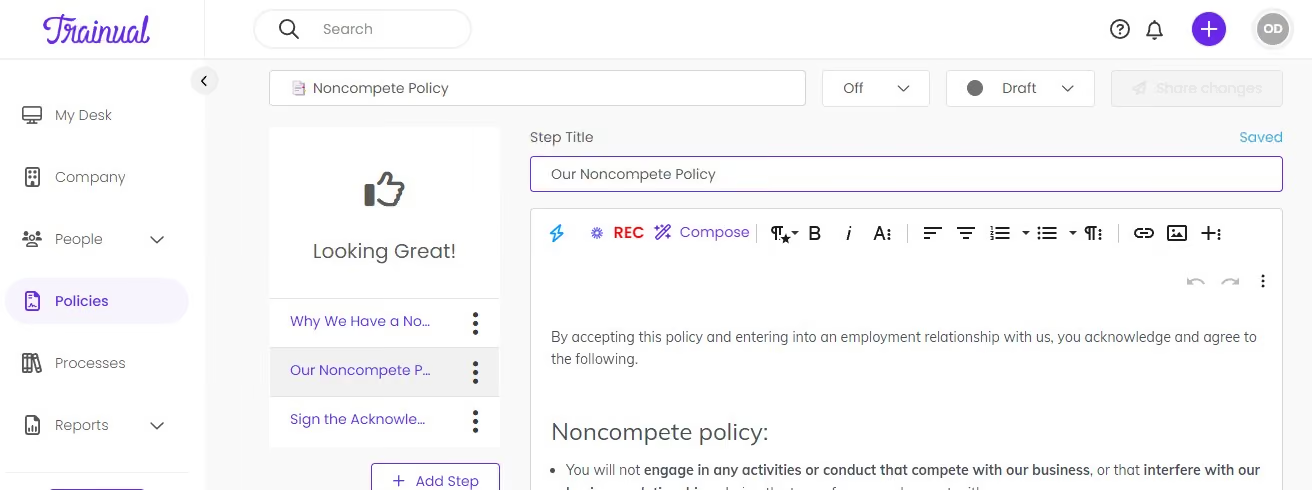
- Analytics and insights are the number one pro for us. Trainual provides detailed analytics and reporting features that can help us track employee progress, identify knowledge gaps, and measure the effectiveness of our training programs.
- Efficiency is the other pro. By automating many of the administrative tasks associated with training and onboarding, Trainual helped us save time and resources. This freed up our HR to focus on more strategic initiatives.
- Building engaging policies and employee handbooks right there on the platform. There is no limit to your creativity here. It is a fun way to deliver the employee handbook to new hires.
My small organization was looking to reduce spend as well as condense the growing number of third-party vendors we used to run our operations. It became increasingly hard to keep track of log-ins for different tools and websites. We were struggling to find a one-stop-shop solution for onboarding and training our new employees and we heard that Trainual can offer a solution to our problem. We have been using this tool for 6 months now and couldn't be happier.
- While Trainual does offer some integrations with other software platforms, such as Slack and Google Drive, the number of integrations available is limited compared to other training platforms.
- The minimum number of users/seats is 10 so if you have less than 10 employees in your company you may be overpaying.
- There is only a 7-day trial which may not be enough to fully understand if Trainual can give you what your organization is looking for.
Trainual focuses on small to medium organizations while most of the other training platforms are targeting large corporations.
It allows you to pay monthly while you are learning the ropes and figuring out your needs. It also includes a range of automation features that can help streamline the training and onboarding process, such as automated reminders, progress tracking, and the ability to assign training modules based on employee roles.
- First, consider the specific features that are most important to your organization. For example, do you need a platform that can automate onboarding tasks, provide detailed analytics and reporting, or allow for customization of training materials? Or do you need a platform that already offers ready-to-use training materials?
- Consider whether the platform can integrate with other software tools that your organization uses, such as HRIS software or communication tools like Google Meet or Microsoft Teams.
- Consider the cost of the platform, as well as any additional fees for implementation, support, or upgrades. Make sure the cost aligns with your budget and the value you expect to receive from the platform. How many employees do you have? Is your company planning to grow in the future? Can this platform accommodate the growth and how will the cost increase?
- Consider the level of customer support offered by the platform, such as training resources, technical support, and a user community.
I have not used it long enough to see major changes.
Startups, small to medium sized companies and growing organizations, especially ones with remote teams.
- Business with less than 10 people that is not planning to grow.
- Trainual may not be the best fit for very large enterprises with complex training needs, as the platform's features and scalability may be more limited compared to more robust enterprise-level solutions.
- Organizations that don't prioritize training.

Remote
Remote handles onboarding for hires employed through its EOR or added to its global payroll, covering employees and contractors in over 100 countries. Sending, filing, signing, and storing documents is paperless and mobile-friendly.
PROS
- As an owned-entity provider, Remote offers a lean onboarding process without the worries of IP and data passing to third parties.
- Employee self-service options.
- iOS and Android apps with self-onboarding for employees.
- Responsive customer service available via live chat and email.
- Regional global employment resources are easily accessible.
- Equity-based compensation option.
- Fast and compliant payroll in 170+ countries.
- Live chat support with local payroll experts.
- Flexible, localized benefit packages.
- Flat-rate pricing structure, no deposits or hidden fees.
- Mobile app streamlines expense reimbursement with autofill from receipt photos.
CONS
- Remote doesn’t offer a free plan or free trial.
- The platform doesn’t provide phone support.
- No features to support employee feedback for the onboarding process. (currently on the vendor’s roadmap)
- Doesn’t have a free trial.
- Redundant for organizations solely recruiting within the U.S.
- Help center documentation isn’t easiest to understand.
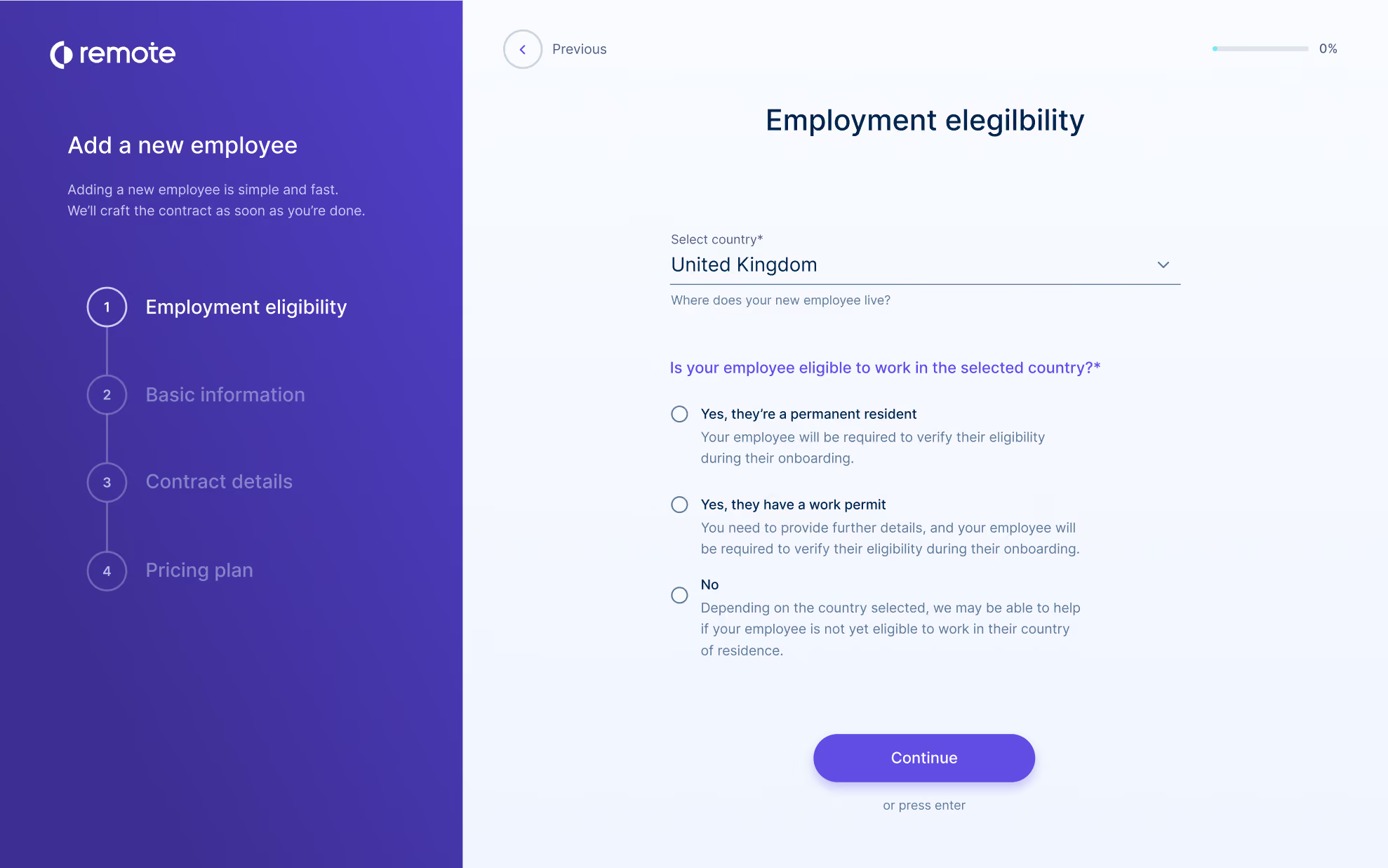
Remote is a great platform for companies that plan to hire and onboard a substantial number of international employees in the near future.
They have built a reputation with their flat-rate, straightforward global payroll, but their onboarding features are also top-notch. Their platform handles payroll, onboarding, taxes, benefits, and more – all with compliance and IP protection in mind.
One particularly appealing feature is the availability of experts in each region they operate. Sometimes, only a local will do this when it comes to the complex standards and customs of local laws and practices, and they have assured that resource is available to their customers by offering local support in each of the 60+ countries in which they operate. According to our research, the majority of Remote users who contacted these local experts for support were pleased with the service. Users also had positive feedback about Remote’s technical support.
Remote can be a sound option for effective global onboarding, whether you want to establish a new branch or employ one person in a different country. It has a dedicated self-service portal to keep workers connected. It provides robust data protection and security.
However, businesses looking for features like employee training or pre-built integrations won’t find Remote helpful, as the tool isn’t a training-focused onboarding platform, and rather than offering a range of native integration options, it provides customers with free custom API.
Arduino, GitLab, Paystack, Loom, cargo.one, Secureframe, Phaidra.
The onboarding features are included within Remote’s HRIS, which costs $12 per employee per month when billed annually.
Best For
Remote is a good fit for globally distributed teams looking to hire, pay, onboard, and retain international talent with country-custom benefits, seamless onboarding experience, and payroll.

Remote is used by our firm to hire in locations like South Africa, Colombia and Brazil. We are able to use Remote as the Employer of Record and offer benefits just like they worked directly for our firm. You queue up the hire, Remote makes the offer in their system and makes all the employee information available via web portal. All expenses, benefits info, etc. can be accessed any time.
- Easy Onboarding - Remote does make onboarding hires in remote locations quite easy.
- Online Portal - great to have all the hires from all international locations in one place.
- Expenses - easy for employees and companies to track/pay expenses.
With a shortage of talent in the U.S., our firm needed to hire in locations where we did not have an entity. Global EORs offer a way to do that without setting up a legal entity first. Remote was an up-and-coming player in the space that made getting setup much faster, less complex than traditional partners like Velocity Global. We have used the system for approximately 2 years now.
- Billing/Invoicing - Remote has had multiple billing errors in our invoices and their system is incredibly confusing for reconciling what is outstanding vs. the errors they have made.
- Management - Remote has changed management recently and they have changed terms & conditions from our original invoices and have taken away promotions by saying they were "introductory promotions" rather than the "negotiated terms" like we originally discussed.
Remote was a leader in simplicity when we first began using their services a couple of years ago. Now, I believe certain competitors have caught up and surpassed them.
- Cash flow - these services require upfront payment for payroll so be prepared to pay month end payroll by the 17th of that month.
- Terminating employees - Employment laws vary country by country. Remote is offering a service to make it easier on your company to hire elsewhere; however, terminating employees can be quite difficult.
Remote was very startup friendly 2 years ago. Their management has changed and their culture has changed drastically. It is no longer a customer-focused culture going above and beyond to win customers.
Remote is good for an established company in search of a way to explore hiring people in other regions of the world.
Remote is not good for startups.

Enboarder
Enboarder digitizes your onboarding process and makes it more personalized. It facilitates communication between your existing team and new hires to guide them through the transition and make them feel welcome.
PROS
CONS
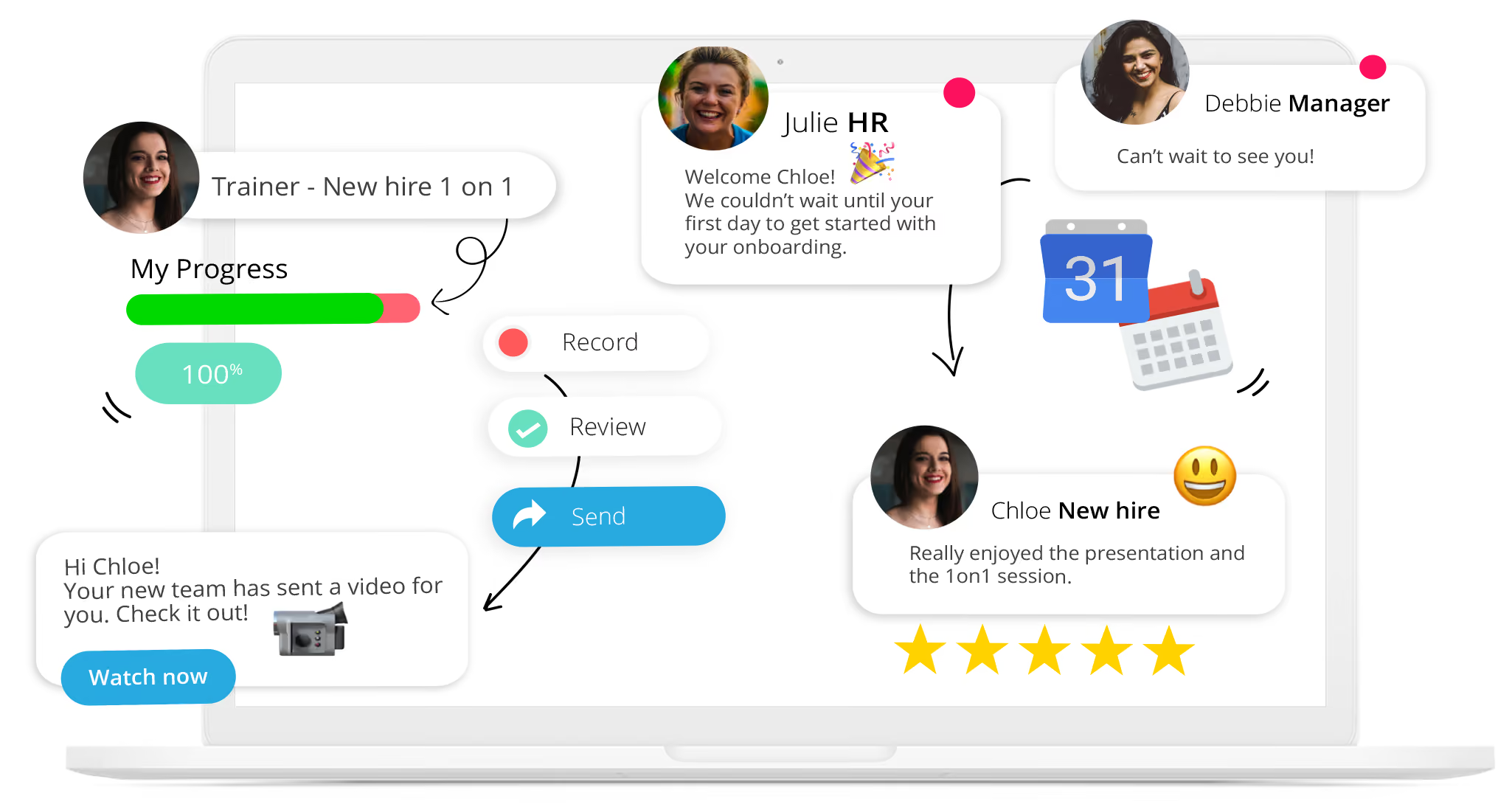
Enboarder is a cloud-based platform that streamlines how you onboard, offboard and reboard people - all while delivering great experiences. The platform is quite versatile; you can use it to transition employees at different levels, as well as partners, customers or any other relevant stakeholder. Enboarder is also easy to use; it features a drag and drop mechanism, allowing you to customize it to your liking with little to no help from your IT department.
Hugo Boss, EventBrite, Mcdonald’s, LVMH Fashion Group, ING
The pricing of Enboarder’s solutions isn’t disclosed upfront. Contact their Sales team to get a custom price quote based on the size and needs of your business.
Best For
Enboarder serves businesses of various sizes, from SMBs to Enterprises.

ClearCo
Modern, easy-to-use, and efficient, ClearCo's employee onboarding software has many useful features some of which are: device and equipment management, compliance management, automated task notifications, bulk onboarding.
PROS
- Offers several integrated HR solutions you can pick from and combine as needed.
- Intuitive, easy-to-navigate interface.
- Highly rated support team for speedy, quality responses.
- They provide implementation support so you can get your instance up and running quickly.
- ClearCo offers a host of talent solutions that work well with one another. You can choose the solution you need or combine them all to have a comprehensive talent management platform in your stack.
- The majority of users find ClearCo’s interface to be quite intuitive and easy to navigate.
- Many users have highly rated ClearCo’s support team for speed and quality of response. Several users have also reported a smooth implementation experience.
CONS
- Pricing is not readily available and you can’t create a trial account on your own.
- Reporting customization options are limited.
- The candidate search functionality could be improved in accuracy and speed.
- There isn’t a mobile app, but the platform is mobile-optimized.
- ClearCo’s pricing is not readily available on their website. You also can’t create a trial account on your own from the website and have to go through the sales team for more info.
- Some users felt that the reporting feature is limited in customizations.
- According to a few users, the candidate search function doesn’t always bring up the correct candidate(s) and could use some improvement.
- ClearCo doesn’t currently have a mobile app, but the platform is well optimized for mobile use both for hiring managers and candidates.

ClearCo's solution can provide a paperless onboarding experience for new hires. Their mobile friendly experience helps take care of compliance issues (I9, W-4, etc) all the way through directions to the office and new team member introductions.
ExxonMobil, Mitsubishi Electric, Yates Construction, JC Penney, and Lake Charles Memorial Health System.
Choose from buying a single module, several, or the whole platform. That being said, ClearCo's prices aren't provided upfront.
Best For
Companies looking for more than just an onboarding tool to add to their HR tech stack.

I used ClearCo as an applicant tracking system from requisition inception to candidate start date. One of the features that ClearCo provided was onboarding tools and performance management. Unlike other ATSs, ClearCo was a one-stop shop for all things talent acquisition and HR.
It is a one-stop shop that makes it easy for the recruiting team and HR team to communicate and see where every candidate is in the hiring process. ClearCo also has LinkedIn integration, which is very valuable for the talent acquisition department. The base price is inexpensive, but addons will increase the price depending on company needs.
ClearCo was an easy choice for one of the small clients I supported in the US. They were looking for an inexpensive applicant tracking system to manage candidate steps and statuses. I have used ClearCo for one year. In addition to an ATS, ClearCo also provided employment verification and background checks post-offer.
The interview scorecards were not user-friendly for recruiters. The pricing was a bit unclear as to what is included and what is an upgrade. The reporting of recruiting metrics was limited.
In terms of ease of use, it is very easy to navigate. I prefer more detailed systems such as Taleo, SuccessFactors, and Workday as their capabilities have no end. ClearCo is an average ATS with a slight edge for the onboarding and performance management tools also included.
Think about how many people in your organization will be using the system. While it is only a base price of $5.00 per license, once you figure out how many people will need access, it will add up, particularly if you need upgraded features. Their customer service is easily accessible and helpful. Ease of use is crucial, and the dashboard is set up well, making it easy for users to navigate.
While I have only had one year of experience, I know they are constantly making improvements to make it a better and more user-friendly system.
This depends on the needs of the company. I think a smaller-sized organization is best suited for a tool like ClearCo, especially if you aren't looking for all the bells and whistles.
Fortune 100 companies or similar-sized companies with 10,000+ employees may not get the most out of ClearCo. Those companies would benefit from one set price rather than a per-user fee.

Workleap
We found Workleap particularly impressive for its range of customizable templates and thoughtful e-learning tools, which make the onboarding journey more like an online course. This makes it an easy recommendation for teams that want to improve their new hire experience through generative AI and fresh employee feedback.
PROS
- Multiple searchable onboarding templates are available.
- A new hire survey will automatically be included in all future onboarding plans.
- The freemium plan includes core features of Workleap Onboarding, with easy activation— just create your account (no credit card required).
- Integration options for HRIS, video conferencing, calendar, and email are available.
- Workleap is easy to use and has a free plan that a team of up to 10 users can use.
- To ensure that feedback is truely anonymous, without the manager, or anyone with higher access being able guess who submitted what response, a minimum of 5 responses need to be sent in before the survey manager is able to access the anonymous feedback.
- The platform has a feature for peer-to-peer recognition, giving your employees the ability to praise one another for outstanding work.
CONS
- No e-signature feature.
- There is no mobile app.
- The free plan is limited to one onboarding template.
- Lack of phone and dedicated customer support.
- Some users have reported that Slack integration sometimes malfunctions.
- Workleap does not include a complete performance management solution among their offerings. They have an OKR tool that lets you set goals but there isn’t a mechanism in place to track thos
- e goals or conduct performance reviews.
- There currently isn’t a mobile app that managers and employees can use on the go.
Workleap provides an intuitive onboarding solution that makes the entire process easy and efficient for HR teams.

Onboarding templates are a no-brainer these days, as they save recruiters from starting everything from scratch every time a new hire is onboarded, and Workleap didn’t disappoint in that aspect.
There are plenty of templates, all very well-developed and easy to customize. During our testing of the tool via the free trial, we particularly appreciated the ability to assign multiple templates to a new hire. We typically have a general onboarding template for all hires and a specialized one for specific roles, and this approach just complimented our process— it allowed us to tailor onboarding to each role without reinventing the wheel every time. Not to mention, the fact that these templates are available even on the free plan is a huge plus.
For those looking to onboard several new hires more efficiently, you’ll agree with us that Workleap’s bulk assignments and role-based activities are truly labor-saving. The onboarding tool comes with multiple predefined roles and the option to create custom roles.
In our tests, instead of assigning tasks to each individual, we assigned activities to roles within templates. As soon as a specific person was assigned that role, all the related activities were automatically assigned to them.
Employee feedback is critical to improving the onboarding process, and we found that Workleap did an excellent job here. The platform includes native Pulse Surveys automatically enabled for new hires, allowing us to gather valuable insights on how new employees were progressing, their satisfaction levels, and their feelings about their new roles and company culture. We could also see aggregated reports as well as individual feedback, which gave us a comprehensive view of the new hire experience.
Unfortunately, Workleap does not offer e-signature functionality. The platform also lacks a mobile app, although we found that its responsive UI worked well enough on our smartphones to compensate for this.
Furthermore, the support is only available on weekdays during regular hours. For teams spread across different time zones who may need assistance outside of those hours, this limitation can be quite frustrating.
Workleap’s customers include Rewind, CSL Group, Thirdbridge, and Assent. The total number of customers is not disclosed.
Workleap's pricing plans are mostly differentiated by the number of onboarding templates available. The free plan includes one template, while the Starter ($49/month), Essential ($139/month), and Pro ($479/month) offer three, ten, and unlimited templates, respectively. Other features remain consistent across plans, including unlimited users, making it easy for teams of any size to get started.
Best For
Growing teams looking to streamline their onboarding workflows while collecting valuable insights from new hires.

eloomi
Eloomi's onboarding solution helps you define learning paths and automate workflows based on job roles, making it easy for new hires to enroll in all necessary training on their own. You can also customize materials and use interactive modules to make the process more engaging.
PROS
- Comprehensive modules for onboarding, training, performance, engagement, and recognition.
- Pre-made templates to create online training faster.
- Customizable and private surveys for honest employee feedback.
- Can request peer feedback on employee skills.
- Microlearning content prevents overwhelming onboarding.
- Eloomi is quite comprehensive, with modules for onboarding, training/learning, performance management, employee engagement, and recognition.
- The platform comes with a library of ready-to-use templates to help you create online training faster. It also has a mobile app for your employees to access training materials on the go.
- Their surveys are customizable and private, helping you get specific and honest feedback from employees.
- You can request other members of the organization to provide feedback on certain skills of employees.
- You can make use of Eloomi’s micro-sized online training content to prevent overwhelming onboarding experiences.
CONS
- Steep learning curve due to its vast feature set.
- Some bugs and slowness may be experienced when generating large reports, but support is responsive.
- Pricing is not transparent, and no free trials are offered currently.
- Because of the sheer number of features Eloomi offers, there’s a steeper learning curve for the average user to get the hang of the platform and understand it to its fullest.
- A few users reported experiencing bugs and speed issues when generating reports, especially ones with a large volume of data, but have noted that Eloomi’s customer support team is quick to resolve such issues.
- The platform’s pricing isn’t transparent and free trials aren’t available at this time.

With Eloomi’s employee onboarding solution, you can make your onboarding process reflective of your company culture. You can break the entire training process into bite-sized pieces to make it easier for your new hires to grasp all of the new information you share with them. You can also track their progress through your onboarding and training phase in real time and have conversations with them around it.
Eloomi’s customer list includes BONUS Vorsorgekasse AG, Breakout Games, Carne Group, ElectricBrands, Nufarm, Domino’s, and more.
Eloomi offers custom pricing, so the best way to find out how much it costs is to request a demo.
Best For
Eloomi is designed for HR leaders and managers in mid-sized and large businesses. Its purpose is to simplify employee onboarding, foster engagement through regular feedback, and monitor personal development.

The client uses Eloomi to monitor team skills, leverage skills more efficiently across teams, track progress in upskilling and reskilling, and identify talent needs within the development and product teams. They also use Eloomi to identify high-potential employees and support their development.
Additional Uses:
- Custom Learning Programs: Design and implement learning paths tailored to employee needs, covering skill development, leadership training, industry certifications, and product knowledge.
- Goal Setting and Tracking: Leverage performance management tools to set individual, team, and organizational goals, with real-time tracking of progress and performance metrics to ensure accountability and transparency.
- Personalized Learning Paths: Provide employees with personalized learning experiences to help them grow in their current roles and prepare for future opportunities, enhancing engagement by showing a clear commitment to their development.

- Ease of use for both administrators and employees.
- AI functions generate a critical framework for training programs.
- Integration with existing platforms is seamless, and it includes performance management, collaboration tools, reporting, and data analytics.
I evaluated this platform for a client who made the purchase. The client needed a tool to support employee development and client learning for their rapidly growing business. Additionally, the platform needed to have API integration, analytics, and skills intelligence as they prepared to implement strategic workforce planning.
Pain Points:
- Decentralized and fragmented learning platforms
- Limited employee engagement in career mobility through learning and development
- Challenges with onboarding new employees— inconsistency and misalignment of expectations
- Lack of tracking and oversight for skills aligned with regulations and compliance for individual roles
- Lacks customization options and deeper analytics in reporting, which could be helpful as the company scales.
- The integration options work for the company now, but they will likely outgrow these in the next two years and need to look for new options.
- The cost is relatively high, which could prompt the company to consider alternative tools in the future.
We also evaluated Docebo, but at the time, AI capabilities were less of a priority for the client. I believe Docebo could be a future opportunity for the client, as I have recommended it for clients seeking stronger analytics and AI-driven capabilities.
My client’s top three priorities when looking for a similar tool are user experience, integration, and ramp-up time. Cost is also critical, as my clients are scaling startups accountable to investors, which means they need to get the most value for their spending.
Eloomi has expanded its integration options and improved its mobile experience, significantly enhancing the user experience. However, the cost remains a factor, driving a stronger need for the platform to increase its value, which it appears to be doing.
Eloomi is ideal for professional services, tech startups, and SMEs.
Eloomi may not be suitable for large enterprises with complex HR needs.
.avif)
Atlas HXM
Atlas is a good mix of industry expertise and tech. They empower companies to hire and pay employees internationally while complying with local labor regulations.
PROS
- Legal entities in more than 160 countries
- Specialized services for employee onboarding and payroll processing
- Atlas has legal entities in over 160 countries. They’ll help you take care of employee onboarding and payroll processing in any of those countries, eliminating the need to engage any local service providers.
- The platform simplifies how you hire, manage and pay employees and contractors abroad, without needing to set up an operation where they are located.
- Atlas helps you stay compliant with local labor laws and frees you from employer liability.
CONS
- Some users have noted that communicating with support can be tricky and time-consuming since they have an expert for each country. This means new people must sometimes be looped in, depending on the situation. Nevertheless, our research suggests that this is constantly improving.
- Limited pre-built integration modules, Atlas only offers API integration.
- Atlas currently doesn’t offer global managed payroll for non-employer of record (EoR) clients; so if your company doesn't need Atlas to take on from you as EoR, but need to use Atlas' global payroll services, you can't do so at this time. Do note though that the team at Atlas is planning to offer this service next year.
- Atlas currently has limited prebuilt integration modules but they do offer API access for users to plug in third-party tools.
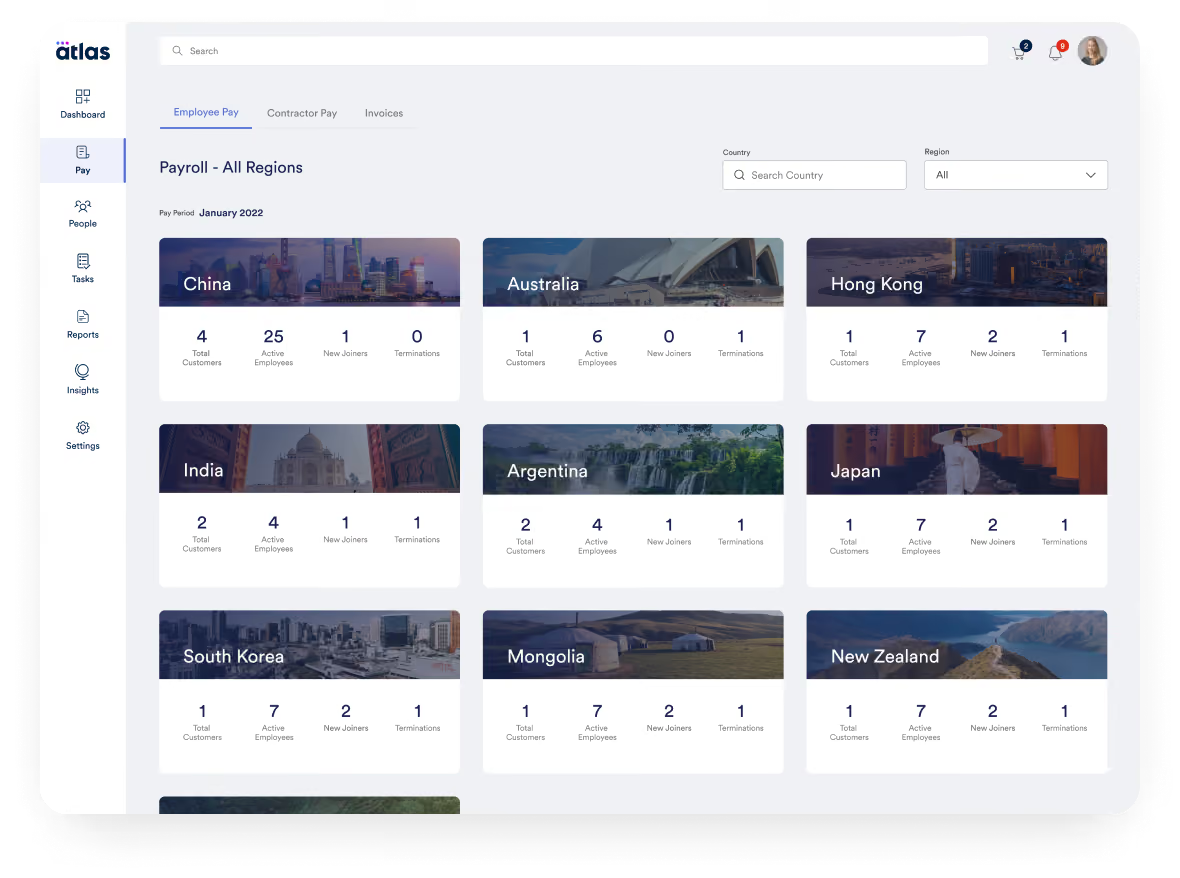
Atlas is a global payroll and direct employer of record (EOR) platform that helps companies ensure legal compliance as they hire and pay employees worldwide. They provide end-to-end management for local labor laws in global markets, from onboarding to payroll processing.
Atlas is suitable for companies of any size. The platform offers a compliance-assured EOR solution for those looking to hire and pay employees globally. The platform is continually growing, and they recently added contractor payments to the mix.
Atlas is used by over a thousand companies, including Toyota, CACI, Bath & Body Works, Coupa, PAE, and Namely.
- Essential: For $99 per month, this plan encompasses features and services that help users navigate the labor & employment laws in over 160 countries (+50 US States), manage employee lifecycle, compliance information between countries, be compliant with their accounting for travel and business expenses, receive personalized notifications, as well as have moderate access to expert insights and HR templates (which are priced separately).
- Premium: For $149 per month, this plan packs everything in the Essentials plan, plus compliance audit interactive checks, people analytics and planning features as well as dedicated account management.
- Enterprise: The pricing of this plan varies according to the number of purchased licenses and customer needs. You can reach out to Atlas’ Sales team for a custom price quote.
Add-ons:
- Contractor Pay: Starting at $49 per contractor per month
- Employer of Record: $595 per employee per month
- Visa & Mobility Sponsorship: Starting at $2,500 per visa
Best For
Atlas is great for teams of any size who’ve determined EOR is the right way to manage global payments.

Our company provided other assistance, but Atlas HXM provided the data support. We could extract employee records for specific review, such as compensation or direct personal needs. This provided enough details to understand if the company had competitive wages.
It always allowed us to use the information to understand if the Atlas HXM onboarding features were user-friendly and saved the company time. For the most part, the clients were happy with their purchase.
Clients used the system and enjoyed the self-management process and support for immigration. The client's data was easy to access, and the information was in an excellent report to isolate any outliers on the compa ratio when comparing the national averages. Immigration allowed for an easy checklist for the operations or HR departments to follow for each employee.
Two clients used Atlas HXM. Clients were in the United States and Australia. Our consulting firm performs different HR duties. Atlas HXM provided other support such as hiring, contracting, and assisting on a similar level of HR. We provided HR data analytics and other supportive measures.
The two companies used it for different reasons. The U.S. company wanted assistance with immigration and hiring. The Australian client used it for onboarding.
Other software captured more personnel data. The extraction was easy, but the formatting can be improved. The setup may not be easy for all personnel.
The layout in some sections is more accessible and complete. The immigration software is supportive of the global market compared to others. It is easier to manage without an attorney. The onboarding needs improvement as there are ways to improve the cultural connection when inputting data for global usage.
The cost is the biggest consideration. The smaller client enjoyed the Atlas HXM but could not afford to purchase more features. The larger client relied on Atlas HXM so much that I do not feel they were properly using it. It basically replaced someone’s job, but if the main admin left, then the system would need someone to relearn the systems and how to add admins, employees, and make edits.
I am not sure as each client role was temporary and did not involve a significant time working on the platform.
Atlas HXM is great for mid-size companies and large companies. It provides all the support they would need and saves money. It is an excellent add-on feature for other software.
Atlas HXM is not great for new companies or low-profit small companies.
Use-Cases: Why Use Employee Onboarding Software
If building a successful company with motivated, inspired, and productive team members is important to you, then you’re going to want a structured onboarding workflow that engages new hires. But if you’re still not sure if you need software to help manage, automate and streamline that process, here are common use-cases that may convince you to invest:
- Culture Building: Company culture starts with your people and how you engage them. Having a company mission and values is one thing, but sharing those with your employees from day one and ensuring that they understand them is another. With employee onboarding software, you can share your mission and values cemented into communications so new hires and existing employees alike know the company’s “why” — and in turn, their own reason for coming to work. You can also schedule welcome events for new hires, create welcome messages for new employees to your team or the entire company, match new hires with an internal “buddy” that they can lean on as they get acclimated to their new job, and more. All of these actions can contribute to the culture you want to create.
- Ensuring Employee Has Necessary Paperwork: There is a legal & compliance piece of onboarding that you need to follow, specifically when it comes to paperwork. Such paperwork includes employment contracts, non-disclosure agreements (if applicable to your company), health and safety training, I-9s and W-2s, company policies, benefits and payroll forms, and more. As you likely know, there’s a lot of administrative work when bringing on a new hire, and if you’re hiring a lot of people at once, it can really eat up your time. HR onboarding software can help streamline and automate this process for you.
- Training: A huge part of onboarding is, of course, employee training — and there’s a lot of it. After all, new hires need to learn the company mission and values, its product and/or service, and its customers as well as team processes, systems, etc. An employee onboarding platform can help you create a training plan, mentoring opportunities with senior leadership, skills assessments, etc. Of course, consider that all of these HR processes can become an automated workflow if you have the right onboarding app.
- Stay Organized: New hire onboarding checklists and processes built into a tool means you don't have to spend as much time making sure every box is checked. If something isn't done, the system will alert the human resources org.
- Automation: If your current onboarding checklist is literally a paper checklist, you are no doubt spending a lot of time and effort on tasks that can be automated through onboarding software. Collecting employee data, e-signtures, background checks, etc are all processes that your HR team can spend a lot less time on.
Considerations & Common Mistakes
There is a big difference between onboarding and orientation. If you don’t realize this, then your new hires’ experiences will be suboptimal. Fortunately, there are common challenges and mistakes associated with onboarding that you can learn from — and avoid. Here are a few:
- Not making employees feel welcomed: Employee onboarding software can only do so much to make employees feel welcomed. There is a required human element that you should make sure managers incorporate into the onboarding experience. For example, taking a new hire out to lunch with the team on their first day, walking them around the company to meet employees, hanging up welcome signs at their new desk, etc.
- Not setting the right expectations: Make sure new hires know from day one — or even before they start — what they can expect at different parts of their onboarding journey. This can help them prepare necessary paperwork, and generally cut down on the anxiety that comes with starting a new job.
- Before they start: To help new hires walk through your company doors with confidence on their first day, tell them ahead of time about anything they need to prepare for day one, where they should go, who they should check in with, what they should wear (if there’s a dress code, that is), etc.
- First day: Who should they meet with on day one to get a rundown of their role? It goes without saying that they should meet with their managers, but if there are other employees they’ll be working with regularly, make sure to pre-schedule the right meetings/meet-and-greets.
- Focusing on paperwork vs. employee experience: As we’ve mentioned, employee onboarding software can take the burden of paperwork off of your plate. But it can also do a lot when it comes to your employee’s overall experience with the company. So don’t shy away from software providers that offer more than just paperwork help — and don’t forget to incorporate any relevant culture activities, like happy hours, team lunches, etc.
- 30/60/90 days: Managers should create a clear 30/60/90-day plan that maps out clear goals and milestones for a new hire’s first three months of employment. Your onboarding software provider should have templates and manager trainings that can help get this started.
Benefits & ROI
At the end of the day, employee onboarding software can help your new hires achieve productivity faster than they would without a formal training and welcoming process. And, as we’ve mentioned, employees are more likely to stay at your company long-term if they’ve undergone a formal onboarding process. Increased retention of course saves you time and money on recruiting, prevents lost work from employee turnover, and contributes to a more productive and successful company overall.
While there’s no defined return on employee onboarding software, the benefits from it (better employee retention, more employee engagement, and more streamlined HR processes) are huge. To help you get an idea of what that translates to in dollars, use our HR tech ROI calculators here.
Pricing
How much to budget for employee onboarding software depends on a number of factors, such as what components you actually need and how many users you’ll have. Some of the software providers we’ve mentioned here charge for each individual module they offer while others charge a per user per month fee (which we’ve seen for as low as $0-$8/user/month) and/or an annual fee. All this to say, don’t forget to discuss pricing on your demo based on your specific needs so you can get a clear sense of total cost.
Features: What You Can Expect from Employee Onboarding Software
At a minimum, employee onboarding software can help you optimize the process of welcoming and training a new hire. This means automating paperwork, streamlining training, and more. But some vendors have a broader set of offerings that cover pre-boarding and recruiting. It really depends on your company’s needs and overall onboarding goals. In general, you can expect to see the following features from employee onboarding software:
- Automated Workflows: Employee onboarding software can help streamline a lot of the workflows that are vital to your job but that also take up a lot of your time. This includes:
- Email & Text Capabilities: Some employee onboarding software allows you to streamline communications with new hires (and even job candidates) through automated email and text capabilities. With email templates, calendar syncing, even text-to-apply functionality, you can more efficiently handle a lot of the admin work involved in recruiting and onboarding.
- Legal Documentation & Other Paperwork: Before new employees actually start, let them complete their paperwork from home. You can send them everything from I-9s and W-2s to your employee handbook, non-disclosure agreements, and more.
- Training: Create training materials (in some cases, with the help of preloaded templates) and offer synchronous or asynchronous training sessions so new hires can get up to speed on everything from company mission and values to core work functions. You can even administer simple tests to increase accountability and make sure everyone is on track as they transition into their new role.
- Performance Management: Offering continuous and real-time feedback to all employees (not just new hires) is a great way to increase engagement and retention — after all, the last thing you want is for an employee to be blindsided at a mid-year review for something that may have happened months prior. Fortunately, some employee onboarding systems offer a performance management feature where you can set goals for individual team members and map them to broader team and company goals. From there, you can track progress, note successes, and discuss lessons learned so team members have a clear path for growth and continuous contribution.
- ATS & Recruiting: Depending on your needs, you can find employee onboarding software that offers applicant tracking components to help you streamline your entire hiring process and lay a strong foundation for onboarding new hires. These features include everything from employer branding and career sites, to interview scheduling and video interview functionality, to talent communities and candidate management, to recruiting analytics, background checks, offer letter management, even referrals.
Demo Questions: What to Ask During Demos
Before you have any software demos, make sure to prepare a list of questions so you can get a clear picture of each vendor and what they offer. That way, you can more confidently invest in the solution that’s right for your company and its unique needs.
To help you get started, here are some sample questions to ask:
- How are new employees automatically put into an onboarding process?
- What parts of the product address training?
- How are connections with colleagues fostered?
- Do I need to buy a broader platform to use this?
- When does onboarding start and end from the employee’s perspective?
- How does this integrate into my existing HR software and payroll? What integrations will I need?
- How will others in the organization use this solution?
- What are the key features I want to ask about?
- What are the things that would make me nervous about buying this sort of solution?
Implementation
There are two key implementation steps you’ll need to take with employee onboarding software. On one hand, you’ll need to get the software up and running, which might include integrating with existing HR software you already use. On the other, you’ll need to set up workflows for different employees and create all necessary training and onboarding content.
In most cases, implementation depends on your company, the software provider you choose, and how the two need to integrate for success. To get a clear sense of what implementation will look like for your company, use your demo to find out how integrations work, who you’ll need to tap internally for help (i.e. will IT need to help with any software integrations), etc.
Employee Onboarding Tools FAQs
What is employee onboarding software?
Employee onboarding software provides tools to automate and improve the process of bringing new hires into an organization. It typically includes features like digital paperwork, company resource distribution, training assignments, and onboarding checklists.
What are the benefits of using onboarding software?
Benefits include a faster, smoother, and more consistent onboarding experience for new hires. It reduces manual tasks for HR and managers, improves engagement, and allows customizing onboarding per employee role.
How is onboarding software different from an LMS?
A learning management system (LMS) focuses specifically on training while onboarding software has a broader scope. It facilitates all aspects of onboarding, not just training - paperwork, company policies, equipment, peer connections, etc.
What features should I look for in onboarding software?
Key features of onboarding software include customizable templates, digital document signing, automated task triggers, new hire portals, team/manager collaboration tools, surveys, analytics, mobile access, and HRIS integrations.
Does onboarding software integrate with my HR stack?
Most onboarding systems integrate with leading HRIS/HCM platforms to allow the passing of new hire data seamlessly and keep records updated across systems. API integration is also often available.
Is onboarding software secure?
Reputable onboarding software vendors ensure the security of sensitive new hire records and data through encryption, permission controls, and other measures like SOC 2 compliance.
What is the typical pricing model for onboarding software?
The pricing of onboarding software usually follows a per-user-per-month model. Some products may base their pricing on features but it isn’t common. Enterprises can expect custom pricing if they require advanced features, particularly around permissions/security.
Next Steps
At the end of the day, new hire onboarding is critical for business success. It’s also a long-term process with multiple stages that can last an entire year — from preboarding (making an offer, handling paperwork, and preparing for their first day), to welcoming them on their first day, to providing ongoing training and support as they get up to speed. Therefore, it makes sense to spend the time getting the right employee onboarding solution live sooner than later.
Eventually, your focus will shift from onboarding to engagment and satisfaction, for a which high-quality employee engagement software is essential — but remember that what you do now for a new hire’s first few months will have a lasting impact on their productivity and longevity with your company. With the right onboarding software, you can maximize success for both your new hire and your company, reduce attrition, and build a productive and welcoming company culture.
About the Author


About Us

- Our goal at SSR is to help HR and recruiting teams to find and buy the right software for their needs.
- Our site is free to use as some vendors will pay us for web traffic.
- SSR lists all companies we feel are top vendors - not just those who pay us - in our comprehensive directories full of the advice needed to make the right purchase decision for your HR team.


